English - 9
External sound speakers and systems sold separately.
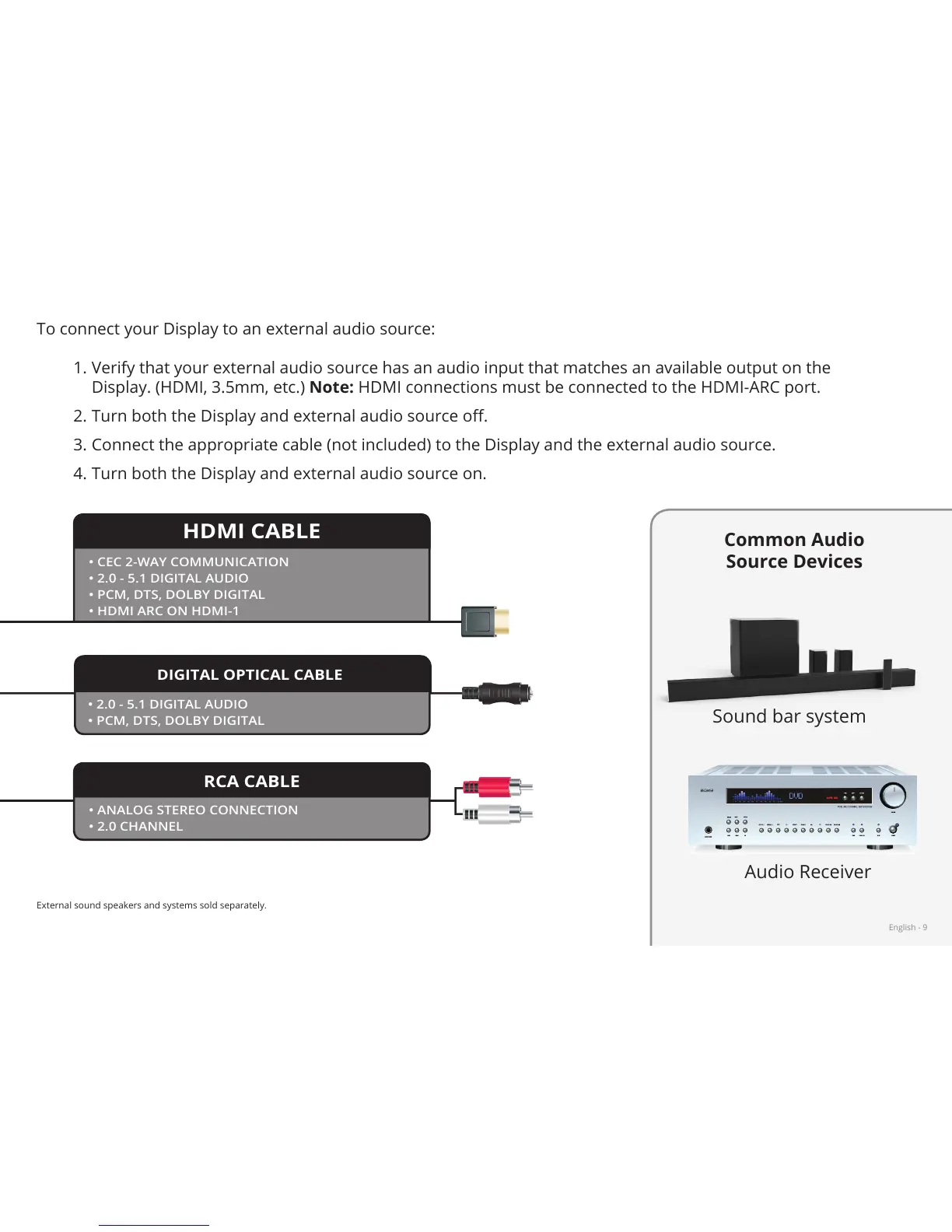
To connect your Display to an external audio source:
1. Verify that your external audio source has an audio input that matches an available output on the
Display. (HDMI, 3.5mm, etc.) Note: HDMI connections must be connected to the HDMI-ARC port.
2. Turn both the Display and external audio source o.
3. Connect the appropriate cable (not included) to the Display and the external audio source.
4. Turn both the Display and external audio source on.
• CEC 2-WAY COMMUNICATION
• 2.0 - 5.1 DIGITAL AUDIO
• PCM, DTS, DOLBY DIGITAL
• HDMI ARC ON HDMI-1
• 2.0 - 5.1 DIGITAL AUDIO
• PCM, DTS, DOLBY DIGITAL
HDMI CABLE
DIGITAL OPTICAL CABLE
RCA CABLE
• ANALOG STEREO CONNECTION
• 2.0 CHANNEL
Common Audio
Source Devices
Sound bar system
Audio Receiver


 To Next Page