2
23
CONNECTING TO YOUR NETWORK
Your TV is Internet-ready. It can be connected to your home
network with a Wired or Wireless connection.
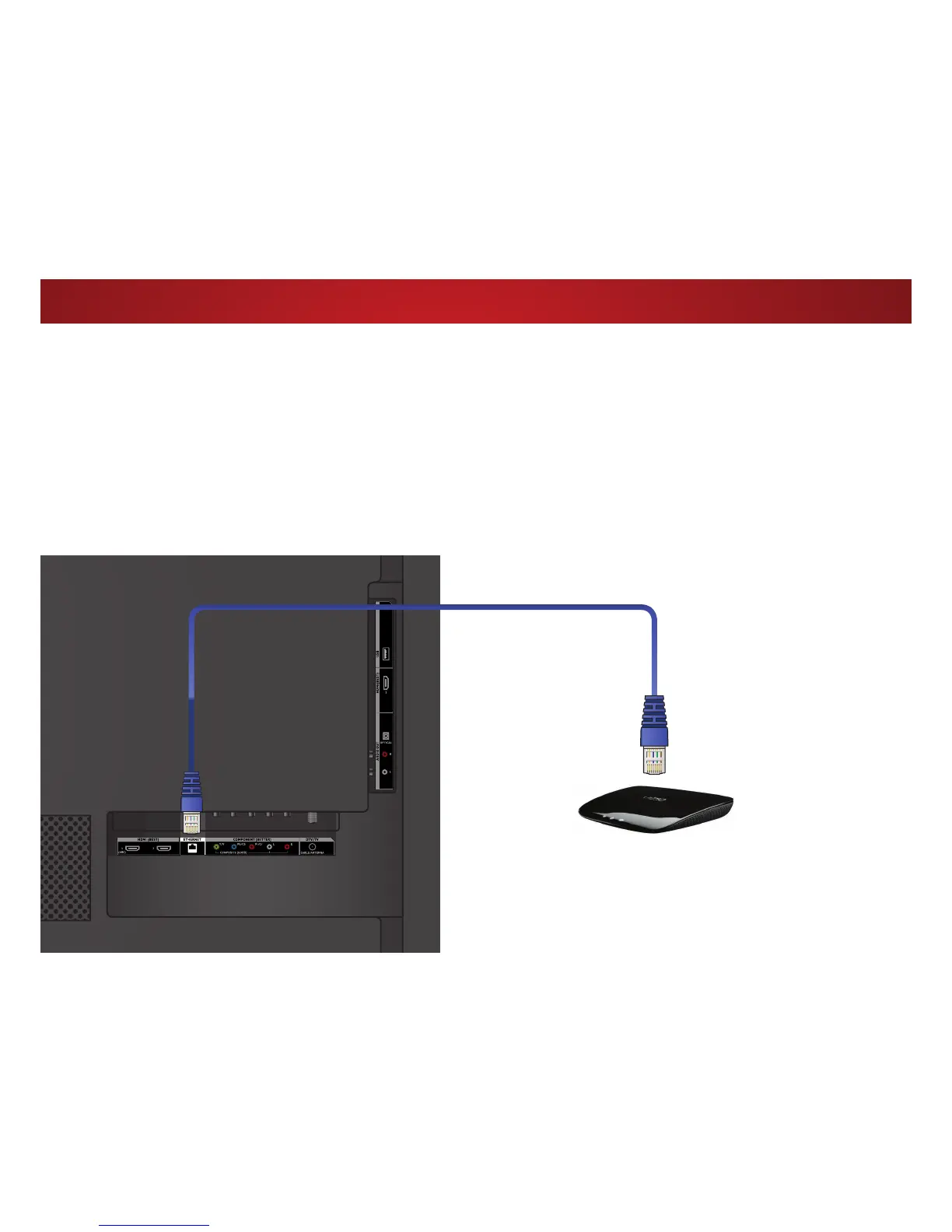
Connecting to a Wired Network (Best)
1. Connect an Ethernet cable to your router and to the Ethernet
port on the back of the TV. See below.
2. 8VHWKH*XLGHG1HWZRUN6HWXSWRFRQȴJXUHWKH796HH
Using
the Guided Setup Menu
on page 58.
Connecting to a Wireless Network
1. Ensure you have a router or modem broadcasting as
high-speed wireless signal (802.11n recommended).
2. 8VHWKH*XLGHG1HWZRUN6HWXSWRFRQȴJXUHWKH796HH
Using
the Guided Setup Menu
on page 58.
Ethernet Cable
Router / Modem
Note: The image shown here is for illustrative purposes only and may be subject to change.
The actual number of ports and their locations may vary, depending on the model.



 To Next Page