CONNECTING TO YOUR NETWORK
Your TV is Internet-ready. It can be connected to your home
network with a Wired or Wireless connection.
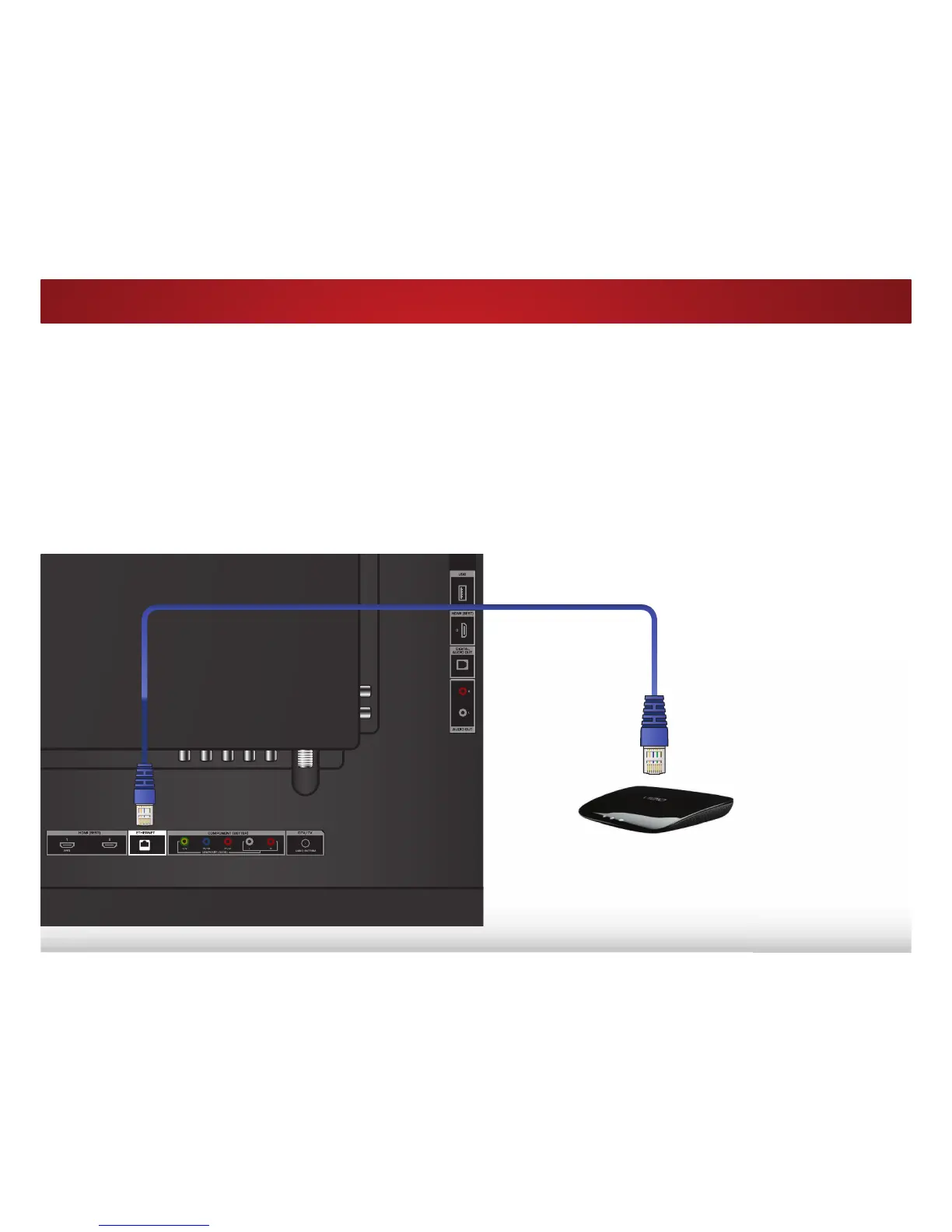
Connecting to a Wired Network (Best)
1. Connect an Ethernet cable to your router and to the Ethernet
port on the back of the TV. See below.
2. 8VHWKH*XLGHG1HWZRUN6HWXSWRFRQȴJXUHWKH796HH
Using
the Guided Setup Menu
on page 55.
Connecting to a Wireless Network
1. Ensure you have a router or modem broadcasting as
high-speed wireless signal (802.11n recommended).
2. 8VHWKH*XLGHG1HWZRUN6HWXSWRFRQȴJXUHWKH796HH
Using
the Guided Setup Menu
on page 55.
Ethernet Cable
Router / Modem



 To Next Page