VIZIO VF550M User Manual
Version 3/4/2009 23
www.VIZIO.com
COMPUTER
Connecting a Computer
1. Turn off the power to the HDTV and Computer.
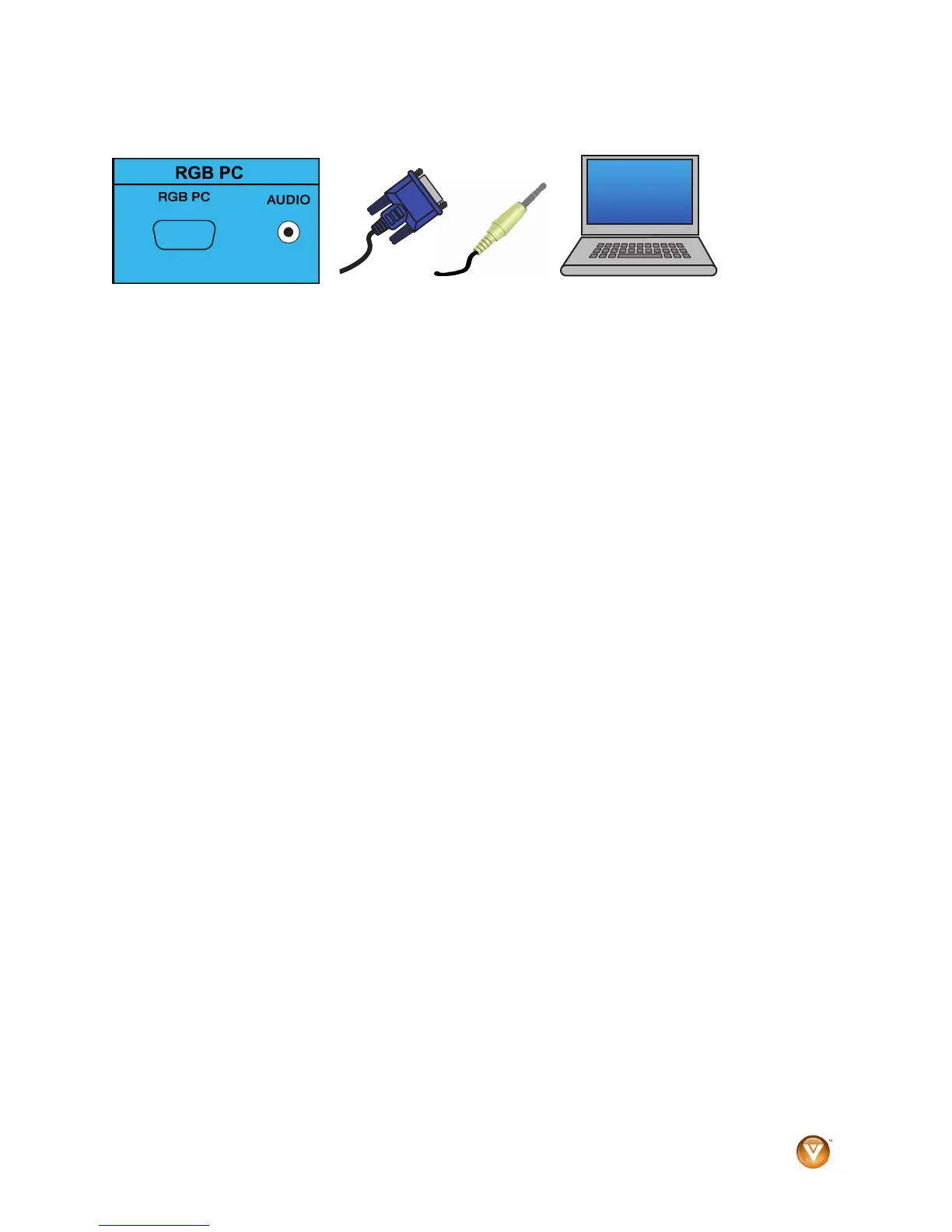
2. Connect the VGA cable from your computer to the RGB PC jack on the back of your HDTV.
3. Connect the 1/8-inch audio cable from your computer to the RGB PC Audio jack on the back
of your HDTV. This step is optional and only needed if you want to transmit audio from the
computer through the TV.
4. Turn on the power to the HDTV and Computer.
5. Select RGB using the INPUT button on the remote or side of the HDTV.
Note:
! For best picture quality when connecting a PC computer through RGB PC, set your PC computer
timing mode to VESA 1920 x 1080 at 60Hz.
! Refer to your PC computer user manual for more information about the video output requirements
of the product.
! A RGB (VGA) cable and stereo mini jack cable are not included and can be purchased at an
electronics store.


 To Next Page