VIZIO VF550M User Manual
32
www.VIZIO.com
Chapter 4 Advanced Adjustment of HDTV
Using the On Screen Display (OSD)
The On Screen Display (OSD) allows you to navigate to and adjust all settings.
The TV will save changes made to the settings, even after the TV is turned off.
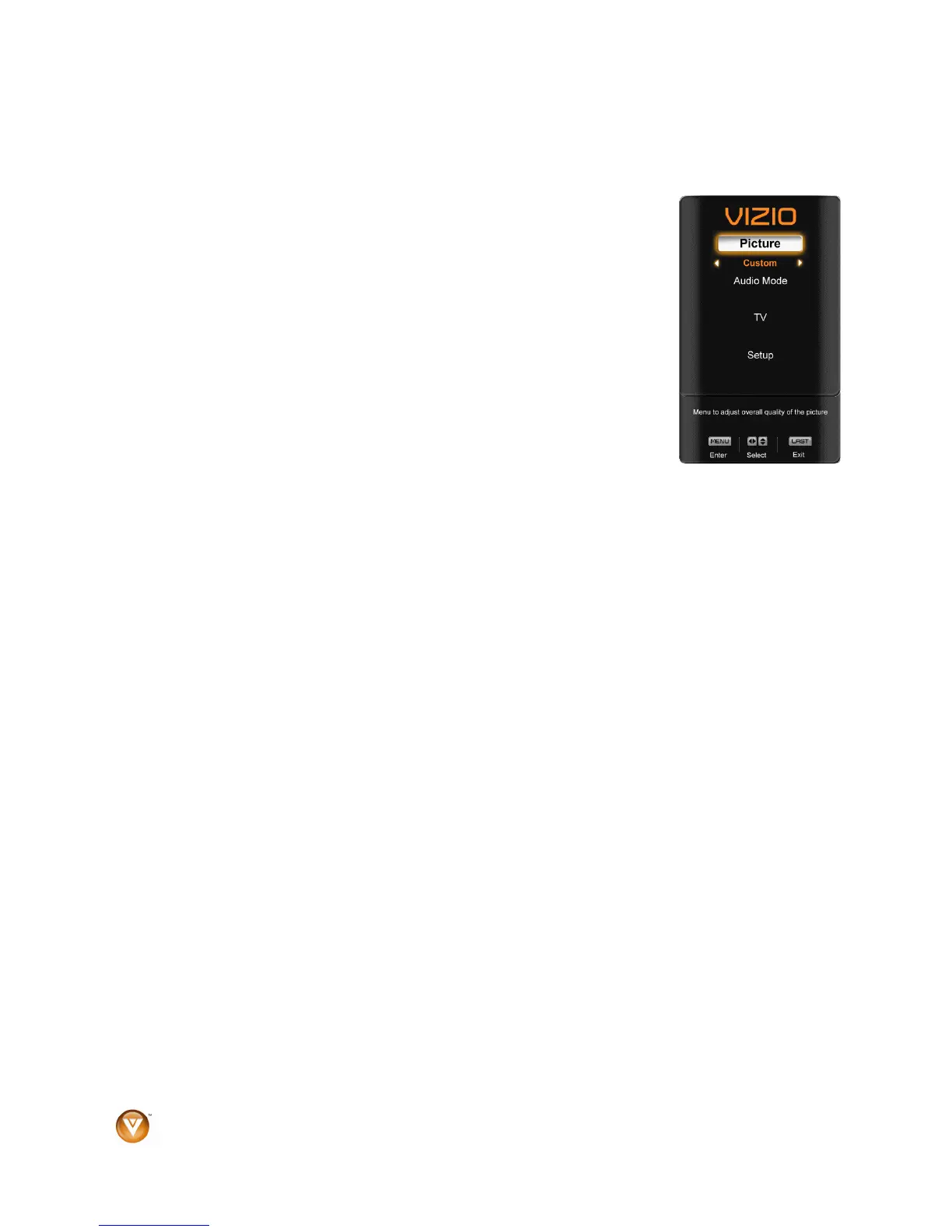
The OSD consists of several menu options: Picture Adjust, Audio Adjust,
TV Tuner Setup and Global
Setup. The main menu options vary depending on the selected input source.
Note: Some of the main menu options may have additional submenus, i.e. the
TV Rating submenu for Parental Controls.
1. Press the MENU button on the remote control or the side of the TV and
the Picture menu will be shown on the screen.
2. Press either
! or " on the remote control or VOL + or VOL – on the
side of the HDTV to select one of the other menu options:
! Picture (Picture Adjust)
! Audio Mode (Audio Adjust)
! TV (TV Tuner Setup)
! Setup (Global Settings)
3. Press MENU to select the option or feature you want to adjust.
4. Once the menu option is displayed, press either
! or " on the remote control or CH + or CH –
on the side of the TV to select one of the items to adjust.
5. Press MENU to select, and then press either # or $ to adjust the selection.
6. Press the LAST button once to return to the previous screen or repeatedly to return to your
program if adjustments have been completed.



 To Next Page