VIZIO VOJ320F1A User Manual
Version 8/25/2008 8
www.VIZIO.com
Preparing Your LCD HDTV for Wall Mounting
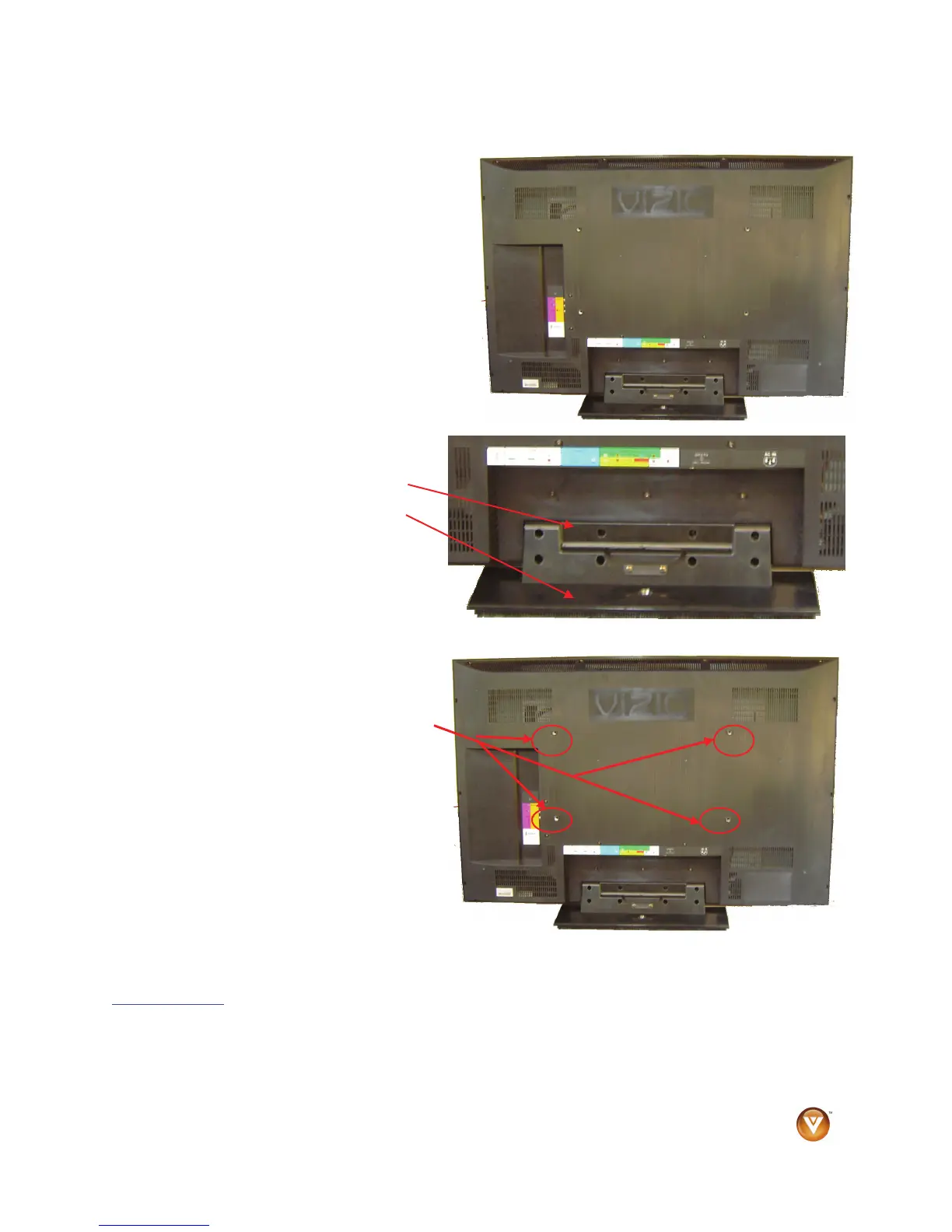
To remove the stand base
5. Unplug all of the cables and cords from
your VOJ320F1A.
6. Place the VOJ320F1A face down on a soft
and flat surface (blanket, foam, cloth, etc)
to prevent any damage to the TV.
7. Push up the plastic panel on the back of
the stand and lift it away once to release.
8. Remove the eight (8) screws that
were hidden by the panel, while
holding the base.
9. Carefully remove the stand base.
Now, the VOJ320F1A can fit securely to a
mount (sold separately) by utilizing the
mounting holes in the center of the back panel
of the TV. Please make sure to read the
instructions of your specific mount to properly
hang the VOJ320F1A.
The pitch of the mounting holes is 400mm
horizontally and 200mm vertically.
The screw type required is metric M6, 1.00mm
pitch. The length of the screws will depend on
the thickness plate being attached to TV set,
our brackets come with different length
screws.
To find the perfect mount for the VIZIO VOJ320F1A, browse VIZIO’s certified mount selection at
www.VIZIO.com
or call directly 888-VIZIOCE (888-849-4623).



 To Next Page
 Loading...