Version 1/19/2009 7
www.VIZIO.com
Chapter 2
Chapter 2 Chapter 2
Chapter 2 Basic Controls and Connections
Basic Controls and ConnectionsBasic Controls and Connections
Basic Controls and Connections
Rear Panel Conn
Rear Panel ConnRear Panel Conn
Rear Panel Connections
ectionsections
ections
Sound Bar
Sound BarSound Bar
Sound Bar
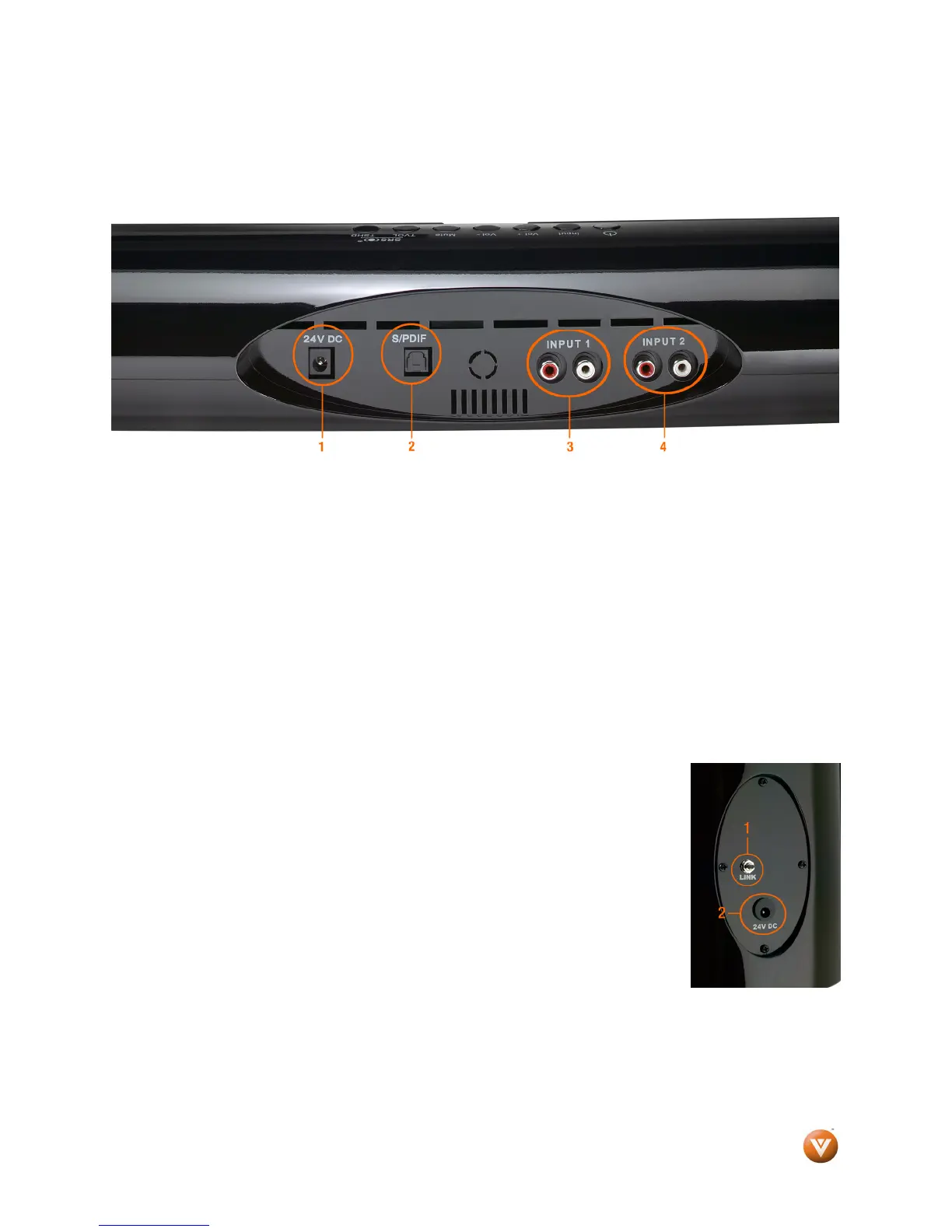
1. DC IN – Plug the connector from the AC/DC Power Adapter here.
2. OPTICAL AUDIO IN – SPDIF Optical connector for connection from a device such as a home
theatre system, Amplifier, Receiver, Set Top Box or DVD Player.
3. ANALOG AUDIO IN 1 – (ANALOG L/R) Connect the analog audio from a device such as a TV,
Home Theatre System, Amplifier, Receiver, Set Top Box or DVD Player.
4. ANALOG AUDIO IN 2 – (ANALOG L/R) Connect the analog audio from an additional device
such as a TV, Home Theatre System, Amplifier, Receiver, Set Top Box or DVD Player.
S
SS
Subwoofer
ubwooferubwoofer
ubwoofer
1. Link Button – Refer to Chapter 3 – Setting up
2. DC IN – Plug the connector from the AC/DC Power Adapter here


 To Next Page