Operation for the APP
Preparation before use
1.Power on and off: The motorcycle ignition machine will
automatically turn on, and when the motorcycle is turned off,
the machine will automatically shut down.
2. Insert memory card:Push the TF memory card straight into
the card slot.
3.Remove the card: Push the TF card forward,
and the card can be removed after it pops up.
Driving recorder
The WIFI function
Download "Road Cam" and "BSKJ" apps in APP Market for
Android phones;
If you want to download the "Road Cam" and "BSKJ" APP from
APP Store, you can scan the following QR code to download.:
Take Road Cam APP as an example
1. On the mobile phone, select a WIFI signal whose name starts
with wifi_camrea. The initial password is 12345678. Go back and
find the "Road Cam" APP to open the app.
Removing the TF card in the recording state may damage the files,
please turn off the card before pulling out the card.
!
Caution
25
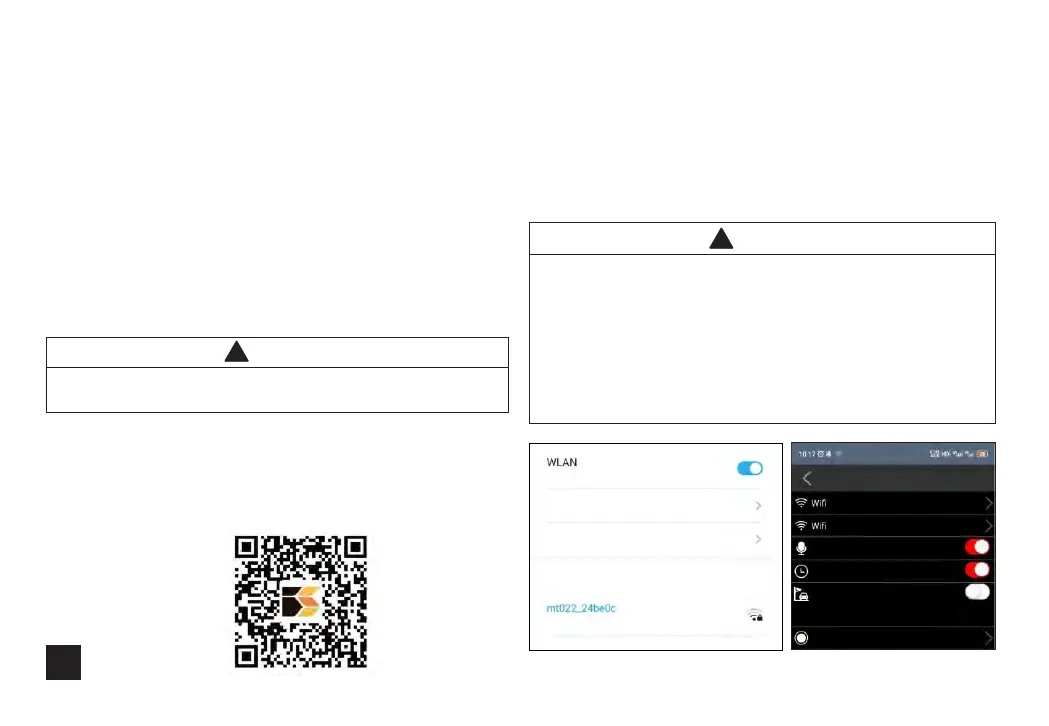
1.When the Android phone prompts that the WLAN network is
unavailable, do you want to switch to the network? Select
Cancel. Location permissions should be turned on.As shown in
Figure 1.
2. Parking monitoring. Prolonged parking and use can lead to
vehicle power consumption and battery loss, as shown in Figure
2.
Figure1 Figure2
!
Caution
Click to view help
network acceleration
More WLAN settings
Available WLAN List
Connected
Opened
Connection password
Set up
sound recording
Camera time watermark
Parking monitoring
Chec k th is o ption, prolon ge d pa rking and use may c au se t he
enti re v eh icle to consume e le ct ricity, resulting in b at te ry p ower
supp ly.
Loop recording time
1 minute
name


 To Next Page