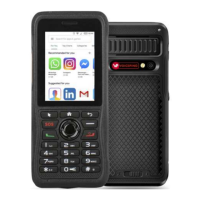
The P-one is a rugged, Android 7.1-powered mobile device designed for robust communication and various applications. Its durable build and specific features cater to users who require a reliable and functional device in demanding environments.
Function Description:
The P-one serves as a compact, feature-rich mobile phone with a physical keypad and a touch-enabled display. It supports 4G LTE connectivity, Wi-Fi, Bluetooth, and GPS/AGPS for comprehensive communication and navigation. A key feature is its Push-to-Talk (PTT) functionality, allowing for quick, predefined calls, similar to a walkie-talkie. The device also includes an SOS button for emergency situations, which, when long-pressed, sends an SMS with the user's current location and a predefined message to a designated recipient. For general use, it supports making and receiving voice calls, sending SMS, and running Android applications. The device is equipped with a rear camera for capturing images. Its design emphasizes ease of use with a physical keypad for dialing and texting, complementing the touch screen interface for app navigation.
Important Technical Specifications:
- Operation System: Android 7.1
- CPU: MT6739 1.5 GHz
- RAM: 1GB+8GB
- Screen Size: 2.4 inches
- Screen Resolution: 240x320
- Camera: Rear camera 8.0MP (8MP)
- Dimensions (HWD): 1356020.8mm
- Weight: ≈ 210g
- Working Voltage: 3.8V
- Working Temperature: -5°C to +55°C
- Storage Temperature: -20°C to +70°C
- Network Support:
- WIFI (2.4/5) BT
- GPS/AGP
- EU Frequencies:
- GSM: B2/B3/B5/B8
- WCDMA: B1/B5/B8
- FDD: B1/B3/B5/B7/B8/B20/B28a/B28b
- TDD: B38/B40
- US Frequencies:
- GSM: B2/B3/B5/B8
- WCDMA: B1/B2/B4/B5/B8
- FDD: B2/B4/B7/B12/B17/B28a/B28b/B66
- Battery: Lithium Battery (1 included)
- Charging: Micro USB cable, AC adapter
Usage Features:
The P-one offers a blend of traditional phone features with modern smartphone capabilities.
- Physical Keypad: The device features a numerical keypad with dedicated buttons for PTT, Volume Up/Down, Selection Key (Mouse Mode), Home, Back, SOS, Dialing, Hang-up, F3 (Backspace/Del), OK, Star (*), Zero (0), and Hash (#).
- Texting Modes: Three modes are available for texting:
- Dictionary (En) Mode: Predictive text input where pressing a button once suggests words.
- Alphabet (Ab) Mode: Traditional multi-tap input where repeated presses cycle through letters.
- Number (12) Mode: Direct number input.
- Emergency SOS: A long press of the SOS button sends an emergency SMS with location.
- Flashlight: A long press of the '0' button activates the flashlight.
- SIM Card Support: Supports two SIM cards (SIM 1: T-Mobile, SIM 2: AT&T) and a Micro SD card for expandable storage.
- Network Connectivity: Easy connection to Wi-Fi networks and cellular data. Users can manage SIM card settings and data usage.
- Android Applications: Being an Android device, it supports Google Play Store applications. The manual highlights specific apps like Google Family Link (for parental monitoring) and AnyDesk (for remote access).
- Charging Indicator: An LED indicator shows charging status (Red for charging, Green for full).
- Battery Installation: The battery is user-insertable, with clear instructions on aligning metal contacts.
- Power ON: Press and hold the power button until the screen illuminates.
Maintenance Features:
Proper care and maintenance are crucial for the P-one's longevity and performance.
- Battery Storage:
- For prolonged storage (10+ days), charge/discharge the battery to 40%-65% to extend life and prevent swelling.
- Store in cool, dry places below 25°C.
- Battery Usage Warnings:
- Avoid overcharging.
- Do not place the battery in microwaves or high-pressure containers.
- Keep broken batteries away from ignition sources.
- If the battery is broken, leaking, or has an abnormal odor, remove it immediately from flammable conditions.
- Stop charging and using if any abnormality (smell, discoloration, deformation) occurs.
- General Device Care:
- Do not modify or disassemble the device.
- Avoid prolonged direct sunlight or proximity to heating appliances.
- Do not expose to extremely dusty, damp, or splashing environments, or place on unstable surfaces.
- Professional technicians should handle repairs.
- Troubleshooting Guide: The manual provides solutions for common issues:
- Unable to turn on: Check battery installation, charge/replace battery, clean metal contacts.
- Phone Apps crashes: Force stop running applications or restart the phone.
- Buttons no response: Restart the phone, contact dealer if buttons are broken.
- White screen display: Restart the phone, contact dealer if screen is broken.
- Echo or noise during connecting: Check network signal, clean speaker surface.
- Unable to identify SIM Card: Re-install SIM card, clean SIM card contacts, ensure SIM card is active and has balance.
- Unable to locate (GPS): Move to an open, flat area for better signal reception.
- Unable to Charge: Check power adapter plug and charging cable connectors for damage or poor contact.
The P-one is designed to be a reliable communication tool, particularly for users who benefit from its ruggedness, physical keypad, and dedicated emergency features, while still offering the versatility of an Android smartphone.


 To Next Page
 General