16
8. Operation
a) Inserting/changing the battery
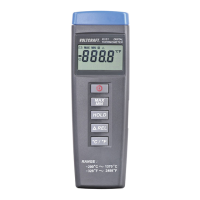
The hand thermometer requires a 9V block battery to operate. When the battery is empty the display “Low Battery
” (14) will appear in the LCD display. The battery will need to be replaced as a correct display cannot be made
when the battery is low.
The procedure for changing the battery is as follows:
1. Disconnect the device from the temperature sensor/s and turn it off.
2. Open the battery compartment (10) by pushing the battery compartment cover towards the bottom.
3. Remove the empty battery and replace it with a new battery.
4. Replace the battery compartment cover.
b) Switching on/off
Press the On/Off button (4) to switch the hand thermometer on or off.
c) Connecting the temperature sensors
Connect a commercial K-type temperature sensor to the input T1 (1) and T2 (2) (only for K102). If the temperature
sensor is defective or not properly connected, “----” will appear in the LCD display.
Take note that the maximum input voltage at the input, 60V/DC or 24V/AC, must not
be exceeded!
d) Selecting the temperature unit °C/°F
When the hand thermometer is switched on the temperature is shown in degrees Celsius. To change the temperature
to degrees Fahrenheit press the °C/°F button (8). To display the temperature back in degrees Celsius press the °C/°F
button (8) once again.
e) Data-Hold function
The hand thermometer is equipped with a Data-Hold function. This allows the current temperature reading in the
display to be “frozen”. To freeze the temperature reading press the hold button (6). When activated the Data-Hold
function will be indicated in the LCD display with the “hold” symbol “
” (11). The hand thermometer continues to read
the current temperature in the background. To deactivate the Data-Hold function, press the hold button (6) once again
– the hold symbol “
” (11) will be extinguished. In the LCD display the current temperature will now be displayed.
When the Data-Hold function is activated, the Relative and MIN/MAX functions as well
as the °C/°F switch are no longer accessible.




 To Next Page