23
Instruments
Select units and language
Choose which units and languages to display.
NOTE! Language and unit settings must be performed in all EVC system tachometers.
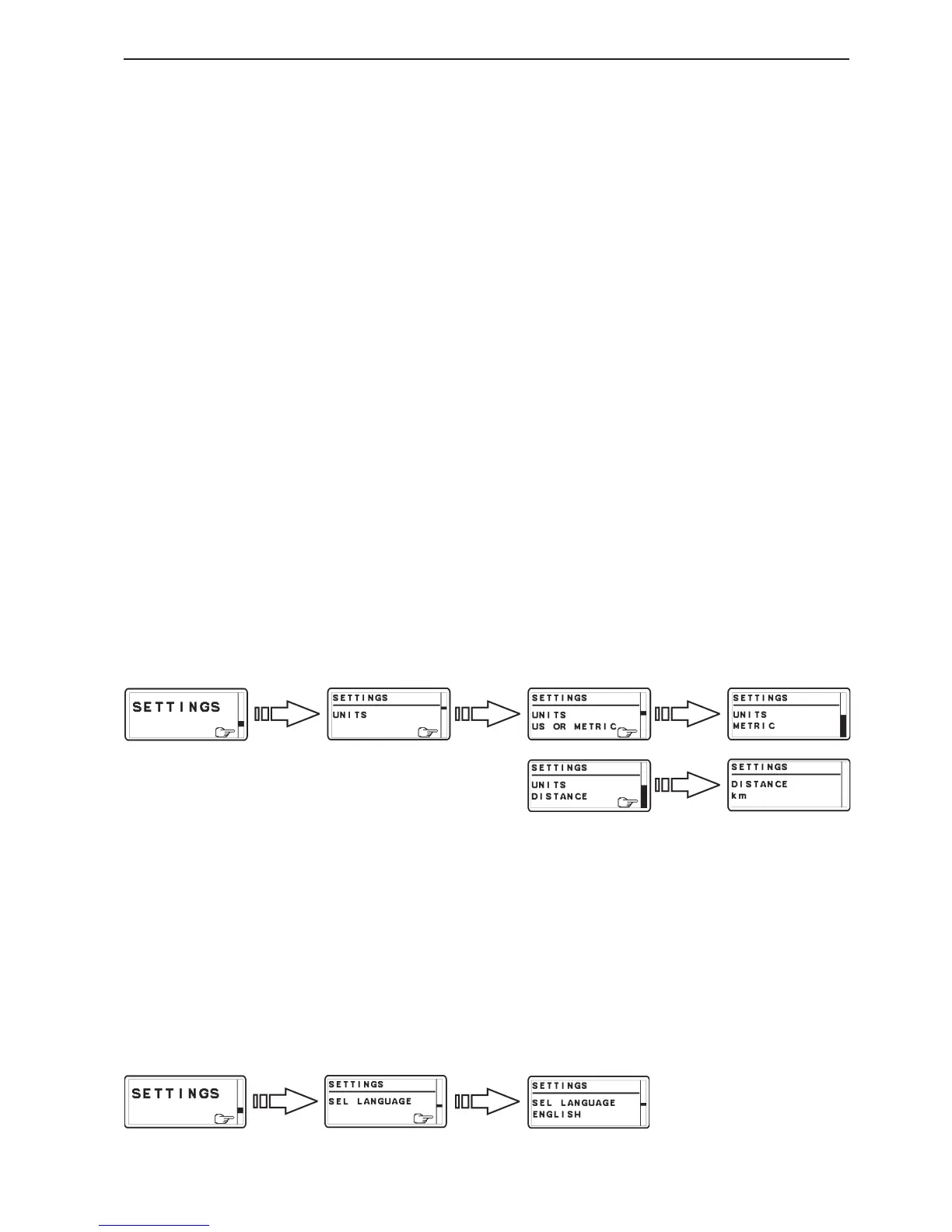
US or METRIC
1. Activate helm station by pushing the ACTIVATION
BUTTON.
2. Select SETTINGS from MAIN MENU by turn-
ing NAVIGATION WHEEL. Push NAVIGATION
WHEEL to enter SETTINGS MENU.
3. Select UNITS and push NAVIGATION WHEEL.
4. Select US OR METRIC and push NAVIGATION
WHEEL.
5. Set US or METRIC units by turning NAVIGATION
WHEEL and confirm by pushing NAVIGATION
WHEEL.
DISTANCE
1. Activate helm station by pushing the ACTIVATION
BUTTON.
2. Select SETTINGS from MAIN MENU by turn-
ing NAVIGATION WHEEL. Push NAVIGATION
WHEEL to enter SETTINGS MENU.
3. Select UNITS and push NAVIGATION WHEEL.
4. Select DISTANCE and push NAVIGATION
WHEEL.
5. Set distance unit: km, nm or miles and confirm by
pushing NAVIGATION WHEEL.
LANGUAGE
1. Activate helm station by pushing the ACTIVATION
BUTTON.
2. Select SETTINGS from MAIN MENU by turn-
ing NAVIGATION WHEEL. Push NAVIGATION
WHEEL to enter SETTINGS MENU.
3. Select SEL LANGUAGE and push NAVIGATION
WHEEL.
4. Select language and confirm by pushing NAVIGA-
TION WHEEL.



 To Next Page