32
Instruments
Menu, trip computer
Fuel consumption (L/N.M.) -
If information about speed is available > 2 knot
Trip fuel consumption (L)
Button 1
Changes display each time the button is pressed
Remaining fuel (until the tank is empty) ( L) –
If there is a tank sensor
Trip hours (hr)
Remaining distance (until the tank is empty) (L) –
If there is a tank sensor
Trip fuel consumption/time (L/hr)
Remaining time (until the tank is empty) (hr)
Fuel consumption/time (L/hr)
Trip distance (N.M)
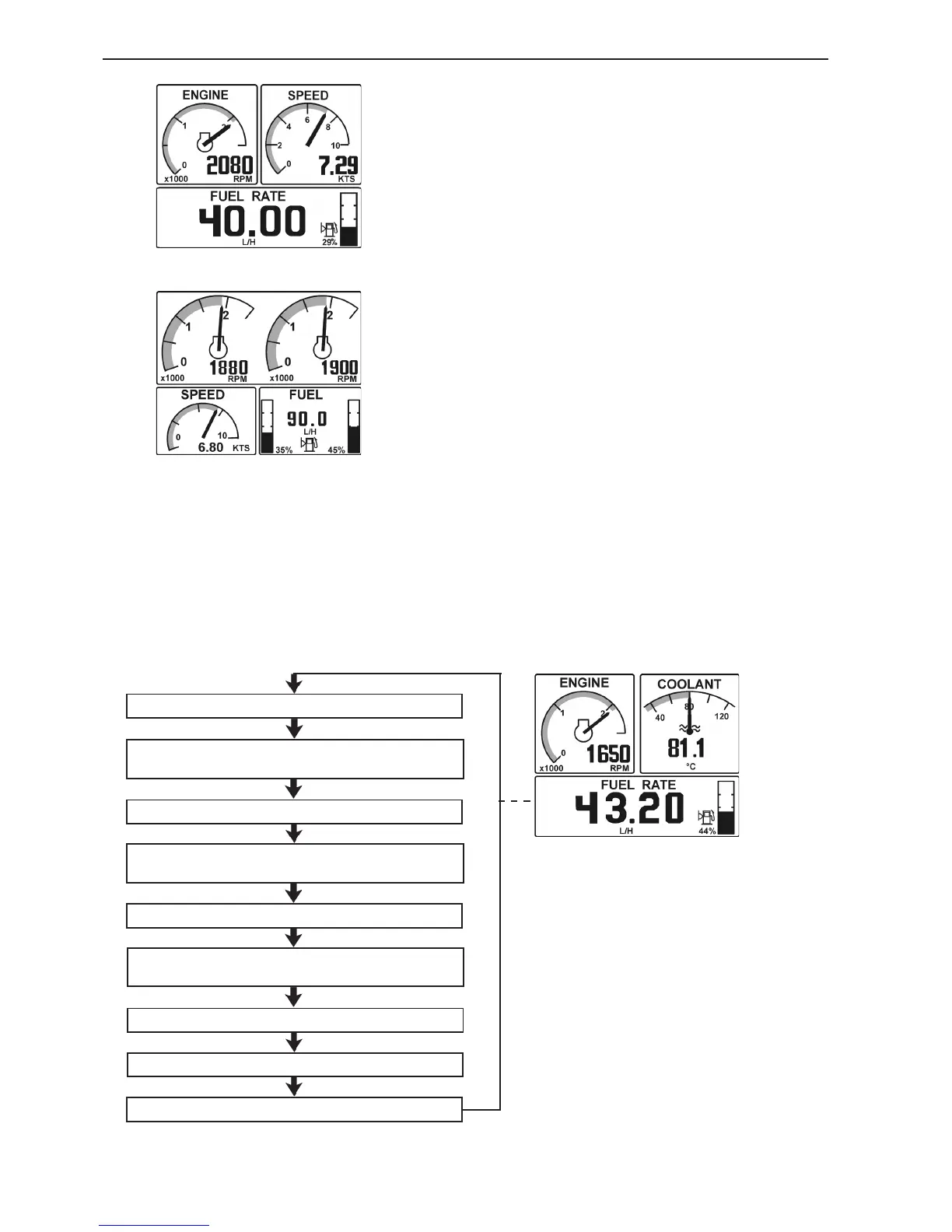
Figure for twin engine installation
Figure for single engine installation
Display mode Engine (Button 1)
This display mode shows the engine speed and boat
speed in the form of standard instruments, together
with a trip computer and fuel level gauge. The fuel
level gauge are displayed if there is a tank sender
installed.
Note! Trip information is only displayed if following
are installed:
- Multisensor or NMEA 0183/NMEA 2000 compa-Multisensor or NMEA 0183/NMEA 2000 compa-
tible component (plotter, GPS, paddle wheel etc)
- Fuel level sender
- Software for trip computer (order and download
from VODIA website)
The trip computer shows various types of information
if you repeatedly press the button ENGINE (ENGINE)
(button 1). Please refer to the trip computer menu
below.
Note! Only metric values are displayed, but other
units can be displayed if they have been chosen in
the configuration menu.
The scale values for maximum engine speed and
maximum speed can be set in the configuration
menu.
If information about boat speed is not available, the
display shows coolant temperature instead.









 To Next Page