Features, installed functions are marked blue.
Components, press
to see installed compo-
nents.
Software, information regarding the software ID
number.
Calibration
The following is only displayed if the function is instal-
led. For further information, refer to the relevant sec-
tions in theSettings Menu page 114 chapter.
Speed Correction, setting the speed factor.
Depth, setting the echo sounder depth alarm. Fol-
low the instructions on the screen.
Fuel Tank, fuel tank calibration. Follow the instruc-
tions on the screen.
ACP Info, setting the ACP protection position.
PTA,
PTA
calibration. Follow the instructions on the
screen.
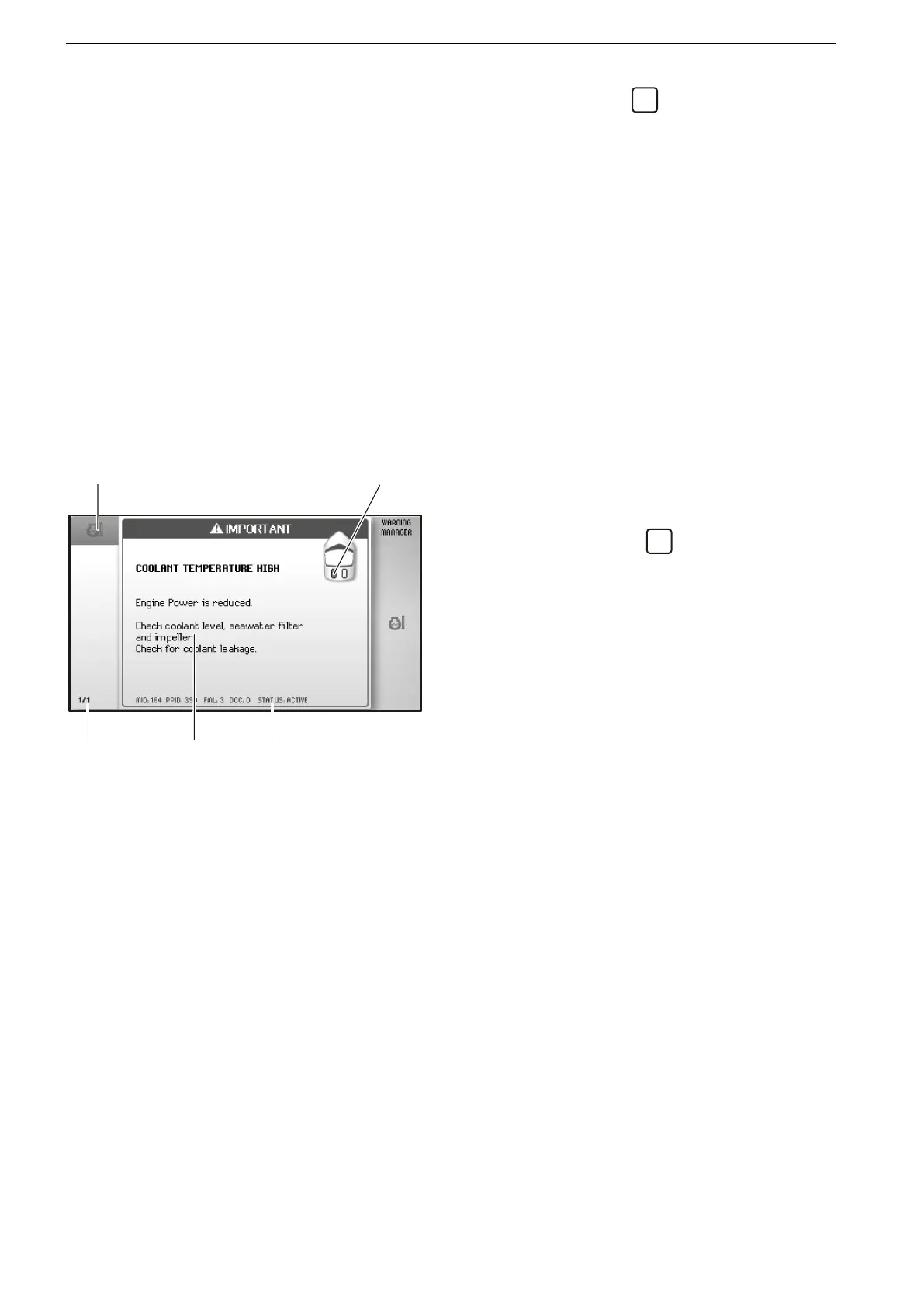
Warning Manager
If the system discovers a fault, the operator is informed
by a message on the screen. The fault message must
be confirmed by pressing
.
All faults are stored in the Warning Manager.
The fault message indicates the drivetrain affected,
describes the fault and suggests suitable actions..
For further information on fault messages, refer to
Fault Handling page 55.
1 Symbol
2 Shows on which drive line the fault is detected.
3
List of registered faults; turn the knob to browse.
4 Fault message with description and suggestion for action.
5 Service information.
Instruments and Controls
30 47702599 12-2011
47702599 - Downloaded from www.volvopenta.com 23/11/2015 22:01:35








 To Next Page