03 Planning your trip
Itinerary
03
``
41
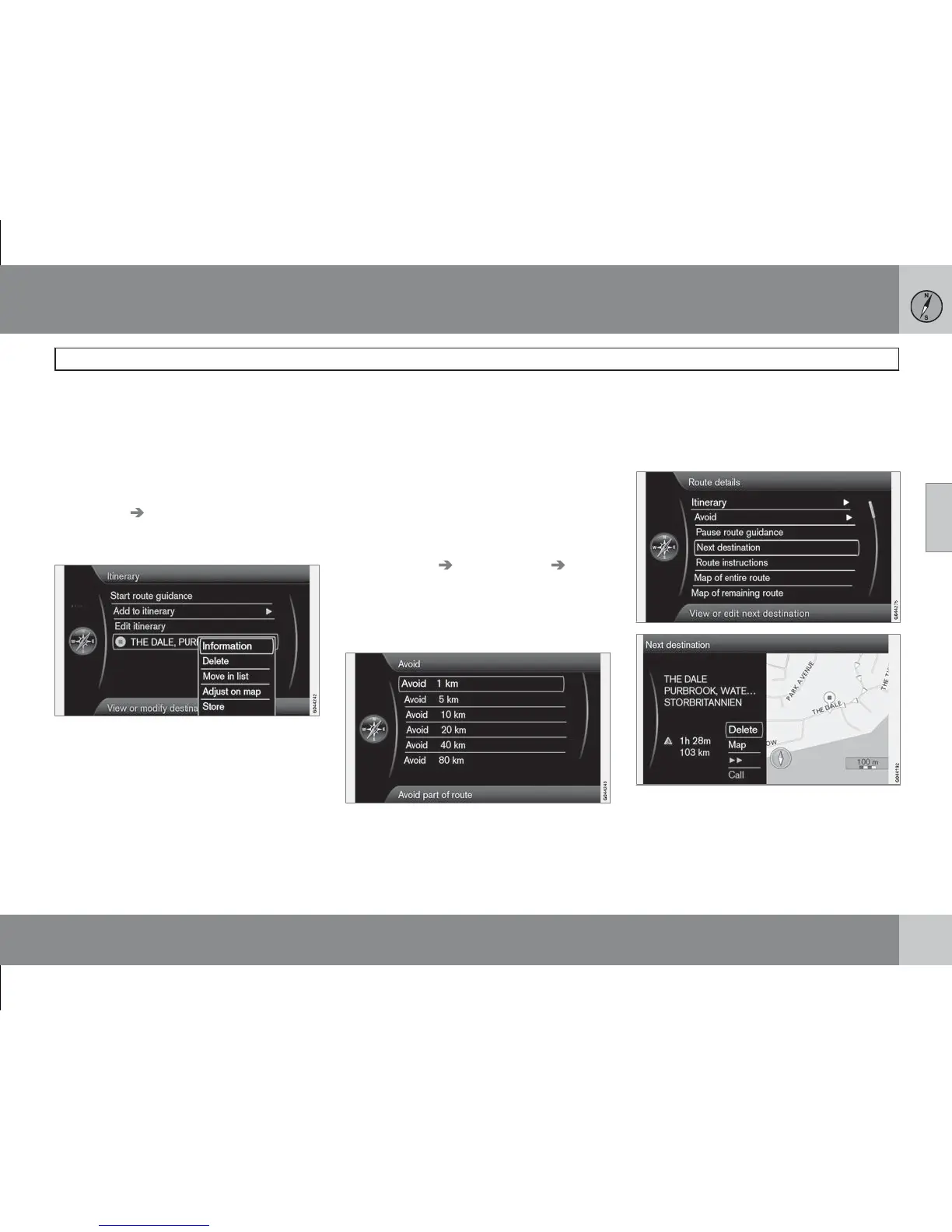
Edit itinerary
(Edit itinerary)
Gives the options:
•
Clear itinerary - deletes the current itin-
erary.
•
Route options - opens a shortcut to
Settings
Route options - see
page 44.
Intermediate destinations in the itinerary
By selecting intermediate destination + OK
each intermediate destination in the itinerary
can be updated.
Information (Information) - Full name and
address, and Latitude and Longitude. In addi-
tion, a facility can be Called up and any Facili-
ties around the location and Car parking in the
vicinity can be seen.
•
Delete (Delete) - deletes the intermediate
destination.
•
Move in list (Move in list) - changes the
order in the itinerary.
•
Adjust on map (Adjust on map) - shows
the location on the map with a crosshair.
Another location there be scrolled forward
and selected with OK, see more about the
Scroll function on page 28.
•
Store (Store) - opens the menu Set
destination
Stored location Edit,
see page 37.
Avoid
(Avoid)
A distance in the itinerary can be deselected
here. The alternative distances are calculated
from the car's current position. The system
then selects another route.
•
Select the desired option + OK.
Next destination
(Next destination)
Shows the next intermediate destination's
position on the map, name, address, estimated
time of arrival and distance there. Also gives
the options:



 To Next Page