04 Traffic information
General
04
54
Display and reception
Transmitted traffic information is always
received and presented - even if no destina-
tions are given.
How traffic information should be presented
can be set and changed in Settings, see
page 44.
The presentation of traffic information also
depends on how it is transmitted.
NOTE
Traffic information is not available in all
areas/countries.
The transmission range for traffic informa-
tion is being increased continuously.
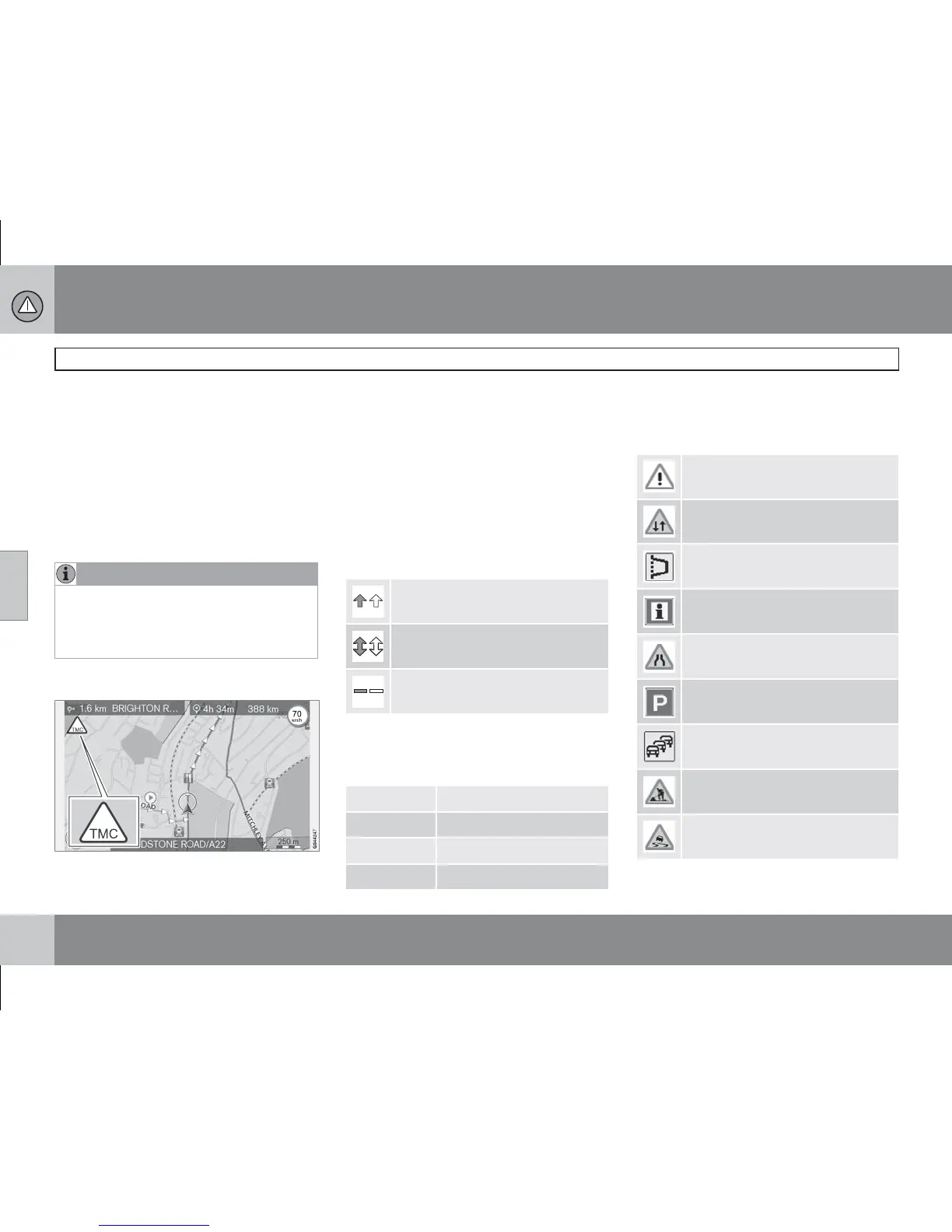
Traffic symbols on the map
Symbol for traffic message/problems.
When there is at least one traffic message
along the itinerary's path, a TMC symbol
(Traffic Message Channel) appears in the
map's upper left-hand corner.
The scroll function (see page 28) can be used
to scroll through the traffic problem to see its
precise position and nature.
Point on map
Traffic problems are marked with arrows, lines
and frames:
Traffic with disruption
Traffic with disruptions in both
directions
Extent
Marking's colour
Colour of arrows, lines and frames indicates
the degree of the disruption:
Black Closed road
Red Stationary traffic
Orange Slow traffic
Yellow General information
Type of traffic disruption
The following symbols can mark different traf-
fic disruptions on the map:
Accident
Contraflow
Diversion
Information
Narrow road
Parking information
Congestion
Roadwork
Slippery road



 To Next Page