AUDIO AND MEDIA
}}
* Option/accessory.
81
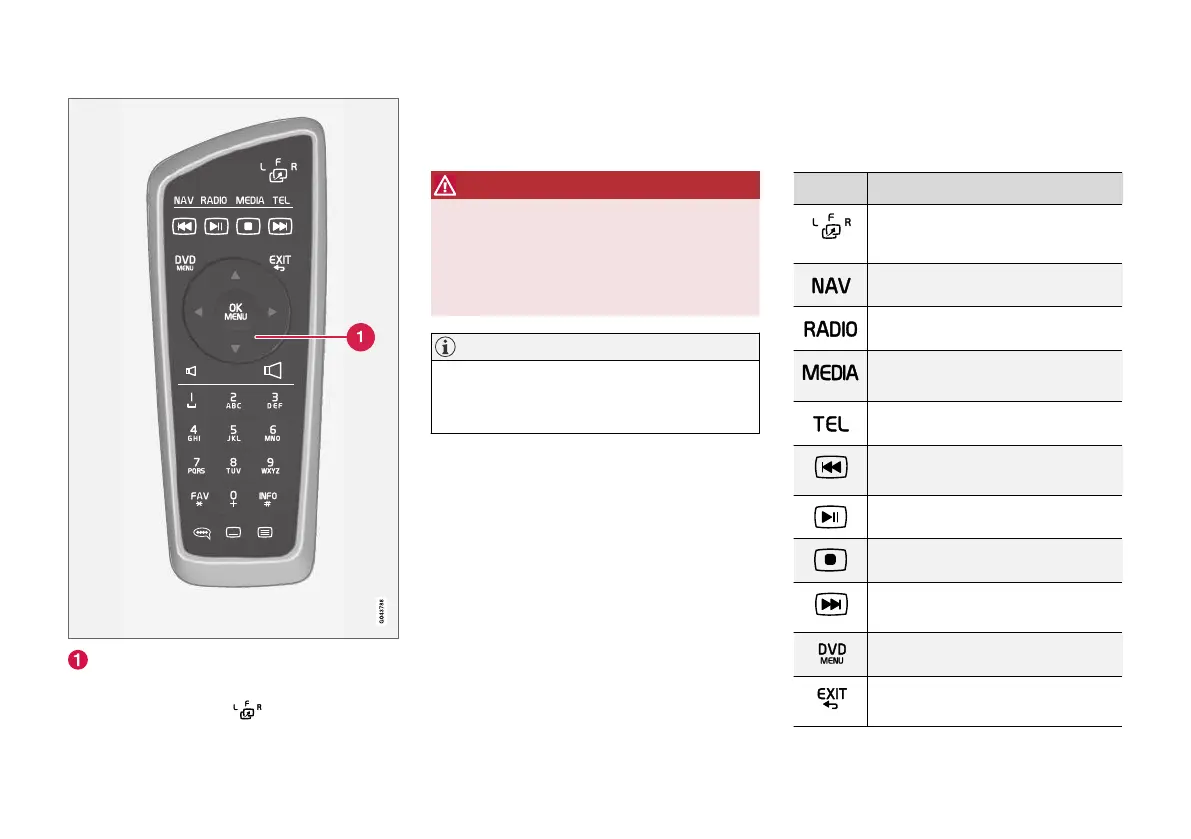
Corresponds to TUNE in the centre console.
When using the remote control, first press the
remote control's button to position F. Then
aim the remote control at the IR receiver, which is
located to the right of the INFO button (p. 28) in
the centre console.
WARNING
Keep loose objects such as mobile phones,
cameras, remote controls for accessories, etc.
in the glove compartment or other compart-
ments. Otherwise they may injure people in
the car in the event of sudden braking or a
collision.
NOTE
Do not expose the remote control to direct
sunlight (e.g. on the instrument panel) - oth-
erwise problems may arise with the batteries.
Related information
•
Audio and media - operating the system
(p. 28)
Remote control* - functions
Possible functions to be controlled using the
remote control.
Key Function
F = Front display screen
L and R = Not possible options.
Change to navigation*
Change to radio source (e.g. AM)
Change to media source (e.g. Disc,
TV*)
Change to Bluetooth
®
handsfree
Scroll/fast rewind, change track/
song
Play/pause
Stop
Scroll/fast forward, change track/
song
Menu
To previous, cancels function, dele-
tes input characters



 To Next Page