AUDIO AND MEDIA
* Option/accessory.
28
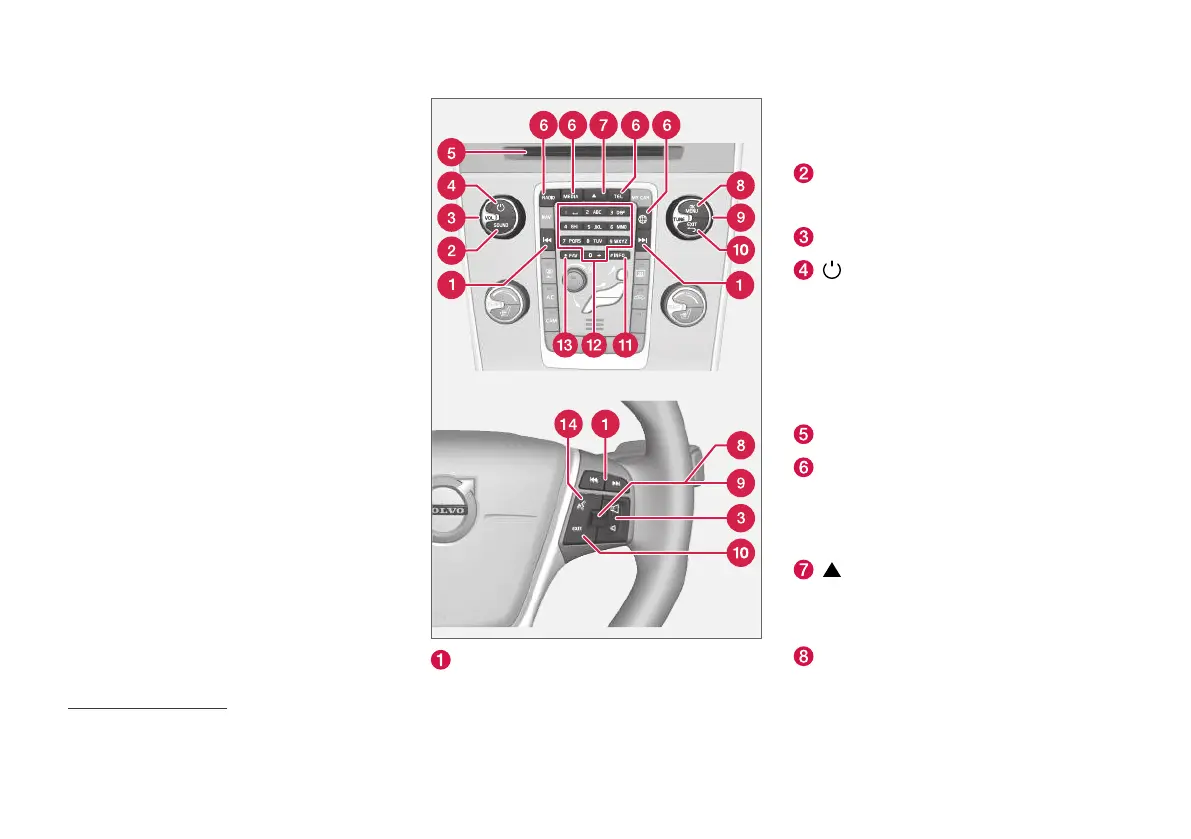
Audio and media - operating the
system
The audio and media system is controlled from
the centre console, with steering wheel buttons,
voice recognition (p. 63) or remote control*
(p. 80). The information is presented on the
screen in the upper section of the centre con-
sole.
Scroll/fast wind/search – Short press
scrolls between disc tracks, preset radio sta-
tions
2
or chapter
3
. A long press fast-winds
disc tracks or searches for the next available
radio station.
SOUND - press for access to audio settings
(bass, treble, etc.). For more information, see
general audio settings (p. 34).
VOL - raise or lower the volume.
– ON/OFF/MUTE – short press starts
the system and long press (until the screen
is off) switches off. Note that the whole of
the Sensus system (including navigation*-
and phone functions) starts/switches off at
the same time. Briefly press to mute the
sound (MUTE) or restore the sound if it had
been switched off.
Disc insert and eject slot.
Main sources – press to select the main
source (e.g. RADIO, MEDIA). Last active
source is shown (e.g.
FM for radio). If you are
in a source and press the main source but-
ton, a shortcut menu is shown.
- disc eject. A disc remains in the ejected
position for about 12 seconds, after which it
is inserted back into the player for safety rea-
sons.
OK/MENU - press the thumbwheel in the
steering wheel or the button in the centre
2
Does not apply to DAB (Digital Audio Broadcasting).
3
Only applies to DVD discs.



 To Next Page