03 Instruments and controls
03
110
Trip computer - combined instrument
panel "Digital"
The car's trip computer can record, calculate
and show information while driving.
The trip computer's menu is in a variable
loop. One of the alternatives is that the trip
computer's three displays extinguish - this
also marks the start/end of the loop.
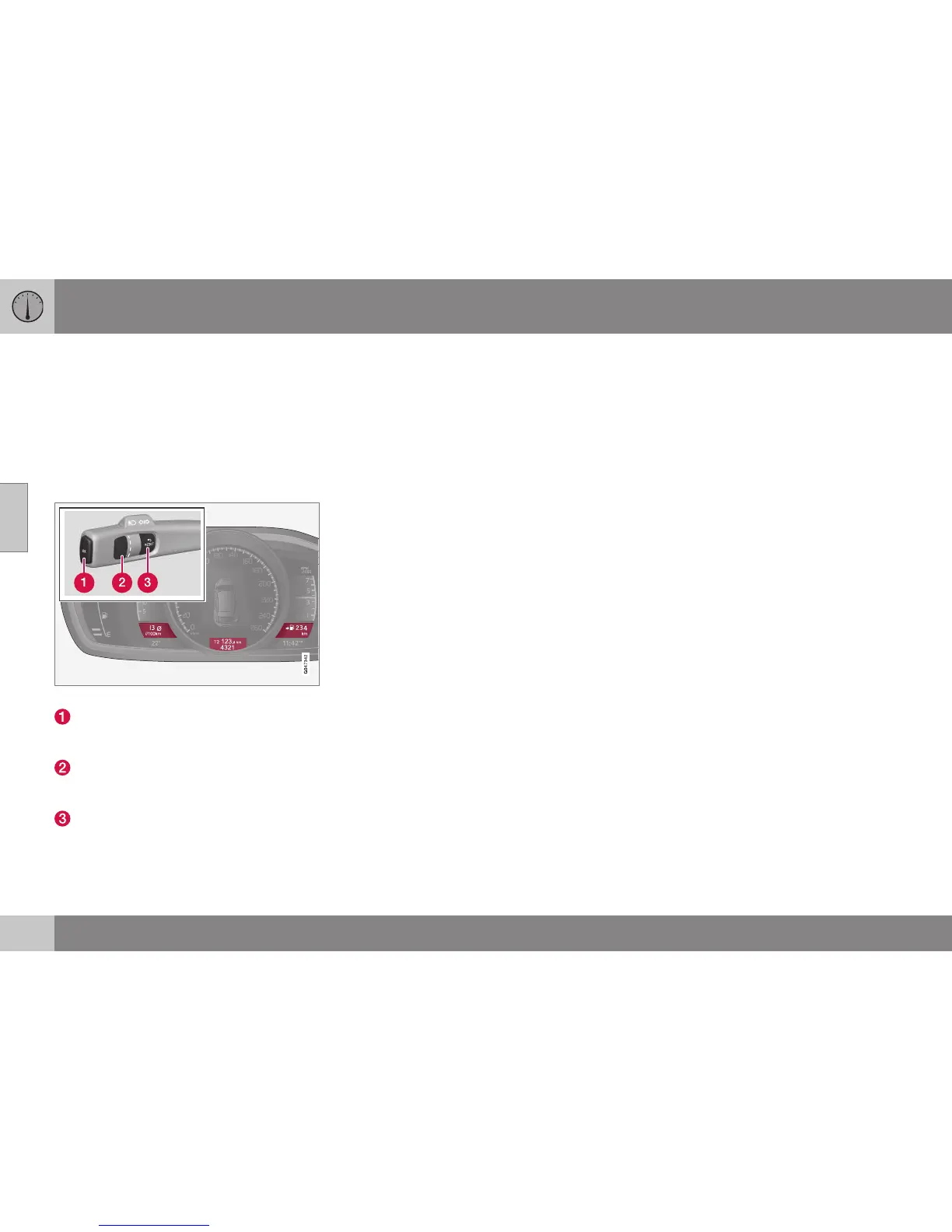
Information displays and stalk switch controls.
OK - Opens the loop with the trip com-
puter's functions + Activates the selected
option.
Thumbwheel - Opens the loop with the
trip computer's headings + Scrolls
through the options.
RESET - Undoes, zeroes or backs out of
a function after making a selection.
Functions
Proceed as follows to open and check/adjust
functions:
1. To ensure that no control is in the middle
of a sequence - "Reset" them first with
2 presses on RESET.
2. Press OK - loop with all functions opens.
3. Browse through the functions with the
thumbwheel and select/confirm with OK.
4. Finish by pressing RESET twice after
completed checking/ adjustment.
The different functions of the trip computer
are listed in the following table:



 To Next Page