VOLVOTECH.EU INSTALLATION MANUAL
VBB4 ( VIDEO BREAK- IN BOX TYPE 4) VERSION 1.1
Page 10 of 14
CopyRight 2012, VolvoTech.EU
C: BE || CD 121107 || V 1.00 || RD 140228 || HC 1 || FC 3.26 ||
VolvoTech-manual-EN-installation-VBB4-VID-POW-MC-S40-V50-
C70-1.1.doc
Contact details:
VolvoTech.EU
support@volvotech.eu
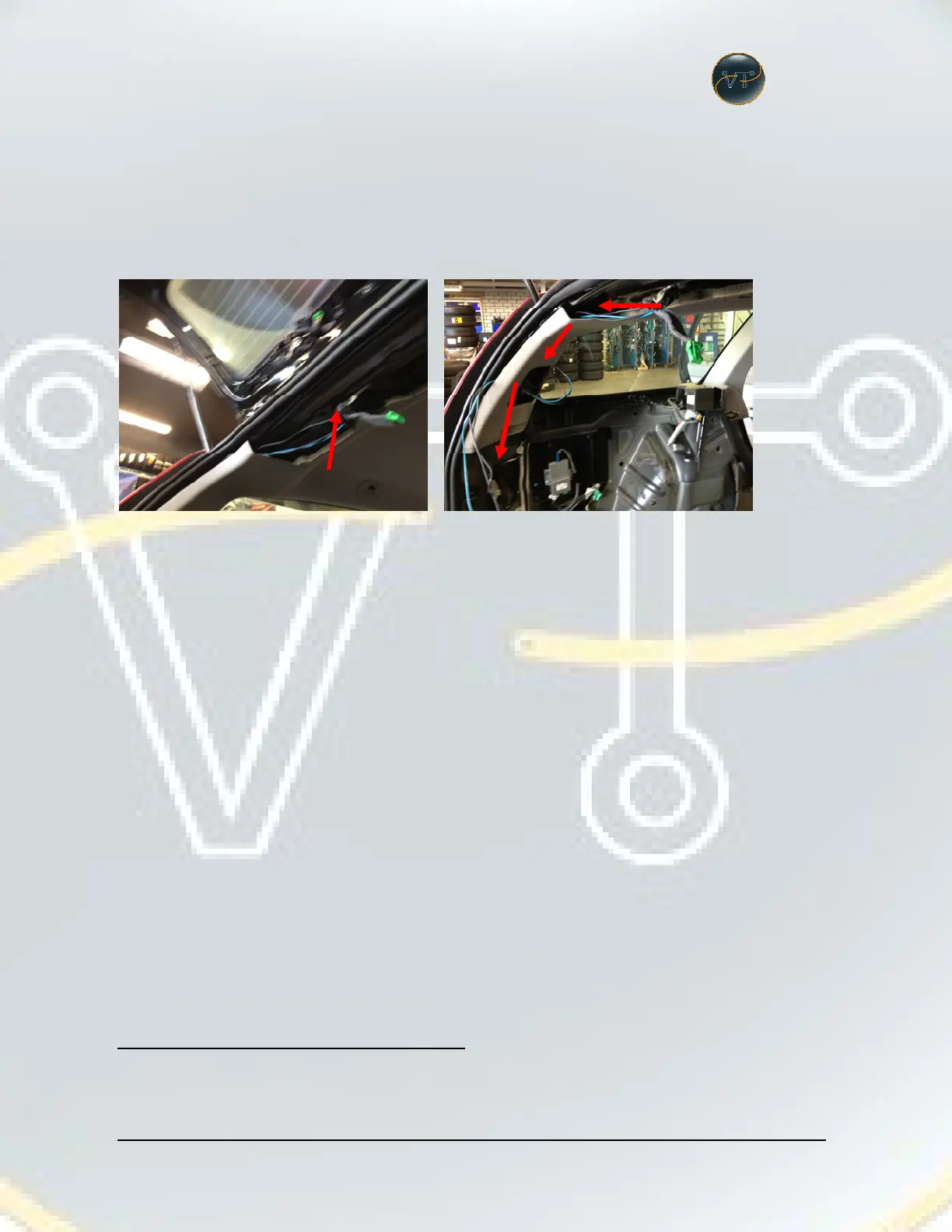
Remove the plastic roof-cover. (Remove the light, and then remove the TORX
screw from there, then slide and pull the cover).
Put the wiring harness from camera through the roof put it behind the panel (just
give it a firm pool to have it come partially away from the car-construction).
Note: YOU CAN CHOOSE TO DO THIS AT THE RIGHT OR LEFT PART OF THE CAR.
EXAMPLE SHOWS LEFT PART.


 To Next Page