VOLVOTECH.EU INSTALLATION MANUAL
VBB4 ( VIDEO BREAK- IN BOX TYPE 4) VERSION 1.1
Page 2 of 14
CopyRight 2012, VolvoTech.EU
C: BE || CD 121107 || V 1.00 || RD 140228 || HC 1 || FC 3.26 ||
VolvoTech-manual-EN-installation-VBB4-VID-POW-MC-S40-V50-
C70-1.1.doc
Contact details:
VolvoTech.EU
support@volvotech.eu
CONNECTIONS
Please read carefully before performing installation:
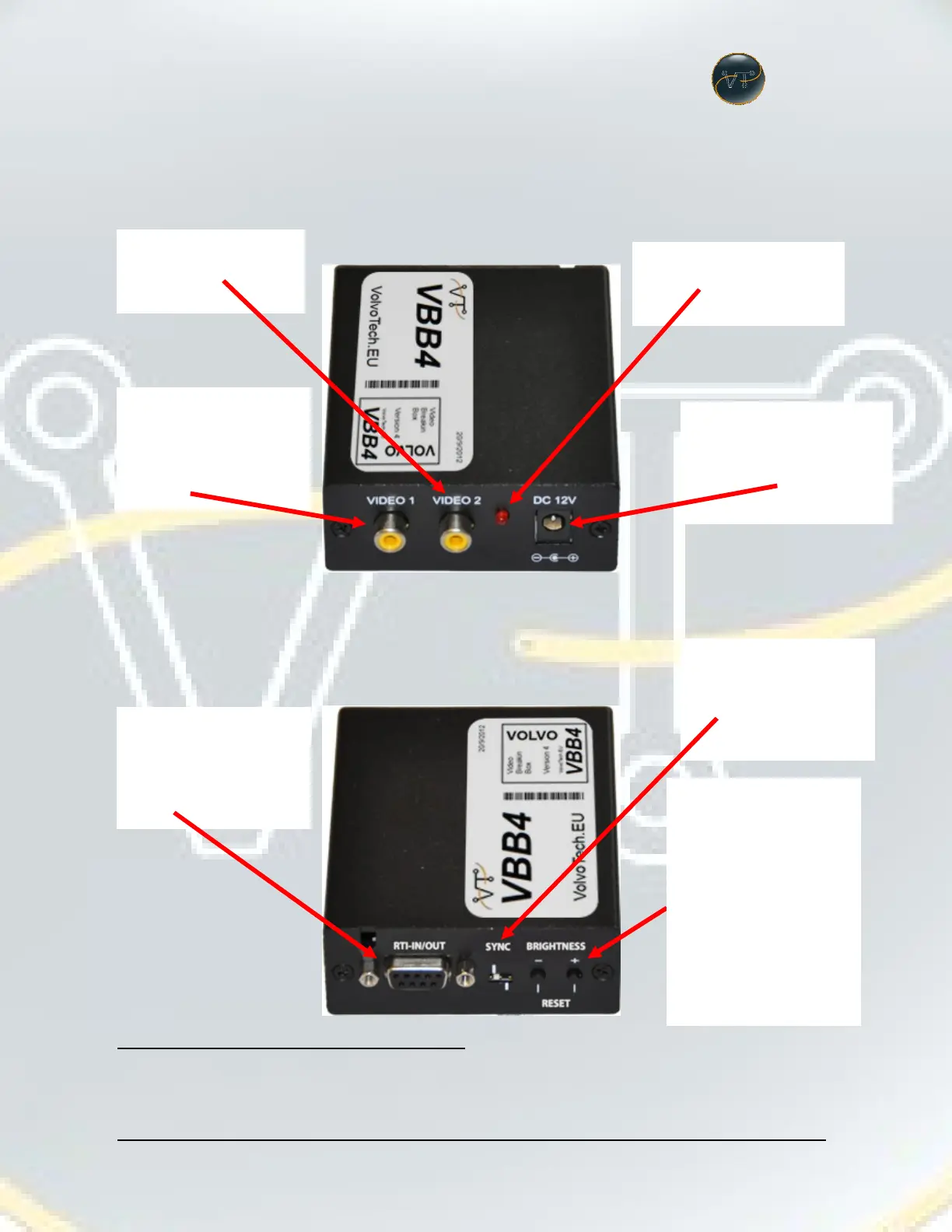
Used for the Rearview
Camera
Should ALLWAYS be on!
Used for any video
playback device,
activated with the
supplied switch
Connect to the RTI
computer with the
supplied connector set.
Connect to the RTI
computer with the
supplied cable.
Set to RGB-S please.
(in YOUR Volvo no
other setting possible)
In case the image of
the video port (Video 1)
is to dark, you can set
and change brightness
here. (NOTE : Not
required for a
VolvoTech camera, the
camera adjusts
itselves!)
RESET : Factory default
the VBB4.


 To Next Page