VONETS——WiFi Bridge/Repeater/Router
7
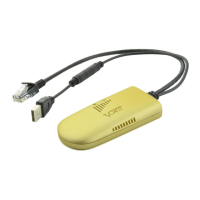
4. “WiFi Tx Power” of VONETS device can be changed, jump to “System Settings”----
“Advance Settings”, choose suitable transmit power, then click “Apply”;
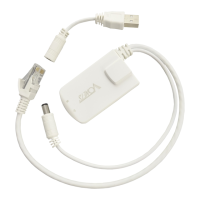
5. Reboot device, jump to “System Settings”---- “Reboot Device”, click “Reboot”, when it is
finished, all revised options will take effort.
Remark 2: When VONETS device connects to external network, its IP address will be
changed. At this time, when log in configured page, we suggest you enter configured domain
name: http://vonets.cfg. Or in Windows command window, enter the command: ping
vonets.cfg, to get the IP address of the device, then log in configuration page by this IP
address.


 To Next Page