② VONETS device is connected to hotspot successfully, but hotspot signal strength is
greater than 50%, WiFi connection status light will quick flash;
③ VONETS device is connected to hotspot successfully, but hotspot signal strength is less
than 50% greater than 10%, WiFi status light will pause flash and flash;
④ VONETS device is connected to hotspot failed, WiFi connection status light will flash
slowly.
2.3 AP Application Configuration
VONETS device can be configured as an AP application, the wireless terminal device can
connect to VONETS device hotspot to connect to the network; however, it is best to change
its WiFi name and password for network security.
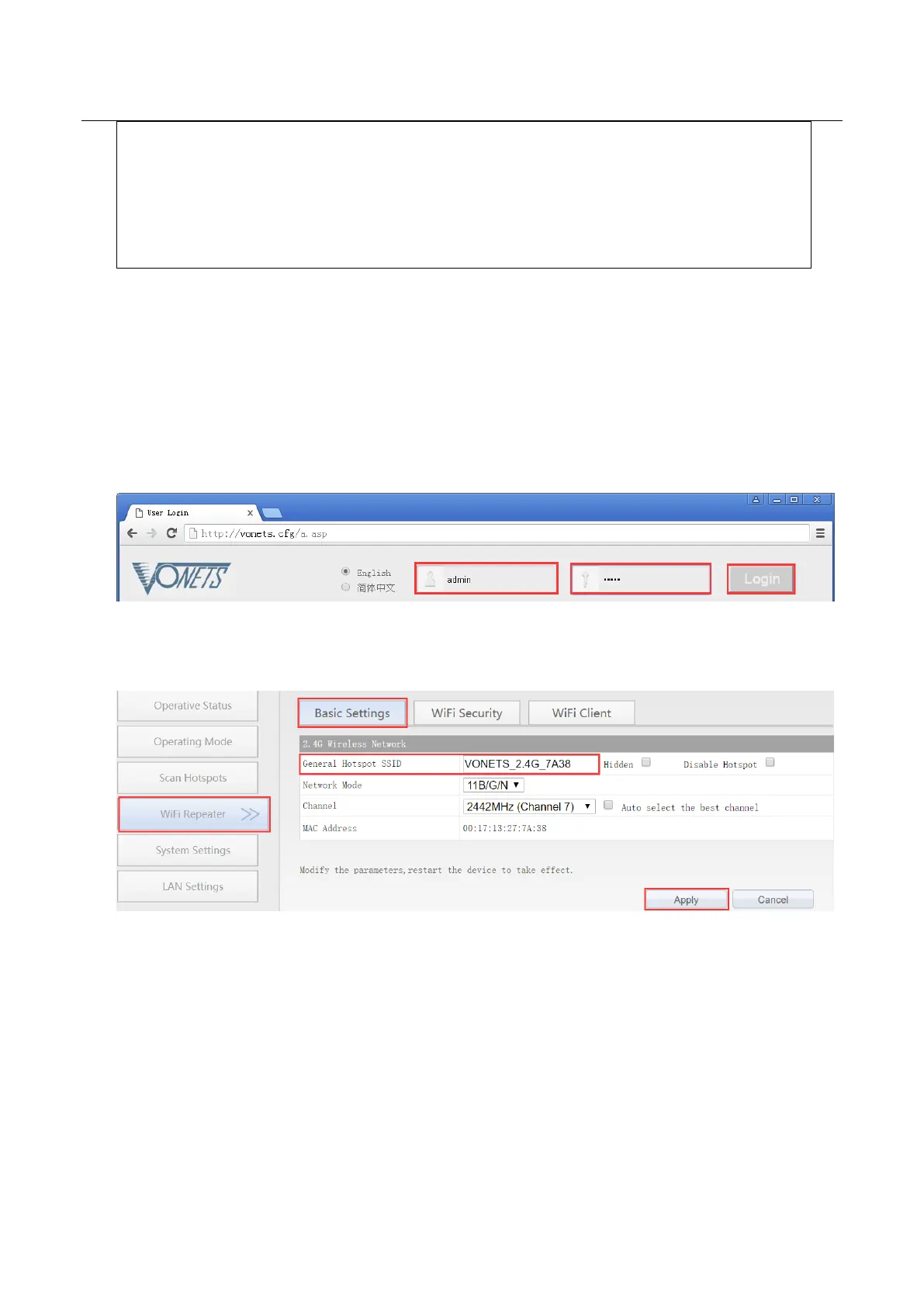
1. Log in to the configuration page http://vonets.cfg (or IP: 192.168.254.254you’re your
computer browser, both user name and password are “admin”;
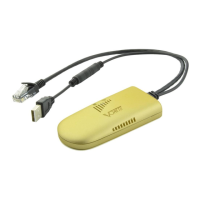
2. Revise WiFi name: Jump to “WiFi Repeater”---- “Basic Settings”, enter new WiFi name
in “General Hotspot SSID”, click “Apply”;
3. Revise WiFi password, in “WiFi Repeater”----“WiFi Security”, enter new WiFi password
in “Pass Phrase”, click “Apply”;


 To Next Page