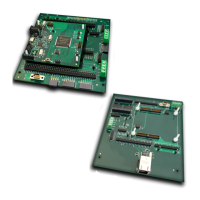
The REB1 is an evaluation board designed for use with Vorago's VA108x0 series of microcontrollers (MCUs), specifically the VA10800 and VA10820. This board serves as a working platform for software development and allows users to evaluate all facets of the MCU at room temperature. The VA10820 MCU includes supplemental Error Detection and Correction (EDAC) and memory scrub functionality, while being register-set identical to the VA10800 in all other aspects.
Function Description:
The REB1 evaluation board provides a comprehensive environment for developing and debugging embedded software for the VA108x0 MCUs. It integrates a Segger J-Link On-Board (OB) JTAG interface, eliminating the need for a separate debug pod, though a connector for external JTAG tools is available. This integrated J-Link OB allows the board to be powered directly from a PC's USB 5V supply, facilitates JTAG communications for debugging and programming, and enables terminal communications for data transfer between a PC terminal window and the VA108x0 MCU.
The board's hardware is designed to support various MCU functionalities, including:
- Power Supply: Regulators for 1.5V and 3.3V, with power supplied via USB. Jumpers (J2 & J20) are provided for measuring current to the MCU.
- Clock Generation: A jumper-selectable clock generator (J16, J18) allows for flexible clock source selection and adjustment.
- Analog-to-Digital Conversion (ADC): A 10-bit, 4-channel ADC is available (J15), with a potentiometer for user input and a temperature sensor (I2C) for environmental monitoring.
- Digital I/O: Multiple port pins are exposed through various connectors, including Arduino-compatible connectors (J4, J5, J9, J10), auxiliary I/O connectors (J14, J15), 12-pin PMOD, and 8-pin PMOD connectors. These allow for extensive interfacing with external components.
- Memory: An on-board 1 Mbit EEPROM (SPI) is included for program storage, from which the MCU boots.
- User Interface: Reset and user buttons (S2, SW_USER) and indicator LEDs (D1, D2-4) provide basic interaction and status feedback. D1 indicates J-Link OB activity, while D2-4 are user-definable.
The REB1 supports three main Integrated Development Environments (IDEs): Keil µVision, IAR Embedded Workbench, and iSystem winIDEA. These IDEs allow users to develop, compile, debug, and program code to the on-board SPI EEPROM. The Segger J-Link RTT (Real Time Terminal) Viewer is used for terminal communication, enabling data logging and keyboard input to the MCU without affecting its real-time behavior.
Important Technical Specifications:
- MCU Support: Vorago VA10800 and VA10820 MCUs.
- JTAG Interface: Integrated Segger J-Link OB, with an optional connector for external JTAG tools.
- Power Source: USB 5V supply.
- Voltage Regulators: 1.5V and 3.3V.
- ADC: 10-bit, 4-channel.
- EEPROM: 1 Mbit (SPI).
- Clock: Jumper-selectable clock generator with adjustable frequencies (e.g., 30MHz, 60MHz, 80MHz).
- Connectors:
- Arduino-compatible (J4, J5, J9, J10)
- Auxiliary I/O (J14, J15)
- 12-pin PMOD
- 8-pin PMOD
- Micro USB for power and JTAG connection
- LEDs: D1 (J-Link OB active), D2-4 (user-definable).
- Buttons: Reset (S2), User (SW_USER).
- Temperature Sensor: I2C interface.
- Potentiometer: For ADC input.
- JTAG Clock Speed: Up to 5 MHz (configurable in debug settings).
- MCU Program RAM: 128kbyte, loaded from SPI EEPROM during boot.
Usage Features:
- Easy Setup: The board is designed for quick setup, requiring only the Segger J-Link driver and the Vorago REB1 software development code.
- Flexible IDE Support: Compatibility with Keil µVision, IAR Embedded Workbench, and iSystem winIDEA provides users with choice based on their preference or existing toolchains. Evaluation versions of these IDEs are typically free for smaller code sizes or time-limited.
- Integrated Debugging: The J-Link OB simplifies the debugging process, allowing direct connection to a PC via USB for programming and real-time monitoring.
- Real-Time Terminal (RTT): Segger RTT enables high-speed, non-intrusive communication between the MCU and a PC terminal, facilitating data output (e.g.,
printf statements) and input from the keyboard.
- GPIO Control: Comprehensive access to MCU GPIO pins through various headers, including Arduino-compatible ones, allows for easy integration with common shields and modules.
- Peripheral Evaluation: The board includes components like an ADC, temperature sensor, and EEPROM to demonstrate and evaluate the MCU's peripheral capabilities.
- Software Examples: The REB1 software development kit includes example projects and a structured code base (common, driver, project, utilities folders) to help users get started quickly.
- Documentation: A detailed user manual, schematic, and Doxygen-formatted software documentation are provided to guide users through hardware and software aspects.
- Input Pin Filtering and Debounce: The VA108x0 MCU features advanced filtering schemes for input pins, which can be configured to eliminate glitches and debounce switch inputs, reducing CPU overhead.
Maintenance Features:
- Software Updates: Users are encouraged to download the latest versions of IDEs, Segger J-Link software, and Vorago REB1 software development code to ensure compatibility and access to new features.
- Jumper Configuration: Clear instructions are provided for setting jumpers for clock selection, current measurement, and MCU voltage supply, which are crucial for proper board operation and troubleshooting.
- Troubleshooting Guide: The manual addresses common issues such as code not running, debugger connection problems, and MCU not booting from EEPROM, offering solutions and references to relevant sections.
- Support: Email support is available for users, with a request to reference "REB1" in the email title for efficient assistance.
- Revision History: A detailed revision history tracks updates to the manual and software, ensuring users are aware of changes and improvements.
- Pack Files: The use of CMSIS-compliant "pack" files simplifies the process of integrating MCU-specific information (NVM programming code, header files, documentation, SVD files) into the IDEs.

 Need help?
 General

 To Next Page