EasyManua.ls Logo

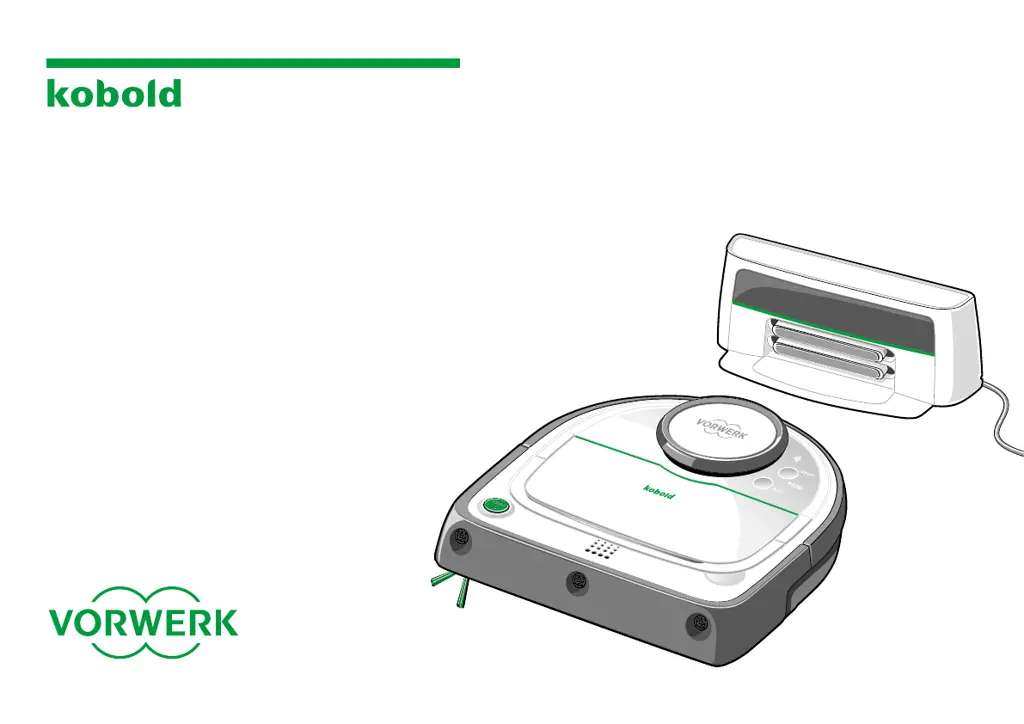
Vorwerk Kobold VR300 - User Manual

Vorwerk Kobold VR300
64 pages
Print Icon
To Next Page IconTo Next Page
Loading...
VR300
USER MANUAL
KOBOLD VR300
ROBOT VACUUM
CLEANER
AND ACCESSORIES

Questions and Answers

  • J
    Johnathan CarrollAug 15, 2025
    What to do if Vorwerk Kobold VR300 cleaning performance has decreased?
    • M
      Michael EstradaAug 15, 2025
      If the cleaning performance of your Vorwerk Vacuum Cleaner has decreased, the dust container is probably full, so you should empty it and clean the filter. Also, the brushes could be dirty. In that case, clean the roller and side brushes.
  • M
    Mia BrockAug 18, 2025
    Why Vorwerk Kobold VR300 Vacuum Cleaner LED display flashes red?
    • S
      Sarah HillAug 18, 2025
      If the LED display on your Vorwerk Vacuum Cleaner is flashing red, it could be due to several reasons: * The roller brush or side brush has stopped rotating. Remove any lint, hair, or dirt from the brush. * The bumper is jammed. Jiggle the bumper to release it.
  • S
    shawnmillsAug 21, 2025
    What to do if Vorwerk Vacuum Cleaner does not respond?
    • C
      christopherweeksAug 22, 2025
      If your Vorwerk Vacuum Cleaner is not responding, the batteries may be empty. Charge the robot vacuum cleaner on the base station. Also, ensure the plug is properly connected to the jack on the base station and that the mains plug is properly connected to the power socket. Note that the robot vacuum cleaner will discharge if it is not docked on the base station.
  • A
    Amanda HernandezAug 28, 2025
    Why Vorwerk Vacuum Cleaner LED display lights up orange?
    • K
      Kerry HoffmanAug 28, 2025
      If the LED display on your Vorwerk Vacuum Cleaner lights up orange, the dust container is likely full. Empty the dust container, clean the filter, and reinstall the dust container, including the filter. Also, clean the floor sensors with a soft, clean cloth, a cotton bud, or a conventional vacuum cleaner.
  • D
    dbensonSep 1, 2025
    How to fix Vorwerk Kobold VR300 not charging?
    • G
      George HernandezSep 1, 2025
      If your Vorwerk Vacuum Cleaner is not charging, the base station and/or robot vacuum cleaner may not be properly connected to the power supply. Make sure that the plug is properly connected to the jack on the base station, and the mains plug is properly connected to the power socket. If you do not charge the robot vacuum cleaner on the base station and have not switched it off using the “Shutdown robot” option, the battery will run down after a few days.
  • R
    Ryan LopezSep 7, 2025
    Why Vorwerk Kobold VR300 Vacuum Cleaner LED display flashes orange?
    • J
      Jonathan CopelandSep 7, 2025
      If the LED display on your Vorwerk Vacuum Cleaner is flashing orange, the cover on the dust container might not be closed properly. Close the cover until you hear it click. Alternatively, the filter and/or dust container may be missing. Insert the dust container with the filter back into the robot vacuum cleaner.
  • F
    Frank GarciaSep 10, 2025
    What does it mean if Vorwerk Kobold VR300 LED display flashes green?
    • E
      Eric MillerSep 12, 2025
      If the LED display flashes green for approximately 5 seconds on your Vorwerk Vacuum Cleaner, press the start button again within 30 seconds to start cleaning. Keep in mind that the battery charge may not be sufficient for the entire cleaning cycle, and the robot vacuum cleaner may discontinue cleaning to recharge. It is also recommended to charge your robot vacuum cleaner before starting cleaning.
  • R
    Richard HortonNov 24, 2025
    Why Vorwerk Kobold VR300 Vacuum Cleaner does not return to base after cleaning?
    • M
      mariomartinezNov 24, 2025
      If your Vorwerk Vacuum Cleaner isn't returning to its base station after cleaning, check whether the protective film has been removed from the infrared window of the base station. You may have started the cleaning process in normal cleaning mode from a location other than the base station, or cleaning may have been interrupted, and the robot vacuum cleaner may have been switched back on in a different place in the room. Remove any objects covering the sensors on the robot vacuum cleaner and clean the sensors. The base station may be located behind a wall or other obstacle that is blocking the signal, so try setting up the base station in a different location, ensuring that there are no obstacles within an area of 0.5 metres on either side of the base station or within 0.3 metres above it. ...

Summary

Safety Information

Hazard Warnings

Lists potential risks and hazards associated with operating the robot vacuum cleaner and its accessories.

Danger Levels Explained

Explains hazard warning symbols, signal words, and associated danger levels for user safety.

Getting Started

Base Station Setup

Provides guidance on selecting an appropriate location and setting up the charging base station.

Charging the Robot Vacuum Cleaner

Charging on Base Station

Detailed instructions on how to place the robot vacuum cleaner on the base station for charging.

Operating the Robot Vacuum Cleaner

Putting Into Operation

Instructions on how to switch on and start the robot vacuum cleaner for the first time.

Selecting Cleaning Modes

Details the available cleaning modes: ALL ROOMS and SPOT cleaning.

Robot Sensors

Describes the various sensors used for navigation and obstacle detection.

Wi-Fi and App Control

Technical Requirements

Specifies the Wi-Fi and smart device requirements for using the Kobold Robot app.

Installing the Kobold Robot App

Step-by-step guide on downloading, installing, and setting up the Kobold Robot app.

Establishing Wi-Fi Connection

Instructions on how to connect the robot vacuum cleaner to your Wi-Fi network.

Connecting to Smart Devices

Procedure for adding the robot vacuum cleaner to the app and linking it with smart devices.

Maintenance and Care

Dust Container and Filter Care

Procedures for emptying the dust container and cleaning the filter for optimal performance.

Emptying the Dust Container

Detailed steps on how to empty the dust container after each use.

Cleaning the Filter

Instructions on how to clean the filter using a vacuum cleaner or cloth.

Cleaning the Roller Brush

Instructions on how to remove, clean, and reinstall the main roller brush.

Cleaning the Sensors

How to clean the various sensors (floor, wall, ultrasonic) for optimal operation.

Troubleshooting Common Issues

LED Flashes Green

Troubleshooting for the green flashing LED, indicating low battery or uncharged state.

Vorwerk Kobold VR300 Specifications

General IconGeneral
TypeRobot Vacuum
Battery TypeLithium-ion
Wi-Fi ConnectivityYes
App ControlYes
Power58 W
NavigationLaser-based navigation
Dustbin Capacity0.53 liters
Filter typeHEPA
Charging Time3 hours

Related product manuals