EasyManua.ls Logo

Vorwerk KOBOLD VR200 - User Manual

Vorwerk KOBOLD VR200
64 pages
Print Icon
To Next Page IconTo Next Page
Loading...
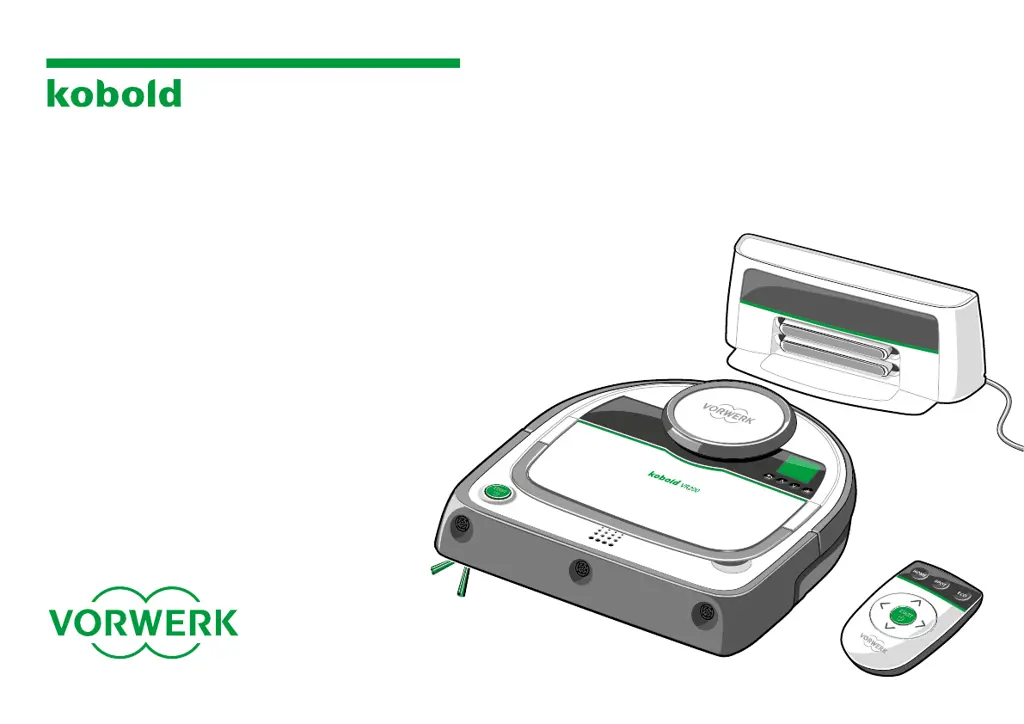
INSTRUCTIONS FOR USE
KOBOLD VR200
ROBOT VACUUM
CLEANER
AND ACCESSORIES

Questions and Answers

  • D
    davisbrendaJul 26, 2025
    Why my Vorwerk Vacuum Cleaner does not return to the base station after cleaning?
    • N
      Nicole GonzalesJul 26, 2025
      If your Vorwerk Vacuum Cleaner isn't returning to its base station, there might be several reasons: * Check if the protective film on the infrared window of the base station was removed. * If you initiated cleaning in normal mode from a spot other than the base station, the robot will return to that starting point. * Obstructions or dirt may be covering the sensors on the base station or the robot vacuum. Remove any obstructions and clean the sensors. * The base station's location might be blocked by a wall or obstacle. Try relocating the base station. * The base station setup might not be optimal. Start spot cleaning from the base station to test its setup.
  • M
    Megan WilliamsJul 30, 2025
    What to do if my Vorwerk Vacuum Cleaner suddenly stops cleaning?
    • K
      Kristy ArellanoJul 31, 2025
      If your Vorwerk Vacuum Cleaner suddenly stops cleaning, here's what might be happening: * You might have accidentally selected spot cleaning mode. Switch to normal cleaning mode if you want it to clean the entire room. * The sensors could be covered or dirty. Ensure they are unobstructed and clean them with a soft cloth or cotton swab. * In large, empty rooms, the robot might have trouble navigating if there aren't enough walls or furniture within 2-3 meters. Try blocking off the area with the magnetic strip. * If the sensors are dirty, the robot vacuum may interpret dark and dense carpets as a drop-off. Clean the floor sensors regularly.
  • F
    frazieranthonyAug 4, 2025
    How to fix navigation issues on Vorwerk Vacuum Cleaner?
    • R
      robertsmariahAug 4, 2025
      If your Vorwerk Vacuum Cleaner's navigation isn't working, it could be due to a few reasons: * The robot vacuum's path is obstructed. Remove any objects blocking its way, or slightly reposition the robot vacuum. * The robot vacuum was moved during cleaning. Avoid moving it more than 0.5 meters, as this can cause navigation issues. * Furniture was moved or doors were opened/closed during cleaning. Try not to rearrange things while the robot vacuum is operating. * The dust compartment cover isn't fully closed. Ensure it's properly engaged.
  • S
    Steven FergusonAug 8, 2025
    Why is my Vorwerk Vacuum Cleaner not charging?
    • M
      Michele GriffithAug 8, 2025
      If your Vorwerk Vacuum Cleaner isn't charging, here's what you should check: * Ensure the base station and the robot vacuum are properly connected to the power supply. Make sure the plug is securely connected to the jack on the base station. * If the robot vacuum isn't charging on the base station and isn't switched off via the menu, it will discharge. Also, verify the mains plug is properly connected to the outlet.
  • M
    Mr. Kevin SanchezAug 13, 2025
    What to do if Vorwerk Vacuum Cleaner does not respond?
    • O
      ogeorgeAug 13, 2025
      If your Vorwerk Vacuum Cleaner isn't responding, it might be due to these reasons: * The batteries may be drained. Charge the robot vacuum on the base station. * The robot vacuum will discharge if it is not docked on the base station. Ensure that the mains cable and plug are properly connected to the base station and the outlet.
  • B
    Benjamin FoxAug 16, 2025
    Why Vorwerk Vacuum Cleaner cleaning performance decreased?
    • A
      Alexis PhillipsAug 17, 2025
      If the cleaning performance of your Vorwerk Vacuum Cleaner has decreased, consider the following: * The dust container is likely full. Empty the dust container and clean the filter. * The brushes are dirty. Clean the round and side brushes.
  • D
    Deanna TateAug 21, 2025
    What to do if my Vorwerk Vacuum Cleaner dust container is full?
    • M
      Marie BakerAug 21, 2025
      If your Vorwerk Vacuum Cleaner's dust container is full, empty the dust container. Then, clean the filter and reinstall the dust container, including the filter, back into the robot vacuum cleaner. This should resolve the issue.

Summary

INSTRUCTIONS FOR USE KOBOLD VR200 ROBOT VACUUM CLEANER AND ACCESSORIES

PRODUCT OVERVIEW

PRELIMINARY REMARKS

Signs and Symbols

Explains the meaning of various warning symbols and icons used in the manual.

Before You Start

Provides essential advice for users before operating the robot vacuum for the first time.

FOR YOUR SAFETY

Intended Use

Specifies the proper and intended use of the robot vacuum cleaner.

Hazard Notices

Lists critical warnings related to electric shock, fire, explosion, injury, and device damage.

Hazard Levels

Explains hazard symbols (Warning!, Caution!, Notice!) and their associated risks.

FIRST STEPS

Preparing Your Household for the Robot Vacuum Cleaner

Safety precautions before operating the robot vacuum cleaner, including cable management.

Carrying the Kobold VR200 Robot Vacuum Cleaner

Instructions on how to properly lift and carry the robot vacuum cleaner using its handle.

Installing the Kobold VR200 Robot Vacuum Cleaner

Steps for setting up the robot, including filter and side brush installation.

Setting Up the Base Station

Guidelines for positioning the charging base station for optimal performance and safety.

Connecting the Mains Cable

Procedure for connecting the power adapter to the base station and power outlet.

Charging the Kobold VR200 Robot Vacuum Cleaner

Details on initial charging, automatic charging, and battery status indicators.

LED Operating Display

Explanation of the status lights on the robot vacuum cleaner and their meanings.

Remote Control

Introduction to the remote control for operating the robot vacuum cleaner.

OPERATION

Operator Panel Overview

Description of the robot's control panel, including display, buttons, and navigation.

Putting into Operation

Steps for initial setup, including switching on, language selection, and clock setting.

Select a Cleaning Mode

Overview of available cleaning modes: Normal, Spot, ECO, scheduling, and pause.

Configuring the Scheduling Function

Instructions on how to program the robot for automatic cleaning at set times.

Pause and Standby Modes

How to temporarily stop cleaning (Pause) and enter low-power mode (Standby).

Switching Off the Robot Vacuum Cleaner

Procedure for completely shutting down the robot for extended periods.

Cleaning Area and Navigation

Information on how the robot maps, cleans areas, and avoids obstacles.

Remote Control Functions

Detailed guide on using the remote control for various operations and modes.

Other Settings

Customization options including sounds, dustbin alerts, battery reset, and LED control.

Status Indicators on the Display

Explanation of icons and indicators shown on the robot's display screen.

MAINTENANCE

Emptying the Dust Container and Cleaning the Filter

Procedures for regular cleaning and maintenance of the dust container and filter.

Cleaning the Side Brush

Instructions for removing and cleaning the robot's side brush.

Cleaning the Round Brush

Steps for removing and cleaning the main rotating brush of the robot vacuum.

Cleaning the Sensors

Guidance on cleaning various sensors to ensure proper navigation and operation.

Cleaning the Robot Vacuum Cleaner and Base Station

General cleaning instructions for the robot unit and its charging base.

SOFTWARE UPDATES

Updating Software via USB Stick

Process for updating the robot's firmware using a USB drive and computer.

Performing the Software Update

Step-by-step guide on how to execute the software update on the robot.

Reading the Current Software Version

How to check the installed software version on the robot vacuum cleaner.

TROUBLESHOOTING

Brush Blockage and Rotation Issues

Troubleshooting steps for when the robot's brushes are blocked or stop rotating.

Bumper Jam

Procedure to resolve issues with the robot's bumper becoming stuck.

Navigation and Path Blockages

Solutions for navigation errors, blocked paths, and object detection problems.

Dust Compartment Cover Not Closed

Guidance on ensuring the dust compartment cover is properly secured.

Reduced Cleaning Performance

Causes and solutions for a decrease in the robot's cleaning efficiency.

Robot Not Responding or Charging

Troubleshooting steps for unresponsive robot or failure to charge.

Sudden Stopping and Docking Failures

Resolving issues where the robot stops cleaning unexpectedly or fails to dock.

DISPOSAL AND ENVIRONMENTAL PROTECTION

Device Disposal

Legal and environmental guidelines for disposing of the electric robot vacuum cleaner.

Battery Disposal Information

Important safety and environmental information regarding the removal and disposal of batteries.

Packaging Disposal

Instructions on how to properly dispose of the product's packaging materials.

Environmental Protection Information

Information on the manufacturer's commitment to environmental protection and sustainability.

WARRANTY

SERVICE

TECHNICAL DATA

Vorwerk KOBOLD VR200 Specifications

General IconGeneral
Battery TypeLithium-ion
Noise Level70 dB
Charging Time3 hours
Battery Voltage14.4 V
FiltersHEPA filter
TypeRobot Vacuum Cleaner
NavigationLaser Navigation System
Dimensions340 x 340 x 90 mm
Accessoriesside brush
Runtime60 minutes
Dust capacity0.5 liters
Cord lengthCordless

Related product manuals