Fr-6
3. Commande MIC INPUT LEVEL
Cettecommanderègleleniveaud’entréedumicro.
4. Commande OUTPUT LEVEL
CettecommanderègleleniveaudesortiedesprisesLINEOUTPUTsituéesenfacearrière
.
Silevolumedel’enceinteJamVOXestinsuffisant,vouspouvezbranchersapriseLINE
OUTPUTàvotr
einstallationaudio.
5. Prise PHONES
Vouspouvezybrancheruncasque.
6. Commande MONITOR LEVEL
Déterminelevolumedeshaut‐parleursinternesetducasque.
7. Témoin POWER ON
Ceboutons’allumequandl’enceinteJamVOXestbranchéeàl’ordinateurviaUSBetestsous
tension.
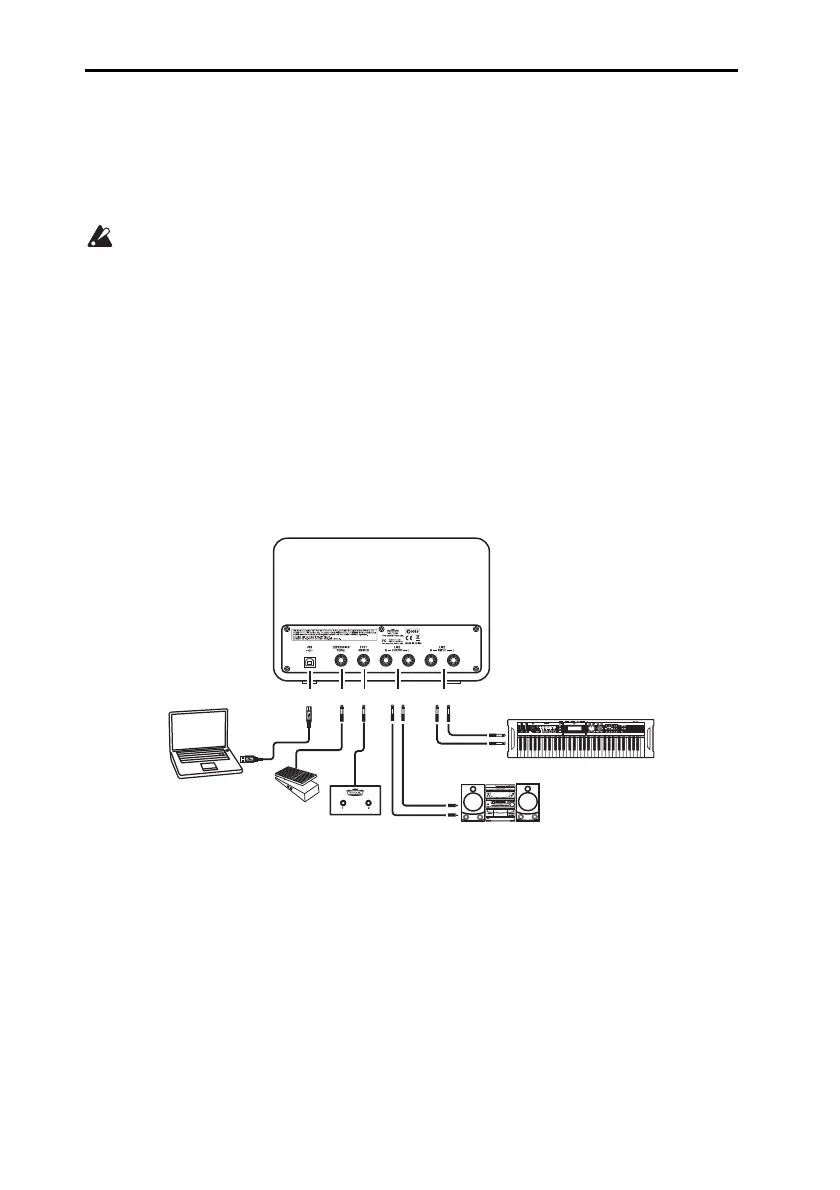
Face arrière
1. Prise USB
Branchez‐ylecâbleUSBfournipourlarelieràlapriseUSBdevotreordinateur.
2. Prise EXPRESSION PEDAL
Branchez‐yunepédaled’expressionKorgEXP‐2disponibleenoption.
3. Prise FOOT SWITCH
Branchez‐yuncommutateuraupiedVOXVFS2disponibleenoption.
4. Prises LINE OUTPUT L/R
Branchez‐yvotrechaîneaudio.
1
2
3
4
5
AUX IN
OUTPUT
Korg EXP-2
VOX VFS-2
Chaîne audio etc.
Synthétiseur, chaîne audio etc.
Ordinateur



 To Next Page