4
CONTROLS AND OPERATION
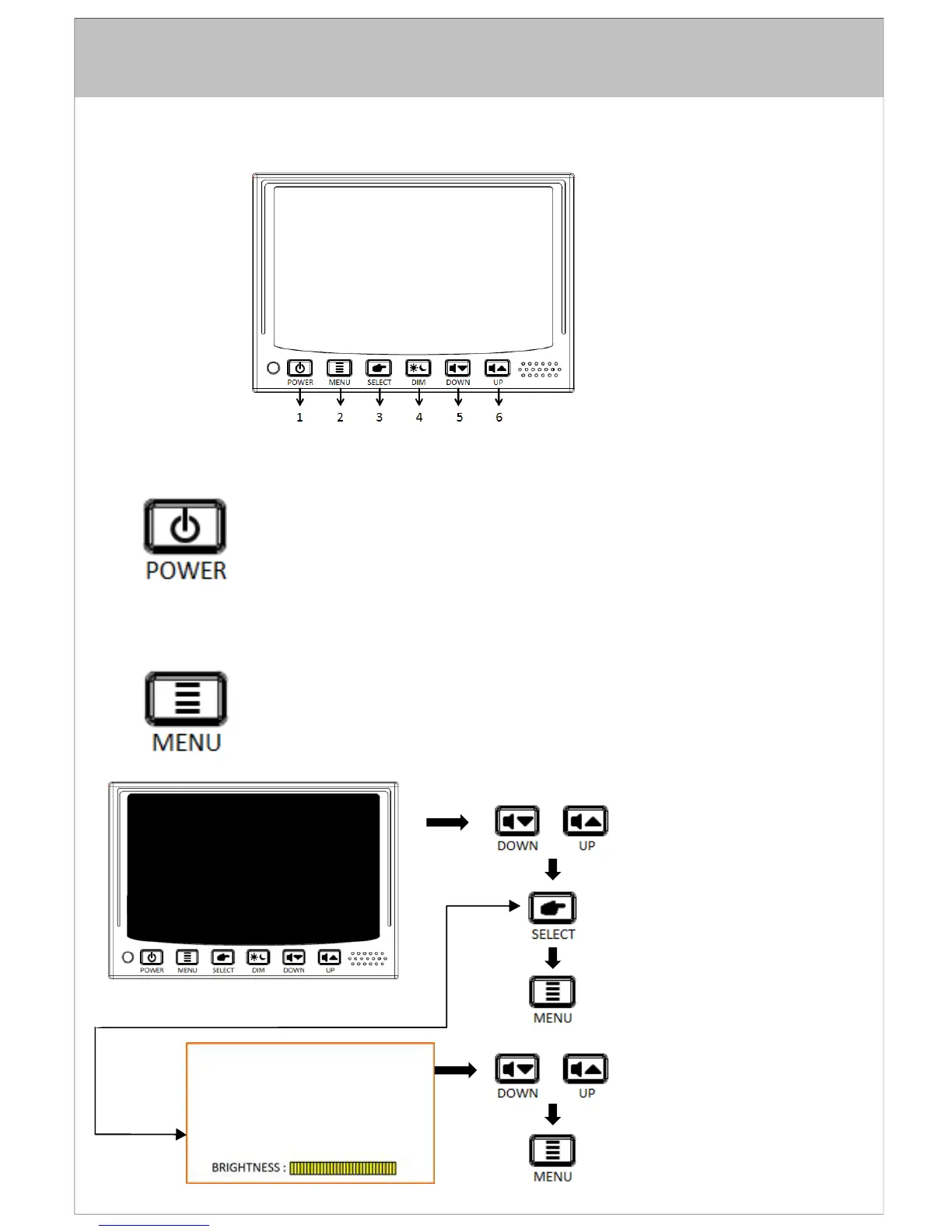
1. POWER ON/OFF
- Press once to turn the unit on.
-
Press again to turn the unit off.
-
With power applied and the unit turned off, only the red power button is backlit.
- When unit is turned on and switch to Night Mode/Auto Mode, all buttons are backlit.
2. MENU
- Press once to enter main menu mode (See Figure1).
- Press again before time out to exit the menu mode.
- Time out of OSD menu is approximately 8 seconds from when the last key was
pressed.
VOM74WP
PRESS TO NAVIGATE SELECTION
PRESS TO EXIT MAIN MENU
PRESS TO BACK TO MAIN MENU
PRESS TO ADJUST +/-
PRESS TO BACK TO MAIN MENU
FIGURE. 1 MAIN MENU
SELECT
“BRIGHTNESS”
Brightness
Hue
Saturation
Contrast
Display
Input


 To Next Page