SERIES 1000-X ELECTRIC ACTUATORS
13 VER: 0812-1
ADJUSTMENT OF ACTUATOR - 2 POSITION
Units are calibrated at the factory to rotate 90° - if any adjustment is needed please use the following
procedure.
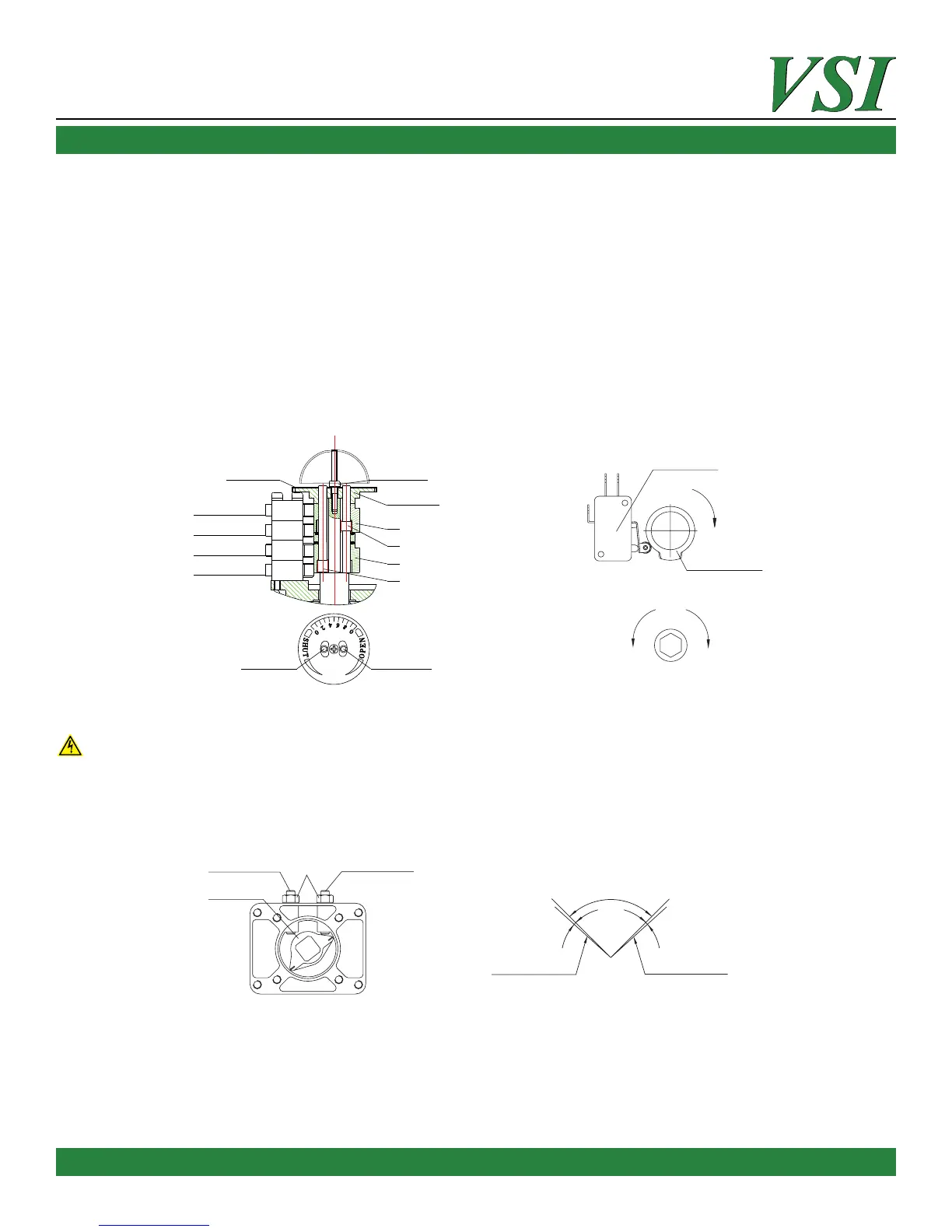
1. Adjustment of electric limits for 2 posion valves (Fig 5.)
a. Full Closed posion adjustment: Using the manual hand wheel or hand crank, drive the valve to the full closed posion.
Ensure the pointer on the dome lid is poinng red zero “shut”. If not, remove lid and loosen dome indicator and re-posion to
red zero “shut”. To adjust the closed limit switch, loosen shut posion regulang sha (S) using 2mm Allen wrench and rotate
the stroke dog D1 (lower) clockwise unl the K1 switch makes click. Tighten shut posion regulang sha (S).
b. Full Open posion adjustment: Using the manual hand wheel or hand crank, drive the valve to the full open posion.
Ensure the pointer on the dome lid is poinng yellow zero “open. To adjust the open limit switch, loosen open posion regulat-
ing sha (O) using 2mm Allen wrench and rotate the stroke dog D2 (upper)counter-clockwise unl the K3 switch makes click.
Tighten open posion regulang sha (O).
Figure 5
2. Adjustment of mechanical stops (Fig 6 & 7) PLEASE SEE WARNING BELOW BEFORE PROCEEDING!
To prevent damage, the electrical limit switches need to be set to make contact prior to the sha reaching the mechanical
stops.
a. Using the manual override handle or hand wheel, rotate the valve to the full closed posion unl the switch K1 clicks.
b. Loosen the lock-nut on the le side of the unit and rotate the adjusng screw clockwise using Allen wrench unl the screw
comes into contact with the stopper – then back o ½ of a turn (counterclockwise). Tighten lock nut.
c. Repeat step above for open direcon of operaon.
3. Electric Test
a. Connect wiring per the control circuit diagram – located in the terminal cover lid.
b. Verify that the valve rotates to the closed posion by observing the dome indicator points to red zero “shut”.
c. Verify that the valve rotates to the open posion by observing the dome indicator points to yellow zero “open”.
d. Aer all adjustments menoned above, check the alignment of the dome indicator scale and pointer. If the pointer is not
aligned properly on open and closed posion – adjust as needed by loosening the dome lock screw and then reghtening.
Scale plate
Dome indication
Full-open position
Full-close position
Lock screw
Opening gear
Shut position regulating shaft
Open position regulating shaft
S(Red) O(Green)
D2
D1
O
S
K1
K2
K3
K4
Open-direction middle position
Close-direction middle position
Micro-switch
Clockwise
Stroke dog
Counter-
Clockwise
Clockwise
Regulang sha
Figure 6
Adjusng screw for
closing limit-switch
Adjusng screw for
opening limit-switch
Lock Nut
Mechanical
Limit Stopper
Figure 7
Electric Limit-Switch
(Full Close Posion)
Electric Limit-Switch
(Full Open Posion)
Mechanical Limit-Switch
for close direcon
Mechanical Limit-Switch
for open direcon
90°
2.5°
2.5°



 To Next Page