-5-
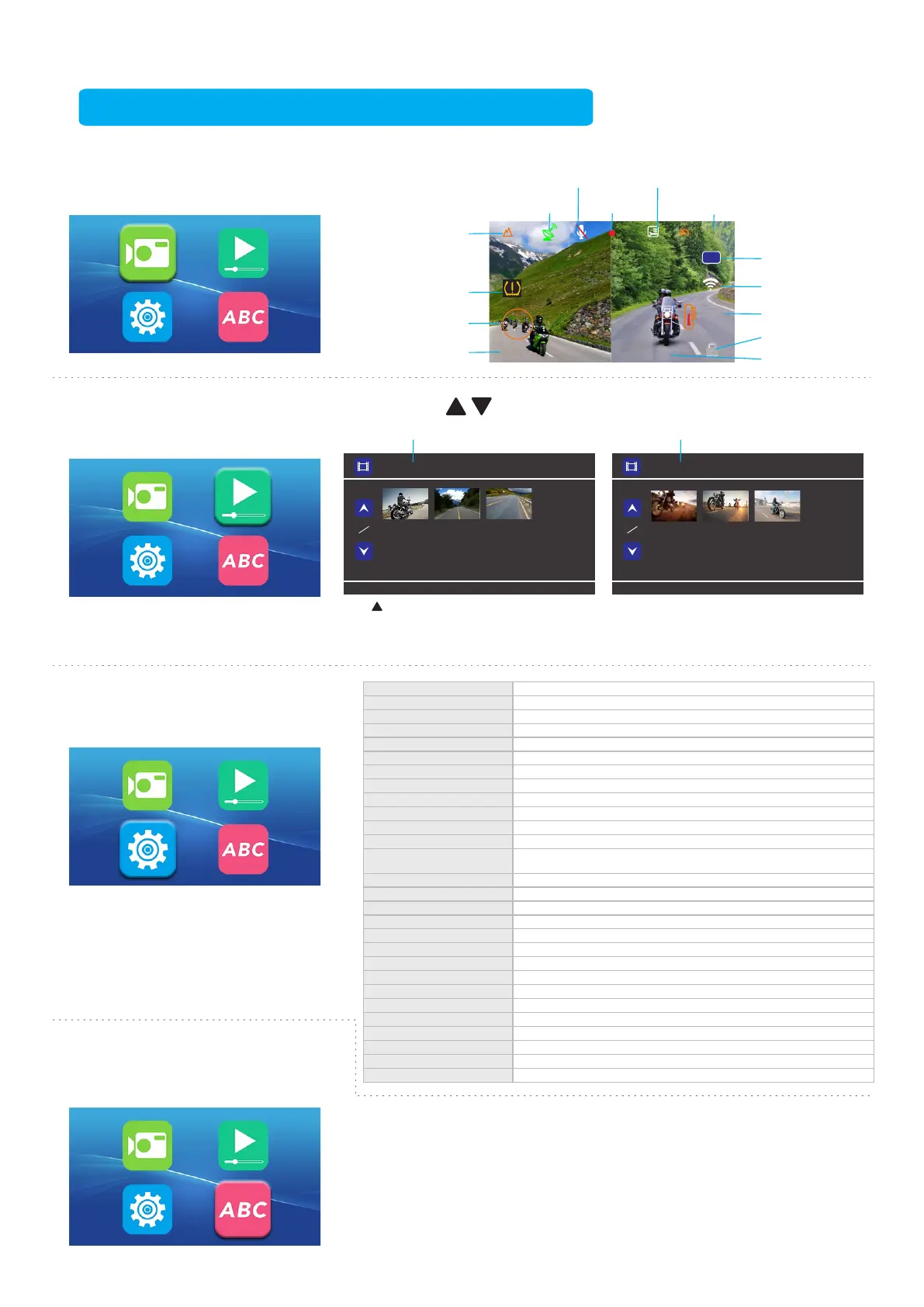
1.After selecting, press [OK] to enter
Video Mode.
2.The icon becomes larger to indicate
that the function is selected.
1. Press to select the video to playback
1. Character description on the display in recording mode:
"F/"indicates front camera video playback "R/" indicates rear camera video playback
2023/02/2115:12:01
00:00:26
75
km/h
Lock File
WiFi
Date & Time
Information
Temperature
Speed
Tire pressure
Warning Value
605HPA
53M
1. Video clip time
1/2/3/5 minutes can be selected
2.Sound record
On/Off
3.MIC sensitivity
Set the sound level of MIC
4.LCD Power Save
Set the display screen backlight to be off, or off after 1 min/3min
5.Parking monitoring
On/Off
6.Parking monitoring sensitivity Set the vibration sensitivity when parking
7.Recording Time After Flameout
Set recording time after flameout
8.Date format 3 options YYYY MM DD/MM DD YYYY/DD MM YYYY
9.Clock setting
Day&Time
10.Time zone selection
Time zone selection around the world
11.Date watermark
Whether the recorded video needs date watermark display and other options
12.Speed watermark
Whether it is necessary to turn on/off the driving speed display when playing video on the computer or app
13.Overspeed alarm
Set the overspeed alarm value. When the driving speed exceeds the preset value,
the recorder will issue an alarm prompt.
14.GPS status
Display the current number of satellites, longitude, latitude and other information
15.Unit system Set the speed and temperature unit selection displayed when driving
16.Tire pressure function(Optional) On/Off
17.Tire pressure unit(Optional)
2 unit options (bar/psi)
18.Tire pressure alarm sound(Optional)
On/Off
19.Tire pressure alarm threshold(Optional) Set the alarm sound for the lowest and highest values of tire
20.Rear camera mirror
Whether mirror selection is required for the rear camera display
21.Protect Level
G-Sensor sensitivity level adjustment
22.Button sound
On/Off
23.Voice prompt
On/Off
24.System reset
Restore to the factory default settings
GPS
Front/Rear
Camera
R/REC-230221-151201R.MOV
1
1
F/REC-230221-151201 F.MOV
1
1
2023/02/2115:12:01[00:00:26] 2023/02/2115:12:01[00:00:26]
Video Time
22.3
°C
F/R
25.WiFi mode
On/Off
26.Format SD card
Delete all videos from the memory card
27.Operation guide
Introduce the operation method of the button function of the wire controller
28.FW version
Information about the current software version of the machine
Images Information and Menu Description
1. After selecting, press [OK] to enter
Playback Mode.
2. The icon becomes larger to
indicate that the function is selected.
1. After selecting, press [OK] to enter
Setting Mode.
2. The icon becomes larger to indicate
that the function is selected.
1.After selecting, press [OK] to enter
Language Choosing Mode.
2. The icon be comes larger to indicate
that the function is selected.
Altitude
Recording
SupportParkingMonitoring
Atmospheric Pressure
Microphone
Long press for 3 seconds in
the Playback Mode to switch to
the video files list of front and
rear camera
1. Front camera video files
name identification:REC_
The year, month and time
of current video F.MOV
2. Rear camera video files
name identification:REC_
The year, month and time
of current video R.MOV
1. Language identification — Corresponding to the
selected language.
2. The number of language choices depends on the
actual model.


 To Next Page
 Loading...