-4-
◆Function operation
75
km/h
605HPA
53M
22.3
°C
BACK
倒⻋
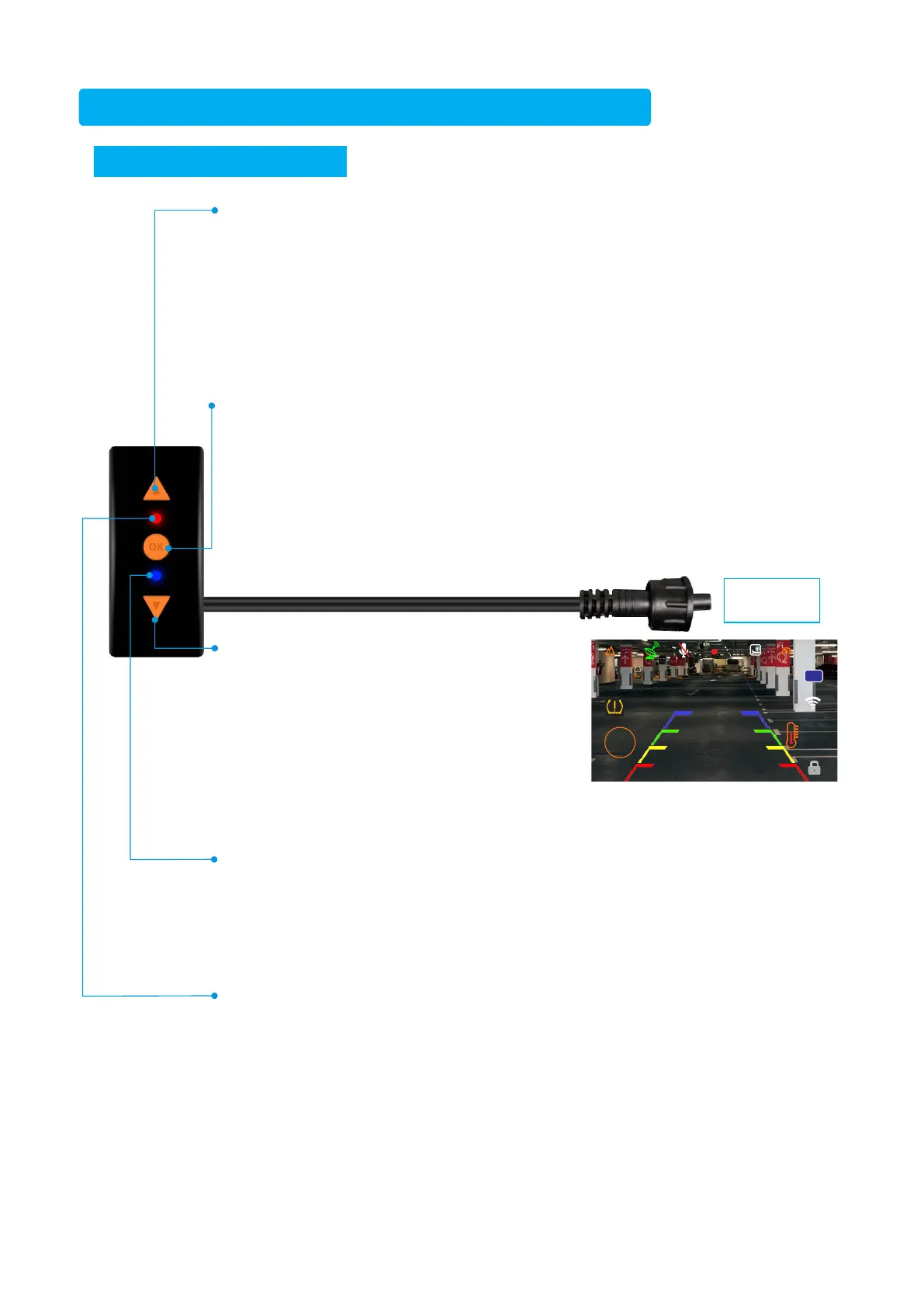
UpButton:
①In the front and rear camera split screen mode of the video recording interface,
short press the up button to switch to a single full front camera screen.Short press
the up button again to switch to a single full rear camera screen.Then Short press
the up button again to return to the left and right split screens.camera video long
press the up button to switch to the rear camera video file.
※The software defaults to split screen images for left and right display.When you
select which display mode,the recorder will remember it.Next time you turn on the
recorder it will be the previous display mode you selected.
OKButton:
①In the video recording interface, short press the OK button once to enter the
emergency video mode, and the front and rear cameras will capture a photo at the
same time.The emergency recording locked video filename is: KEY-XXXXXX.
※If there are more than 10 videos named KEY-XXXXXXX in the folder saved by the
front or rear camera in the memory card, the system will automatically delete the
oldest video.
②In the video recording interface,long press the OK buttonto enter the setting
interface.You can use the up/down button to operate the settings required by the
main unit. When the required functions are set long press the OK button to return to
the video recording interface.
Down Button:
①In the video recording interface, short press
the down button once to switch to the full screen
mode of the rear camera,which can be used as
a back up camera. Then short press the down
button once to return.
②In the video recording interface, long press
the down button to enter the auxiliary mode,
you can view Speed, Tire Pressure and
Temperature, Battery Power Display, Location,
Short-term Memory, Date &Time.
LEDRedLight:
-Red light slow flashes-Camera is recording normally, the video file name is
REC-XXXXXXX.
- Red light constant lights- Camera pauses recording.
- Red light fast flashes- Camera triggered the gravity sensor to record emergency
video, the video file name is GSR-XXXXXXX.
※If there are more than 10 videos named GSR-XXXXXXX in the memory card, the
system will automatically delete the oldest video.
W5T Wire Controller Operating Instructions
Connectto
themainunit
LED Blue Light:
After connecting the GPS module:
①Blue light-Slow flashes-GPS is searching for satellites, the satellite icon in the
upper left corner of the display is white.
②Blue light-Constant lights-The GPS positioning is successful,and the satellite
icon in the upper left corner of the display is green.


 To Next Page
 Loading...