-2-
1.Quick Test and Installation
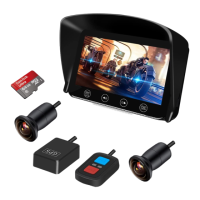
Please refer to the "Quick Installation Guide".
2.Insert the Memory Card
Insert the memory card into the card slot until you hear "Da". If you want to take out the card, gently
press the memory card and slowly release it after hearing "Da".
How to use
Tips:
Please insert the memory card in the correct direction.
※Please do not pull out or insert the card when it is turned on to avoid damaging the video
file and recorder.
※Please use the high speed Class 10 or above genuine card.
※Please format the memory card regularly to keep it in good condition.
Power on/off
After the recorder is properly installed, when you turn on the motorcycle power with the key, the
recorder turns on. Turn off the motorcycle power, the recorder turns off.
Video Recording
1)Normal Recording Mode
After the motorcycle power is turned on, the recorder will automatically start recording, and the LED
indicator on the remote controller will slowly flash. When the motorcycle power is off, the recorder will
automatically stop recording(If the smart power cable is configured, there is no vibration within 5
minutes after the motorcycle power is turned off, the recorder will shut down. Or long press the up
button on the wired remote controller for 3 seconds to shut down the recorder).
▶Loop Recording: The recorder will save a file after recording for a period of time (the default setting is
3 minutes). When the memory card is full, the system will delete the oldest file. You can manually set
the time of video recording in APP. 1/2/3/5 minutes can be set, and front and rear camera files are
saved in F and R folders respectively. The normal recorded video file is named "REC-xxxx".
2)Emergency Recording Mode
▶G-Sensor emergency recording mode: When the motorcycle collides with other vehicles or the
vibration is strong, the built-in G-Sensor will automatically activate the emergency recording mode.
The LED indicator on the remote controller flashes rapidly. The emergency video file is named "GSR-
xxxx". You can set the sensor sensitivity level in the menu or APP. The higher the sensitivity, the easier
to trigger G-Sensor.
▶Manualemergencyrecordingmode:Whentherecorderisrecording,shortpressOKbutton of
wiredremotecontrollertolockthecurrentrecordedvideo,andthefrontandrearcameraswill
captureaphotoatthesametime.Themanuallylockedvideofileisnamed"KEY-xxxx".
Tips:
※If the memory card is not inserted or is faulty, the video cannot be saved.
※"KEY" and "GSR" emergency video files can be saved 10 each. After more than 10, the
system will automatically delete the earliest one.


 To Next Page
 Loading...