6
WARNING:
Please do not use a stylus, pencil or other pointed object on the ACTIVITY
PAGE AREA and activity cards.
GETTING STARTED
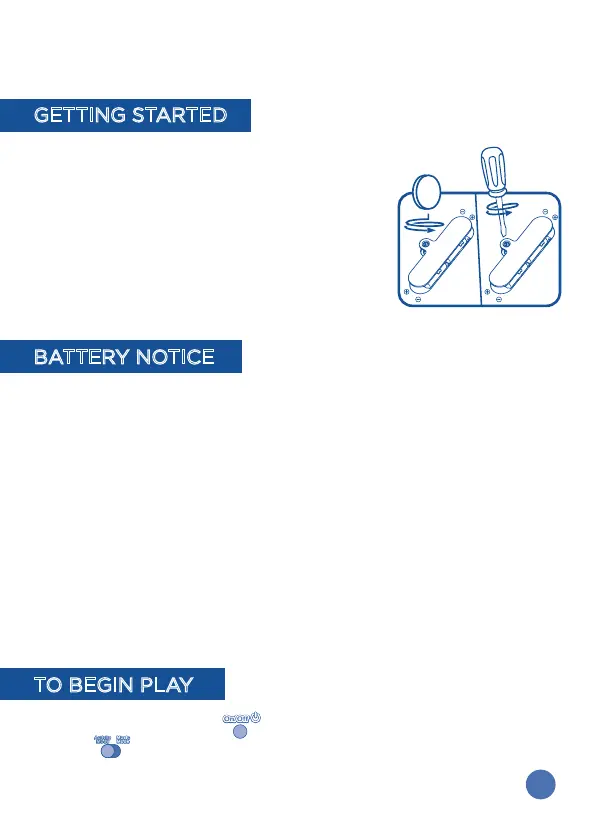
BATTERY INSTALLATION
• Make sure the main unit is turned OFF.
• Locate the battery cover on the back of the
touch panel. Use a coin or screwdriver to open
the battery cover.
• Remove the exhausted batteries and install four
new “AA” batteries following the diagram inside
the battery box.
• Replace the battery cover and tighten the screw
to secure.
BATTERY NOTICE
• Use new alkaline batteries for maximum performance.
• Use only batteries of the same or equivalent type as recommended.
• Do not mix different types of batteries: alkaline, standard (carbon zinc) or
rechargeable (Ni-Cd, Ni-MH), or new and used batteries.
• Do not use damaged batteries.
• Insert batteries with the correct polarity.
• Do not short-circuit the battery terminals.
• Remove exhausted batteries from the toy.
• Remove batteries during long periods of non-use.
• Do not dispose of batteries in fire.
• Do not charge non-rechargeable batteries.
• Remove rechargeable batteries from the toy before charging (if
removable).
• Rechargeable batteries are only to be charged under adult supervision.
TO BEGIN PLAY
Press the POWER BUTTON to turn on the main unit. Slide the MODE
SWITCH to choose Activity Mode or Music Mode.







 To Next Page