3
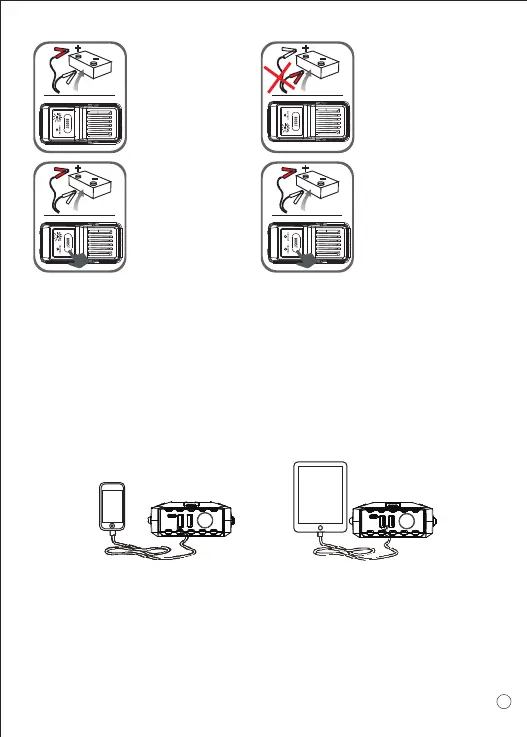
GREEN LIGHT on:
Telling the connection
is correct and the
circuit is working, you
can turn on the engine
to jump-start directly.
REVERSE RED LIGHT
on: Telling the connection
is wrong, to correct the
clamps as step 2
mentioned above, wait
until the GREEN LIGHT
is on to turn on the
engine.
GREEN LIGHT
blinking: Saying the
vehicle battery is low,
press the “BOOST”
button, wait GREEN
LIGHT becomes solid,
then turn on the engine
within 30s.
No Lights on: Saying the
vehicle's battery maybe
damaged, after confirm the
clamps connection is
correct, press the “BOOST”
button, wait GREEN LIGHT
is on, and then turn on the
engine within 30s.
4.Start the vehicle.
5.When the vehicle is started, remove the jumper cable from the
vehicle battery. Leave the vehicle's engine running.
Charging Cell Phone or Tablet Instruction:
1. Plug the switch cable to Quick Charge output port.
2. Select appropriate connector and connect it to your mobile phones
or tablet.
3. Press the switch button to charge.
For power supply to vehicle products or electronics
1. Plug the optional switch cable to 15V 10A output port.
2. Connect the optional switch cable and vehicle product or electronics.
3. Press the switch button to power supply.



 To Next Page