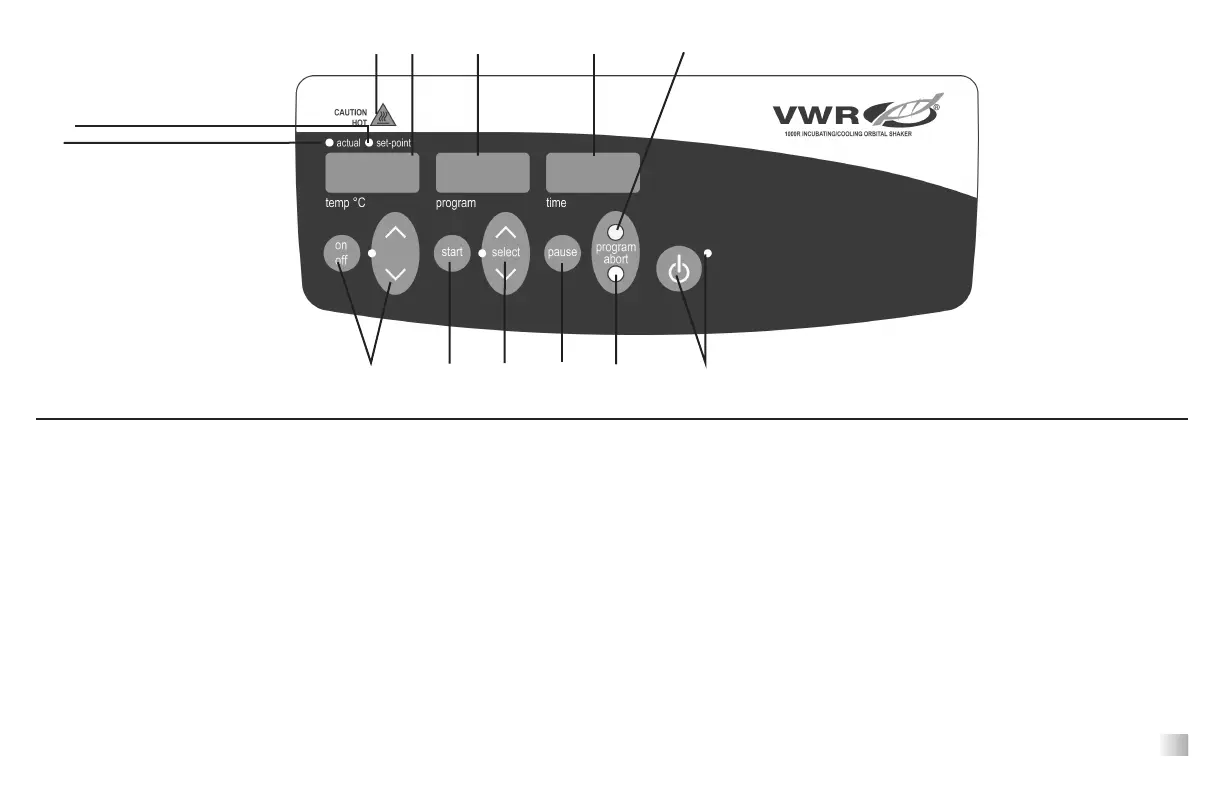
T
he front panel of the Incubating/Cooling Shaker contains all the controls and
displays needed to operate the unit.
A. Standby button/standby indicator light: The standby indicator light will
illuminate when the unit is plugged in. The unit will be in standby mode. Press
the standby button to start the temperature, speed and time functions. The
standby indicator light will shut off. Press the standby button again and the
unit will once again be in standby mode.
B. Temperature display: Displays the actual/set-point temperatures in conjunc-
tion with the actual/set-point indicator lights. C. On/off button starts/stops the
heating/cooling function. Up/down arrows for set-point control.
D. Actual indicator light: Illuminates when the temperature displayed is the
actual temperature of the plate.
E. Set-point indicator light: Illuminates when the set-point temperature is dis-
played.
F. Caution hot indicator light: Illuminates when the temperature is above 40°C
(104°F).
G. Program display: Displays the speed of the shaker. H. Start button
starts/stops shaking function. I. Up/down arrows for on the select button for
speed set-point control.
J. Time display: Displays accumulated time (continuous mode) or how much
time is remaining (timed mode). The display range is from 0 to 9,999 minutes
in one (1) second increments. The display will indicate minutes and seconds
until the timer reaches 99 minutes and 59 seconds (99:59), then the display will
automatically display minutes up to 9,999. K. Pause button starts/stops the
time function.
L. Program Button: To increase time
M. Abort Button: To decrease time
CONTROL PANEL FUNCTIONS FOR STANDARD/MANUAL OPERATION MODE
A.
B. G. J.
C. M.
H.
D.
E.
F.
4
I.
L.
K.








 To Next Page