MICROFLUSH Toilet Manual 6 March 2005
TROUBLESHOOTING
Your Microflush
®
toilet is designed to give you years of trouble-free operation. Please check the following before
beginning any service or repair:
Water supply:
1. Is the water turned on?
2. Is the water pressure between 20 and 50 PSI at the toilet for pressure water system?
Fluctuating or high water pressure can cause intermittent problems with the toilet operation. Check the water
pressure at different times of the day (i.e., early morning, noon, evening) to determine if you have fluctuating or
high water pressure. A pressure-reducing valve installed on the incoming water line will assure you have even
pressure. Make sure no check valve is installed before the Air/Water Sequence Valve.
*Note: Water seal of flapper does not require complete submersion as flapper seal gasket provides complete hopper
seal.
Air system:
1. Is the air turned on?
2. Is the air pressure set at a constant 60-65 PSI at the toilet?
3. Do you have any air leaks or kinks in the air system?
4. Do you have water in the air system? This usually causes irregular timing.
Drain the compressor tank and check the filter regulator and drip leg(s) for water. To check for water in Air/Water
Sequence. Valve, remove Bleed Off Plug, put finger over screw opening and flush. If water is present, it will squirt
from sides of valve body. If water is detected, then the air cylinder and airlines must also be drained.
Cycle time:
1. Is the flapper cycle time set correctly at 4-7 seconds?
2. Is the bleed off plug blocked? Remove, clean and reinstall or replace.
If other problems are encountered, please contact Microphor toll-free at 1-800-358-8280.
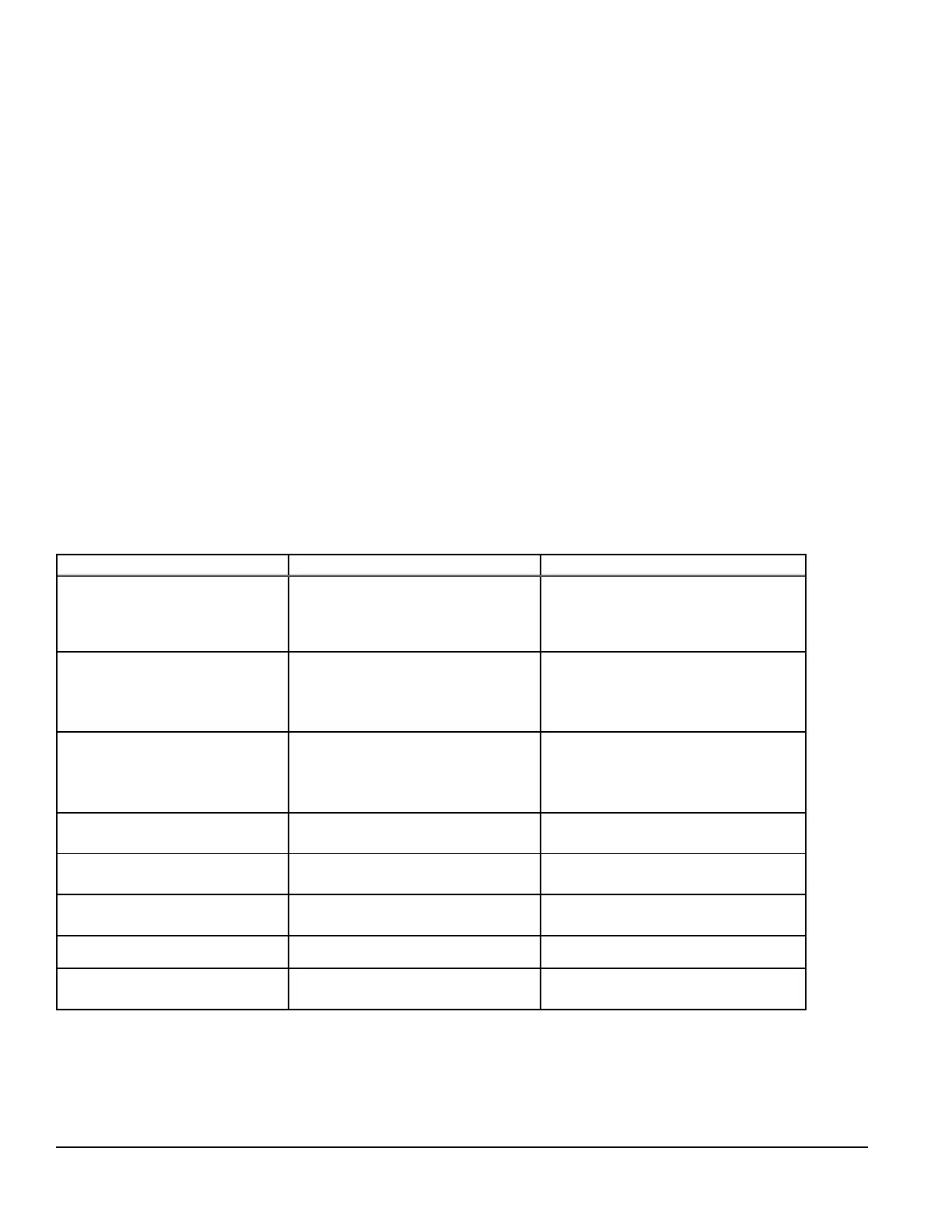
Trouble Possible Causes Correction
Flapper does not open.
Water does not flow.
Nothing happens.
1. No air supply to toilet
2. Water has accumulated in
Air/Water Sequence Valve
1. Supply compressed air at 60-65
PSI at the toilet
2. See 'Check Air System" above
Flapper opens and closes 4-7
seconds after handle is
released, but no water enters
bowl
1. No water supply to toilet
2. Water turned off
1. Supply water at 20-50 PSI
2. Open angle stop (shut-off valve)
Flapper opens when flushed,
and closes immediately when
activator is released
1. Excessively high water
pressure
2. Debris in check valve at base
of Air/Water Sequence Valve
1. Install water pressure regulating
valve, set at 20-50 PSI
2. Clean Air/Water Sequence
Valve
Flapper opens and will not
close
Bleed Off plug blocked Remove, clean or replace, reinstall
Water continues to run when
toilet is not in use
Foreign object is under water seal
in Air/Water Sequence Valve
Clean, replace or rebuild Air/Water
Sequence Valve
Water splashes when flushed Water is too high in bowl Reduce incoming water via angle
stop (shut-off valve)
Flush cycle is too long Bleed-Off Plug blocked Remove, clean or replace, reinstall
Flush cycle is too short Air line leakage Check for air leakage at all
connections


 To Next Page