©2013 Wagan Corporation. All Rights Reserved.
Wagan Tech and wagan.com are trademarks used by Wagan Corporation.
User’s Manual—Read before using this equipment
4
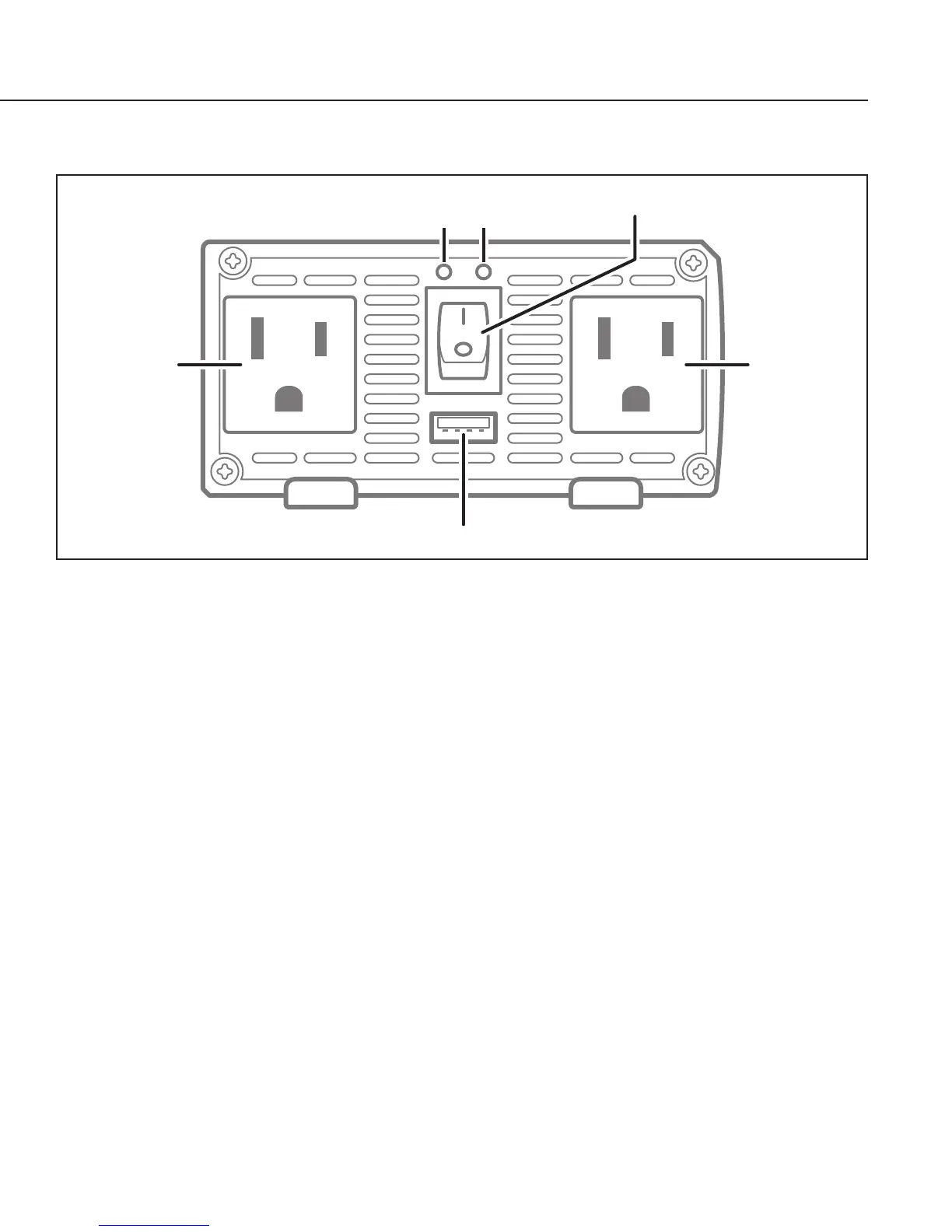
FRONT PANEL
AC Outlet
Power LED Fault LED
On/Off Switch
AC Outlet
USB Power Port
• ON/OFF Switch — This switch controls AC output of the inverter.
• Operating LED (Green) — When this green LED is lit, the inverter is
operating normally.
• FAULT LED (Red) — The RED indicator turns on as the inverter shuts down
due to overheating, overload, under voltage, or over voltage.
• Immediately turn off all AC appliances if the FAULT LED is lit. Allow the
inverter to cool before continuing. Make sure that the ventilation vents
are not blocked.
• If an inverter shutdown was preceded by a buzzing sound, there
may be an excessive load in combination with a low voltage or cable
problem.
• AC Outlets — These outlets can supply up to 3.3 amps at 120V AC 60 Hz
• USB Power Port — This power port can supply 5 volts at 2.1A for charging
or powering smartphones, tablets and e-readers, MP3 players, GPS and
other small electronic devices.


 To Next Page