42
W 950 Flexio/ W 975 Flexio
Wall paint
42
W 950 Flexio/ W 975 Flexio
EN
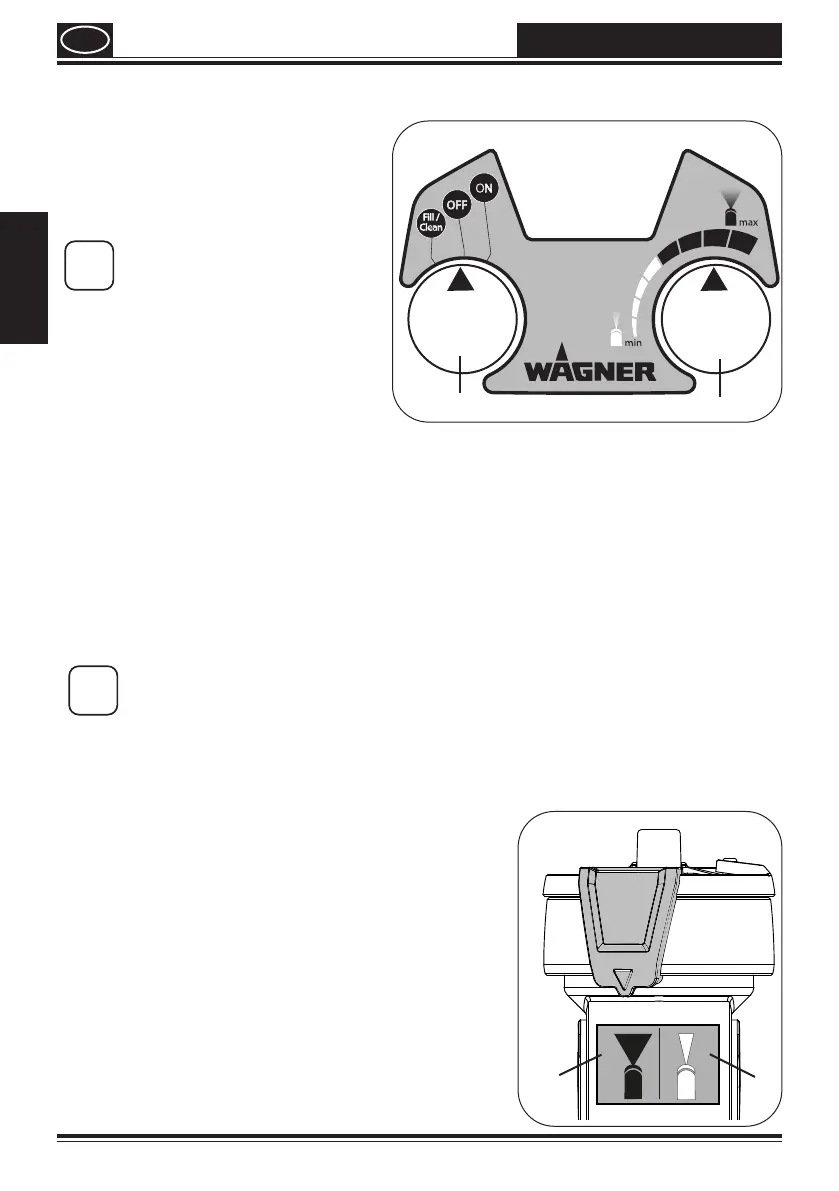
12. Multifunction switch settings (g. 4, A)
FILL/
CLEAN
Settings for cleaning and
pre-lling the system
OFF
System is o
ON
Operating setting
i
When using the spray
attachment for varnish paints
and glazes, the FILL/CLEAN
functions may not be used!
13. Setting the ow rate when working with the spray
lance (g. 4, B)
The material quantity is set depending on the characteristics of the material (viscosity)
and the working speed of the operator.
This setting can be made variably with the material ow limiter:
lower material
turn to the left
higher material
turn to the right
i
We recommend starting with a low material ow setting and then gradually
adjusting this to suit needs. .
14. Setting the width of the spray jet on the spray lance
(Fig. 5)
A = wide spray
jet (black or
yellow)
For coating larger surfaces
Working with a large ow
rate (black area or yellow
area on quantity scale)
B = narrow spray
jet (white)
For coating smaller areas,
corners and edges
Working with a small ow
rate (white area on quantity
scale)
A
B
Volume
A
B



 To Next Page