
 Need help?
Do you have a question about the Walfront Mach3 and is the answer not in the manual?
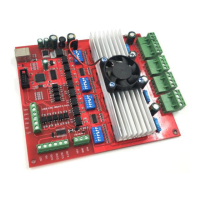
Supports connecting four stepper motor drives or servo drives for 4-axis linkage.
Maximum step-pulse frequency of 100KHz, suitable for servo or stepping motors.
Four general-purpose opto-coupler isolation inputs for limit switches, E-stop, etc.
Supports connection for an electronic handwheel.
Provides 0-10V signal output to control spindle motor speed via Mach3 software.
Four general-purpose isolated relay outputs for controlling spindle, pumps, or other devices.
Single status LED to indicate connection status on the board.
Supports micro-stepping resolutions of 1, 1/2, 1/8, and 1/16.
Supports 3.5A adjustable output current for 2/4 phase bipolar stepper drivers.
Built with 4 outputs and 5 inputs for versatile connectivity.
Connects limit switches, emergency stop, probe, and home switches.
Provides 4 output channels for controlling spindle start, mist/flood, and other devices.
Connects the motion control card to the PC via USB.
Connects an MPG handwheel for manual control.
Connects to a spindle converter for speed control.
Connects to 4-axis control for stepper or servo motors.
Outputs a 0-10V signal for spindle speed control.
Instructions for installing the Mach3 software on your computer.
Details on applying the software license file for Mach3.
Guide to installing the software for the USB motion control card.
Steps for connecting the USB cable between the PC and the motion card.
Procedure to install the motion card plug-in file into Mach3.
Configure X, Y, Z, and A axes settings in Mach3 Ports and Pins.
Set up motor tuning parameters within Mach3 for optimal performance.
Configure homing and limit settings through the Mach3 menu.
Configure the setup for general-purpose input signals.
Configure the setup for general-purpose output signals.
Setup for controlling spindle speed using a 0-10V signal.
Configuration steps for the Mach3 MPG (Manual Pulse Generator).
Enable spindle output configuration within Mach3.
Configure current settings for stepper motor drivers.
Configure micro-stepping subdivision settings for drivers.
Configure decay mode settings for stepper motor drivers.
Diagrams illustrating sensor connections to the motion card.
Diagrams showing connections for output devices.
Diagrams illustrating connections for the spindle inverter.
Details on connecting the DC power supply to the system.
Information and images of belt-driven linear motion modules.
Information and images of ball screw-driven linear motion modules.
Images of stepper motors and associated drivers.
Information about various CNC controller models.

 To Next Page
 General