12
Pro Dry Instruction Manual | Walker Filtration | www.walkerltration.com
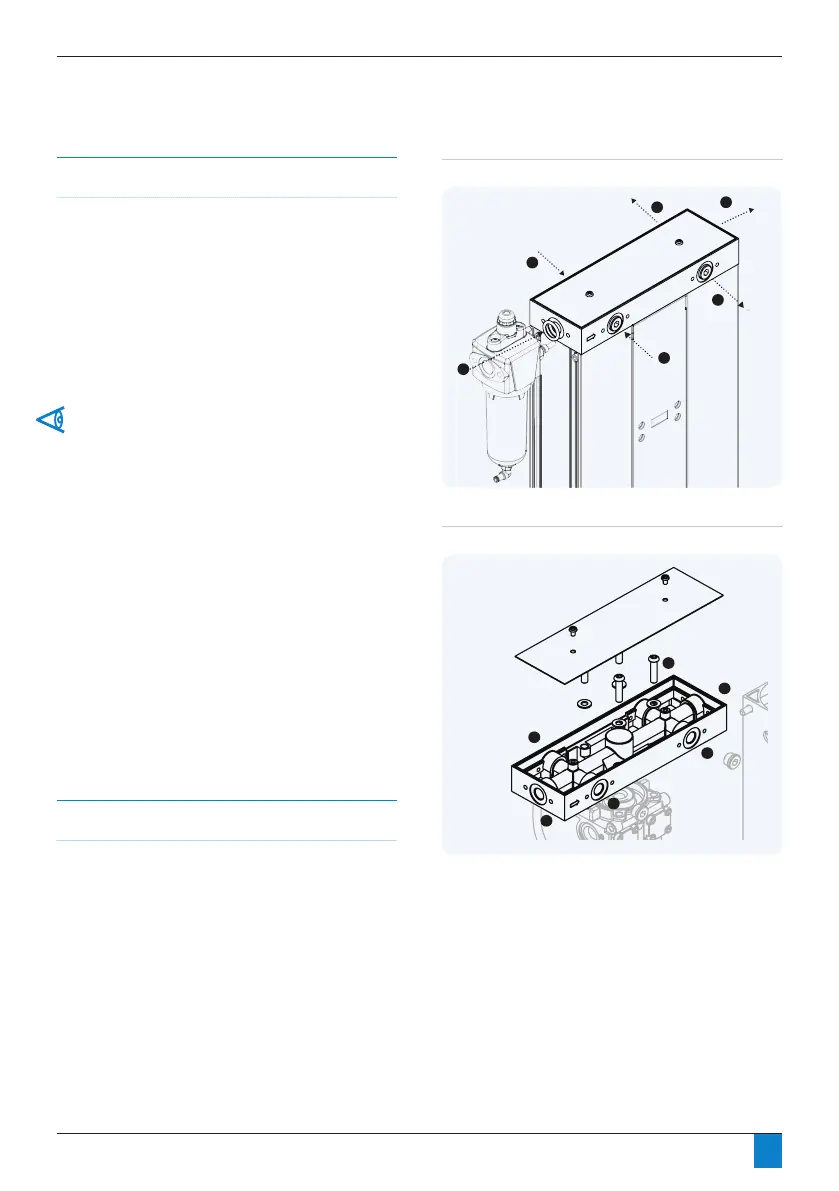
Figure 3.6: Reconfiguration of inlet/outlet ports
Figure 3.5: Inlet/outlet ports
Reconguration of the inlet / outlet ports
PD004 – PD035 models only
Pro Dry has three ports on the inlet (A, B and C) and three
ports on the outlet (D, E and F). Any of the three can be
used for inlet (A, B or C) and outlet (D, E or F). Make sure the
remaining two are blanked off with provided pressure plugs.
Dryer can be recongured to interchange position of inlet and
outlet ports (Figure 3.6).
Section 3: Mechanical Installation
Tools required
• 4mm hex key
• 6mm hex key
Directional arrows are etched into the inlet manifold.
Any / all of the three outlet ports can be used on occasion.
Please ensure combined flow at outlet should not exceed
specification. Please adhere to regional regulations.
It is strongly advised to connect a non-return valve to each
outlet used.
Only use one inlet port at any one time
Ensure original seals are in place.
Check dryer is leak-free prior to operation.



 To Next Page