The three-axis stable gimbal provides a stable platform for the camera, so that the camera can also take a stable
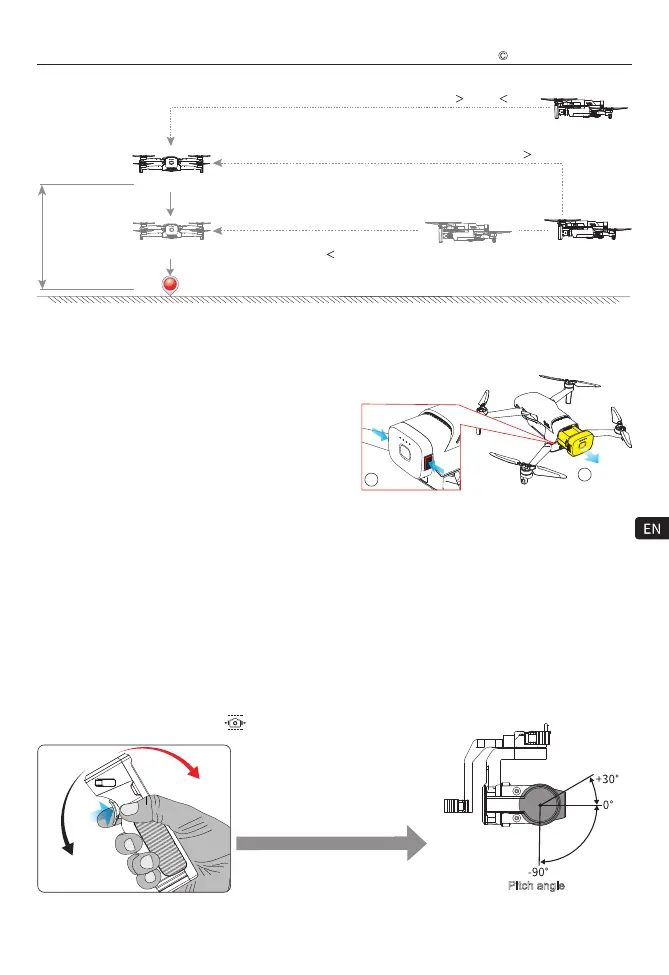
picture while the aircraft is flying at high speed.You can control the tilt angle (PIT) of the gimbal by the somatosensory
control of the WK-V8 controller.
Gimbal control
Attention:
Before using the WK-V8 controller for somatosensory control, double-click the somatosensory control switch (quick
short press twice) to switch the control object to the gimbal (the current somatosensory control object icon displayed
on the WK-V8 controller screen is “ ” gimbal).
Pitch angle
Press and hold the somatosensory
control switch while tilting the WK-V8
controller forward or backward.
The altiude difference from the Home point is greater than the set RTL Height
The altiude difference from
the Home point is less than
the set RTL Height
The horizontal distance between the aircraft and the Home point is
20m or 20m
The horizontal distance between the aircraft
and the Home point is
20m
The horizontal distance between the aircraft and the Home point is
20m
Ascend to
the set RTL
height first
The default setting
of the RTL Height
is 60m (25-100m is
adjustable, please
set it according to
the actual flight
environment)
Home point
Vertical landing
Vertical landing
To End The Flight
1) Manual landing, low battery protection automatic landing
or RTL mode landing, lock the motor after landing on the
ground.
2) Turn off the power of the aircraft first, and then turn off
the power of the WK-V8 controller.
3) Take the flight battery out of the aircraft.
18
Tilt forward
Tilt backward
2 Pull
1 Press
Remove the battery:
After pressing and holding the textured part of the snaps on both sides of the battery, pull it toward the rear of
the aircraft to remove the battery.
Walkera All Rights Reserved
T210 MINI(WK-V8)Quick operation guide



 To Next Page