Aircraft battery charging
Charge
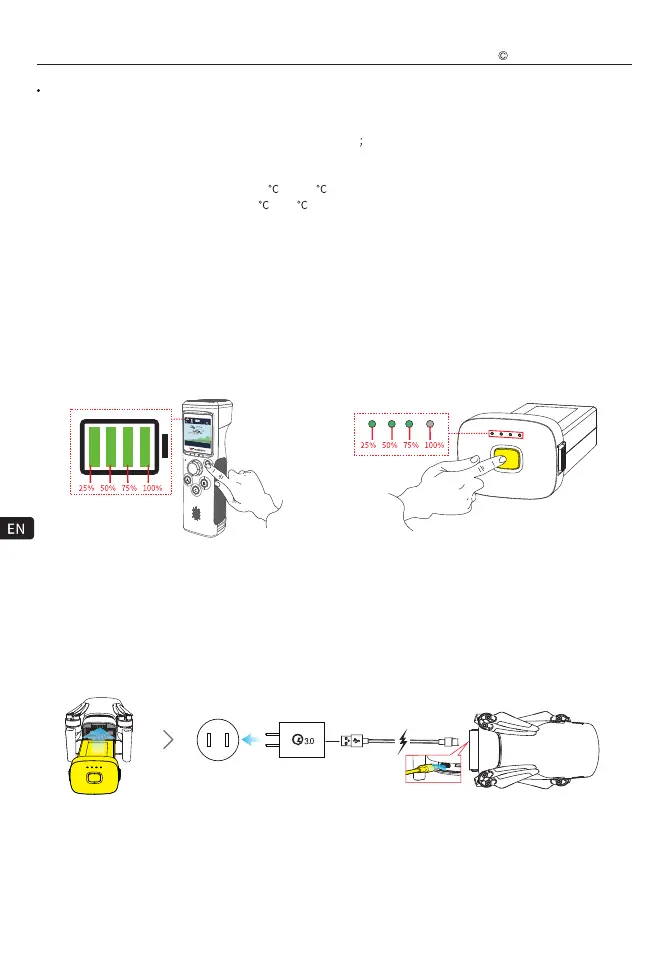
Check Battery Level
WK-V8 Controller battery:
Press and hold the power switch for 2~3 seconds to turn on the WK-V8 controller power (repeat this operation to
turn off the WK-V8 controller), and check the battery level on the LCD display.
Aircraft battery:
Short press the power switch to turn on the battery to check the battery level, the battery indicator light is always
on (displaying the battery level).
8
Operating Frequency:
Maximum Communication Distance:
Display Screen:
Battery:
Maximum Follow Speed:
Operating Ambient Temperature:
Charging Ambient Temperature:
WK-V8 Controller
2.400~2.4835GHz
3~4 km (open without shielding, no electromagnetic interference)
1.54-inch LCD screen
Resolution: 240 * 240
3.7V 5000mAh 21700 LiPo
70 km/h
-10
to + 45
5 to 40
D: 20 m
VS: 00 m/s
H: 00 m
HS: 00 m/s
65%
23
25
Tips: The aircraft battery must be installed on the aircraft to charge, the aircraft is compatible with the market
standard Type-C interface, please use a USB charger that meets the QC3.0 protocol (such as mobile phones,
cameras and other digital product USB chargers) for charging. If you encounter smoke, odor, or night leakage
while charging the aircraft, do not continue charging, please transfer to our company for repair.
Note:
Charging is not supported in the boot state, and the aircraft cannot be turned on during charging.
After the flight, the aircraft battery temperature is high, and the aircraft battery must be charged after the aircraft
battery drops to room temperature.
Battery indicator flashing green indicates that charging starts; the indicator is off when fully charged.
Walkera All Rights Reserved
T210 MINI(WK-V8)Quick operation guide



 To Next Page