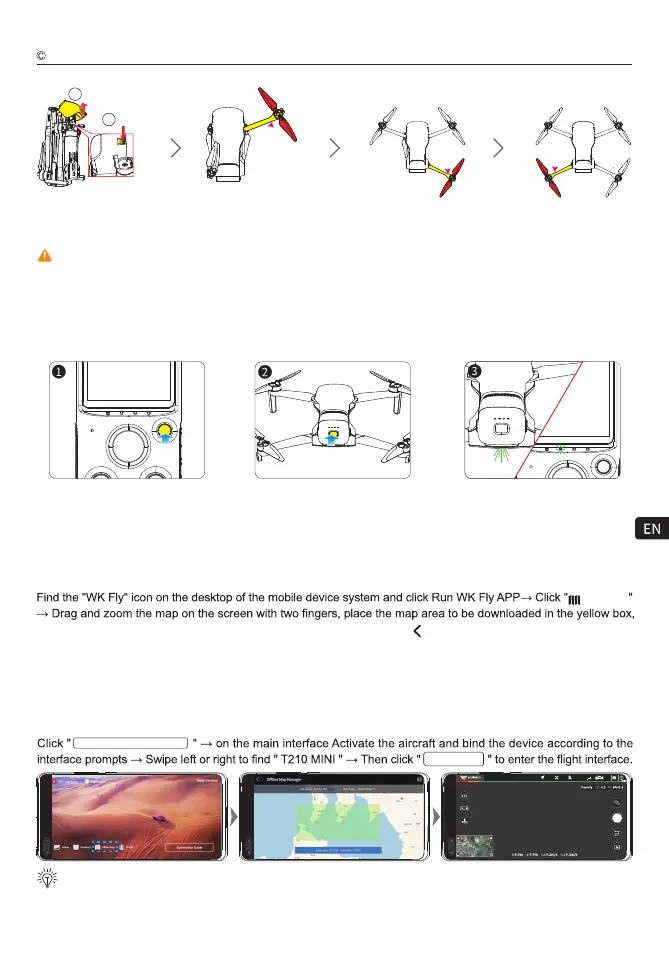
Ready to fly
Power on and connect
1) Long press the power button to open the WK-V8 controller, and rest in the horizontal position until the GPS signal
is successfully received.
2) Short press the battery power switch once, then long press the power switch for 3~5 seconds to turn on the aircraft.
3) Put the aircraft in the horizontal position, wait until the aircraft status indicator turns from yellow light flashing fast
to green light flashing slow, and the buzzer turns to not beeping, which indicates the success of connection and pairing.
Note: Before the aircraft is powered on, make sure the Camera shield is removed to affect the aircraft self-test.
Aircraft
13
2 Open
1 Press
WK-V8
controller
Connect mobile devices
Open the WLAN setting item of the mobile device, wait for about 30 seconds, when WK-GRD-XXXXXX appears
in the available WLAN list, click " WK-GRD-XXXXXX " and enter the password " 12345678 " to connect, exit the
setting after successful connection interface.
then click "Download" to download the offline map of the area, click " " in the upper left corner of the APP to
return to the main interface after the download is completed.
Offline Map
Download offline maps
Activate and fly the aircraft and bind the device
0000
00:01
Sport
Connected
98.5%
33
Walkera All Rights Reserved
T210 MINI(WK-V8)Operation guide
Note: Before flying, please download an offline map of the planned flight area (download the offline
map when your mobile device is connected to the Internet).
CONNECTION GUIDANCE
GO FLY
The brand new T210 MINI must be activated and bound to the device by the WK Fly App, please turn on the power
of the aircraft and the
remote control
respectively, run the WK Fly App after connecting the mobile phone, and
operate according to the interface prompts. An internet connection is required during activation.



 To Next Page