Taking pictures: Long press the C button to switch the working mode to taking pictures (the WK-V8 controller
screen displays the current camera working mode icon as “ ”, and the Photo icon“ ”, appears in the middle
right of the camera window of the mobile device APP interface), then short press the C button, the aircraft will
automatically Take a photo (the aircraft will take a photo every time you press the C button).
Take photos: first voice call "Hello Drone" to wake up the voice control function of the WK-V8 controller,and then
say the voice command "take a photo" the aircraft will automatically take a picture.
Take photos and videos
You can press the C button or wake up the voice control function of the WK-V8 controller ,and speak the voice
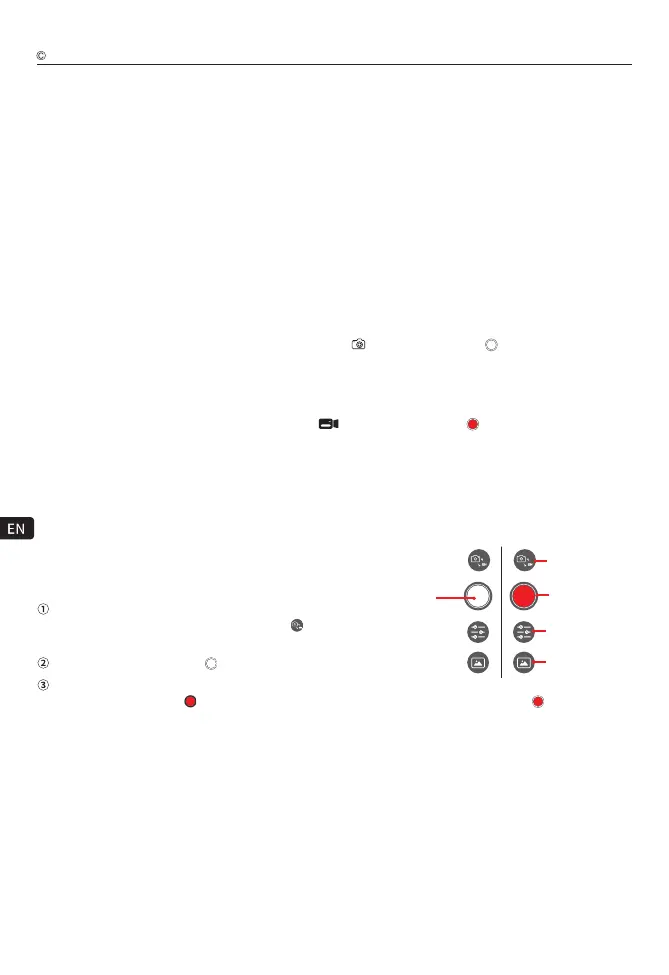
command to realize the remote control aircraft camera to take pictures or videos; You can also click the shutter
icons in the APP interface of the mobile device to take pictures or videos.
Tip: The camera window of the mobile device APP interface
has received the picture transmitted by the aircraft camera,
so that it can be controlled on the APP interface.
Select the working mode: long press the C button to switch the working mode to photo or video.
Video recording: long press the C key to switch the working mode to video recording (the voice controller screen
displays the current camera working mode icon as “ ”, and the Video icon “ ” appears in the middle right
of the camera window of the mobile device APP interface), then short press the C key The aircraft will automatically
Start recording, aft
er recording, short press the C button again, the aircraft will automatically stop recording and
save the recording automatically.
Voice control
Button C control
Control in the mobile device APP interface
Video: First voice call "Hello Drone" to wake up the voice control function of the WK-V8 controller, then speak the
voice command "Start recording" and the aircraft will start recording; after the recording is completed, speak the
voice command "Stop recording" and the aircraft will automatically stop recording And automatically save the video.
Select the working mode:
Click the camera working mode change icon " " to switch the
working mode to photo or video.
Photo: Click the photo icon " " to take a photo.
Recording:
Click the recording icon" " to start recording. After recording, click the recording icon" " again to stop
recording and save the recording to the aircraft TF card.
Click the camera working mode change icon " " to switch the
Shutter (Video)
Working Mode
switching
Camera settings
Media librar
Click the photo icon " " to take a photo.
Shutter
(photograph)
19
Intelligent flight function provides different preset auxiliary shooting intelligent flight modes such as Follow,
TimeLapse(Time-Lapse), and Lock Assist(auxiliary) functions. The aircraft can automatically follow the
set auxiliary shooting flight mode to shoot a variety of classic aerial photography.
Intelligent flight function description
Walkera All Rights Reserved
T210 MINI(WK-V8)Operation guide



 To Next Page