Download and install the WK Fly Application
WK Fly APP supports Android 5.1 and above, HarmonyOS 2.0 and above,
and Apple iOS9.0 and above mobile phones and tablets.For Android system
or Hongmeng system mobile device, please open the browser and enter the
URL ( https://fly.walkera.cn/a/) or scan the QR code below to download and
install the APP; for Apple iOS system, please go to the APP Store and search
for WK Fly to download and install.
※To ensure flight safety, the aircraft will be restricted to a height of 30 m and a distance of 50 m if the APP is not
connected and logged in, and if the user in mainland China does not bind a cell phone to complete the registration
information. Users using the aircraft in mainland China need to complete real name registration according to the
relevant regulations of the Civil Aviation Administration of China (CAAC). Please register through the CAAC real
name registration system for drones or directly in the WK Fly App.
For more information, please visit https://uas.caac.gov.cn
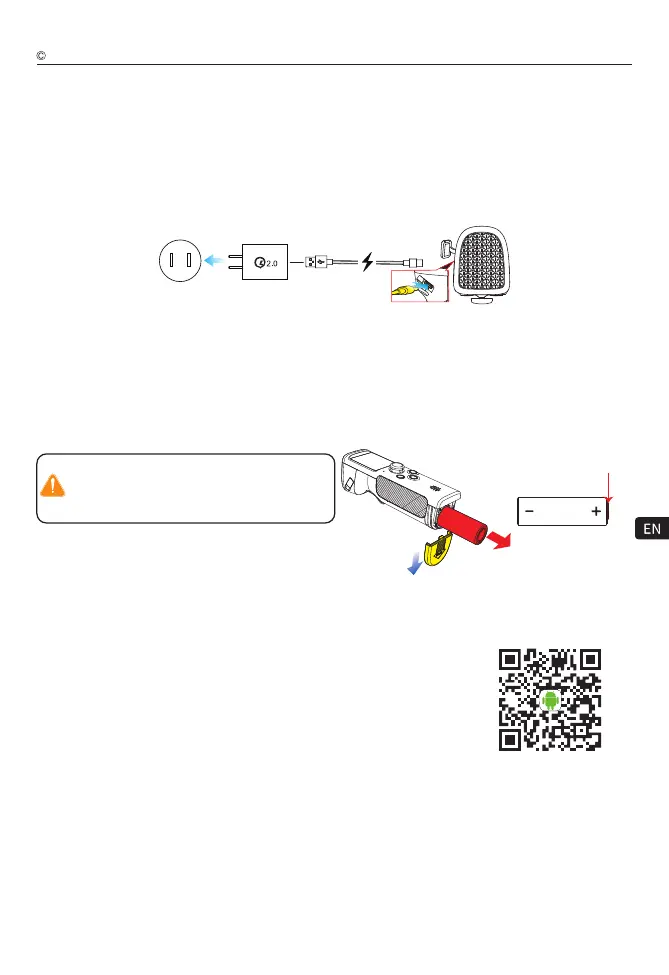
WK-V8 Controller battery charge
Tips:
The WK-V8 controller uses a 21700 rechargeable lithium battery, which can be installed in the voice handle to
charge, or you can take out the battery and charge it with a 21700 lithium battery charger.
Do not charge the product in the baby touch area
to avoid electric shock risk.
Do not charge this product in more than 60°C.
Charging method 1:
Without removing the battery voice handle Type-C interface for charging, it is recommended to use the original
charger for charging or use a USB charger that meets the QC2.0 and above protocols directly connected to the
Type-C upgrade charging port of the voice handle for charging.
1) Remove the 21700 lithium battery from the WK-V8 controller, as shown below.
2) Install the 21700 lithium battery charger for charging (pay attention to the positive and negative poles, do not
install the reverse).
Charging method 2:
Charge with a 21700 lithium battery charger (the charger must be purchased separately).
Android or HarmonyOS system
scan the code to download
9
The slightly convex end
in the middle is the positive
electrode
Note:
Please charge with the WK-V8 controller power off, and the WK-V8 controller charging indicator turns from red to
green to indicate that it is full.
Walkera All Rights Reserved
T210 MINI(WK-V8)Operation guide



 To Next Page