5.2.3 Hydraulic Winch Control
CAUTION!
Stay clear of the winch rope while winching.
Injury from entanglement or rope burn could
occur!
W056
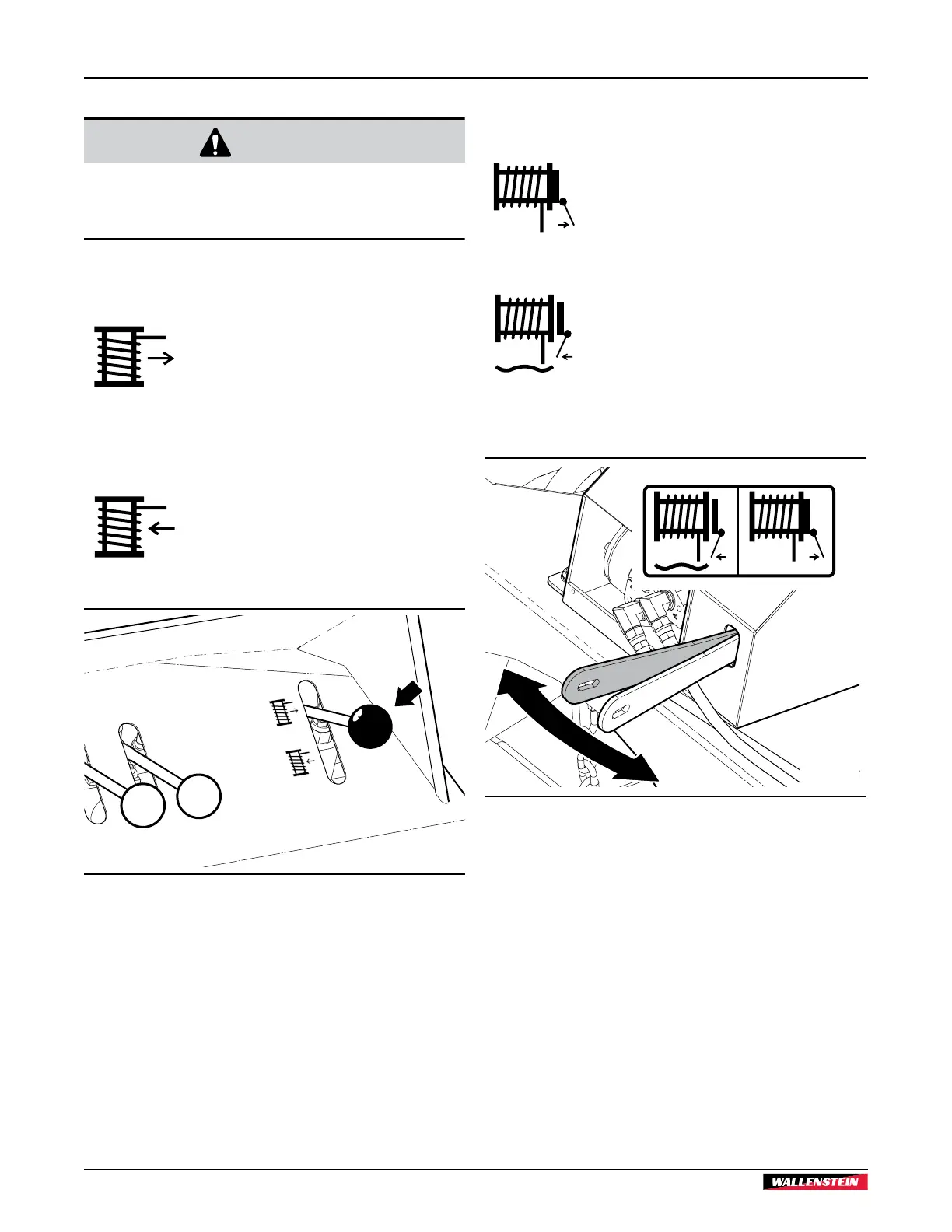
The hydraulic winch control (3) lever is on the RH side of the
operator control panel.
Unwind
Pull and hold the lever up to unwind the
winch rope. Use this control intermittently
and pull the rope out by hand to prevent
it from getting tangled inside the winch
housing.
Release the lever to stop. The lever moves to
the neutral position.
Wind
Push and hold the lever down to wind the
winch rope into the winch.
Release the lever to stop. The lever moves to
the neutral position.
01828
Fig. 11 – Hydraulic winch control lever
5.2.4 Winch Gear Lever
The winch gear lever controls the winch drive system.
Powered
Pull the lever to the LH side (toward the
operator) to engage the winch gear with the
hydraulic motor.
The hydraulic winch control is enabled and
controls the winch operation.
Freewheel
Push the lever to the RH side (away from the
operator) to disengage the winch gear from
the hydraulic motor.
Pull out the winch rope by hand. The winch
spool turns freely, and the hydraulic winch
control is disabled.
Fig. 12 – Winch gear lever
Controls
WP845 / WP875
Trailer Firewood Processor
22



 To Next Page