PGT
®
120.COM Art.Nr. 7100.PGT120.COM
14 / 17 2016-09-07
8 Wall mounting instructions
(Part No. 7100.PGT120.WK)
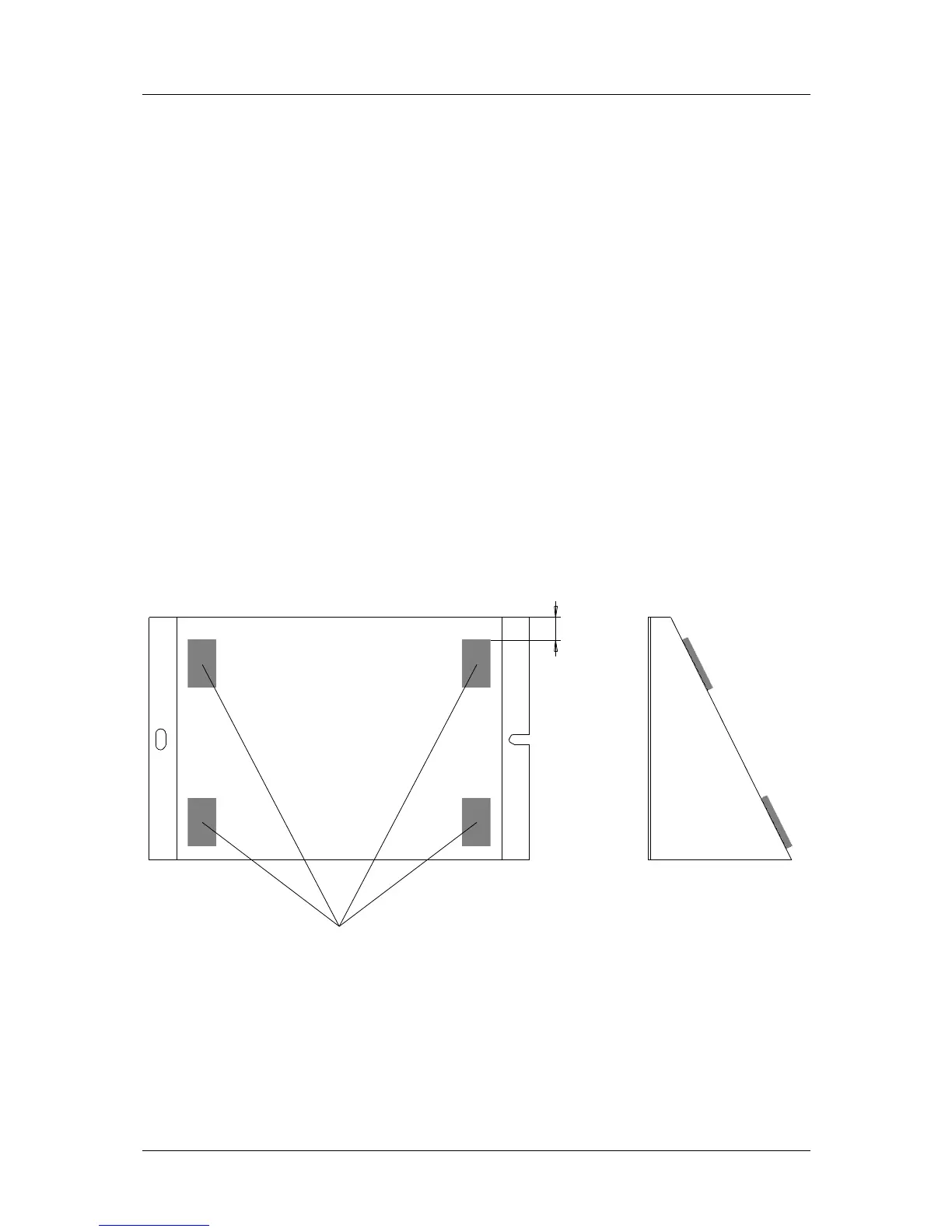
Fix the wall mounting plate with the supplied dowels and screws and stick the self-
adhesive Velcro tapes according to the picture.
1. The surface of the plate and the bottom side of the PGT
®
120.COM have to be
clean, dry and free of grease.
2. Remove protecting foil of the velcro tapes and do not touch the sticky side.
3. Apply the velcro tapes according to the picture onto the mounting plate.
4. Remove the second protecting foil of the velcro tapes and press the
PGT
®
120.COM agianst them.
5. After 24 Hour curing time the PGT
®
120.COM can be removed from the wall
mounting plate
Before removing the unit, please unplug all wires.
Hold the unit on both sides and pull it forwards. To fix it again, press it back onto the
velcro tapes.
Wall mounting plate


 To Next Page