WARN INDUSTRIES
23
TROUBLESHOOTING
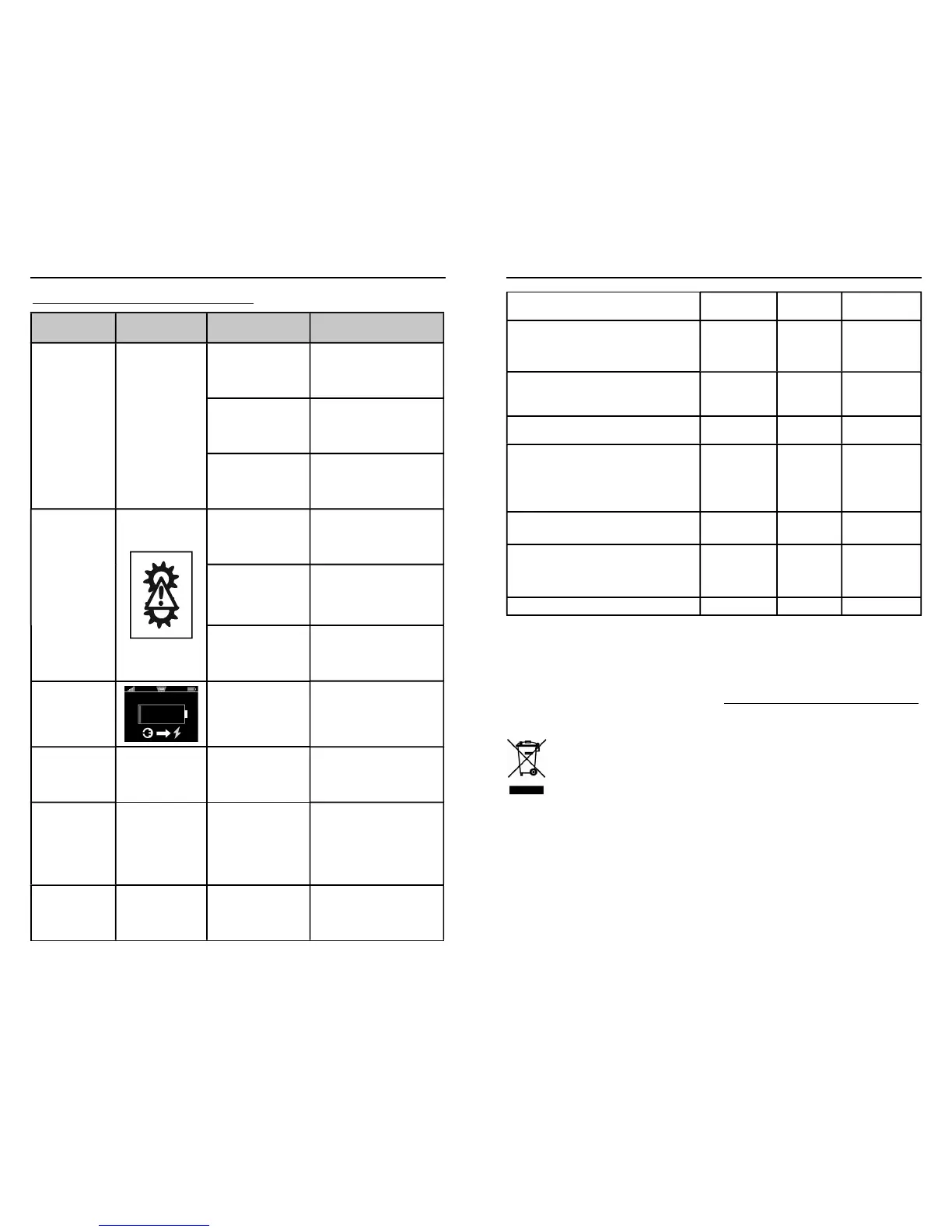
Trouble Shooting/Error Conditions
Problem Error Message Possible cause Corrective action
Winch is not
operating
Low wireless strength
Make sure your Advanced
Wireless Remote Control is
within range.
Wireless Remote
Control Activation
Switch is in the OFF
position
Turn ON the Wireless Remote
Control Activation Switch
Winch control pack is
under water. Wireless
signal will not transmit
under water.
Winch control pack needs
to be above water to receive
wireless signal. See www.
warn.com for accessories.
Remote controlled
clutch does not
disengage when
requested
Tension or Load
exists on the winch,
preventing the clutch
from disengaging.
Power-out winch until winch
rope is no longer under load.
The remote controlled
clutch is disconnected
from the control pack.
Check the 4-pin remote
controlled clutch connector
on the back of the control
pack to be sure it is rmly
connected.
The remote controlled
clutch is damaged.
Contact WARN® customer
service for further information.
Remote will not
operate
The remote battery is
critically low.
Charge the remote battery
See charging instructions on
page 13.
Auxiliary will not
turn on
Auxiliary is not
connected
Check auxiliary connector and
cables.
Auxiliary short
circuit
Accessories wiring
faulty; Accessory
electrical load is
to high.
*
Auxiliary
systems must be rated
for 12v and draw less
than 16 amps.
Check wiring; reduce electrical
load.
Wireless signal
strength is low
Decrease distance between
remote control and winch.
Check
Before rst
operation
After each
use
Every 90 days
Take time to fully read the Instructions and/
or Operations Guide, and/or Basic Guide to
Winching Techniques, in order to understand
your winch and its operations
X
Check fasteners and make sure they are tight
and to proper torque.
Replace damaged fasteners.
X X
Verify wiring to all components is correct and
be certain that all connections are tight.
X X
Verify there is no exposed/bare wiring,
terminals or cable insulation damage
(cha ng/cutting).
Cover any exposures with terminal boots.
Repair or replace damaged electrical cable.
X X
Inspect rope for damage.
Replace rope immediately if damaged.
X X X
Keep winch, rope and switch control free
from contaminants.
Use a clean rag or towel to remove any dirt
and debris.
X
Charge Remote
X X
Take time to fully understand your winch and the
winching operation by reviewing the Basic Guide
to Winching Techniques found online at:
http://www.warn.com/corporate/literaturerequest.shtml.
For further information or any questions
contact:
WARN INDUSTRIES, INC.
12900 S.E. Capps Road, Clackamas
OR USA 97015-8903, 1-503-722-1200,
Customer Service: 1-800-543-9276
Dealer Locator Service: 1-800-910-1122
or visit www.warn.com.
Disposal
Batteries should not be disposed of in general
household waste. Observe the local waste disposal
regulations, details of which can be obtained from
your local authority.
All electrical and electronic equipment must
be disposed of separately from general
household waste using the sites designated
by local authorities.
If a product displays this symbol of a
crossed-out wheelie bin, the product is
subject to European Directive 2012/19/EC.
The appropriate disposal and separate collection of
used equipment serve to prevent potential harm to
the environment and health. They are a prerequisite
for the re-use and recycling of used electrical and
electronic equipment.
For further information on disposing of your used
equipment, please contact your local authority or
your refuse collection service.
WARN INDUSTRIES
24
FINAL ANALYSIS AND MAINTENANCE


 To Next Page