EasyManua.ls Logo

WARPP INTIG 402 PULSE - Front Panel Description and Operation; Process and Mode Switches

WARPP INTIG 402 PULSE
9 pages
Print Icon
To Next Page IconTo Next Page
To Previous Page IconTo Previous Page
Loading...
5
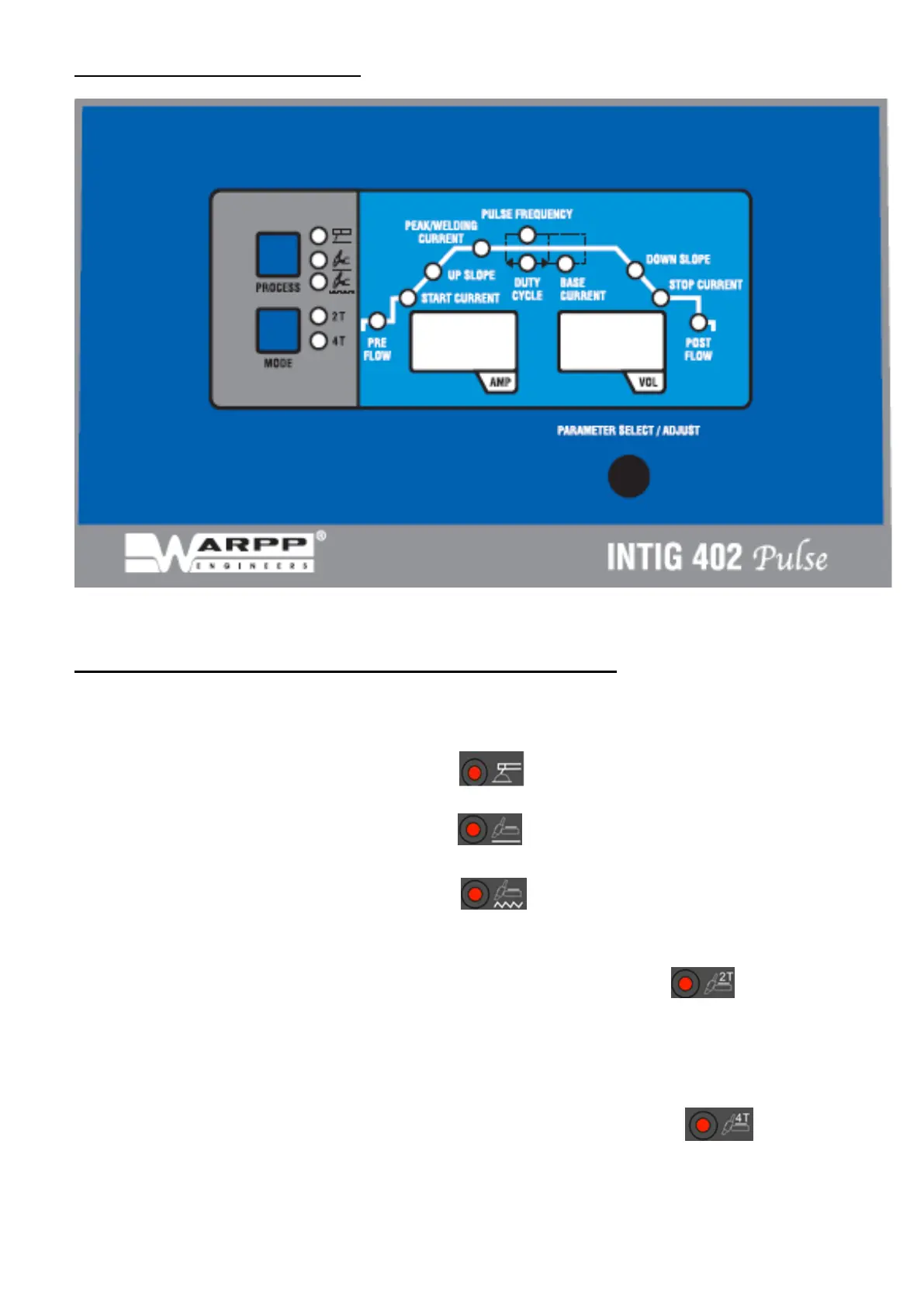
( FRONT PANEL DESCRIPTION ):
Fig 1 :- INTIG 402 PULSE FRONT PANEL.
PARAMETER SETTING FOR INTIG 402 PULSE :-
1) PROCESS SWITCH :- TO SELSCT ONE OF THE THREE
WELDING MODES.
A)
ARC
WELDING.
B)
TIG
WELDING.
C)
PULSE
TIG
WELDING.
2) MODE SWITCH :- TO SELECT 2T OR 4T MODE.
A)
2T :
In
2T
mode
the
trigger
switch
has
to
be
pressed
continuously
till
the
welding
process
has
to
be
continued.
B)
4T:
In
4T
mode
the
trigger
switch
has
to
be
press
&
then
release
to
start
the
welding
process.
After
the
welding
is
complete,
press
the
torch
switch
again
to
stop
the
welding procedure.

Related product manuals