10
Operation
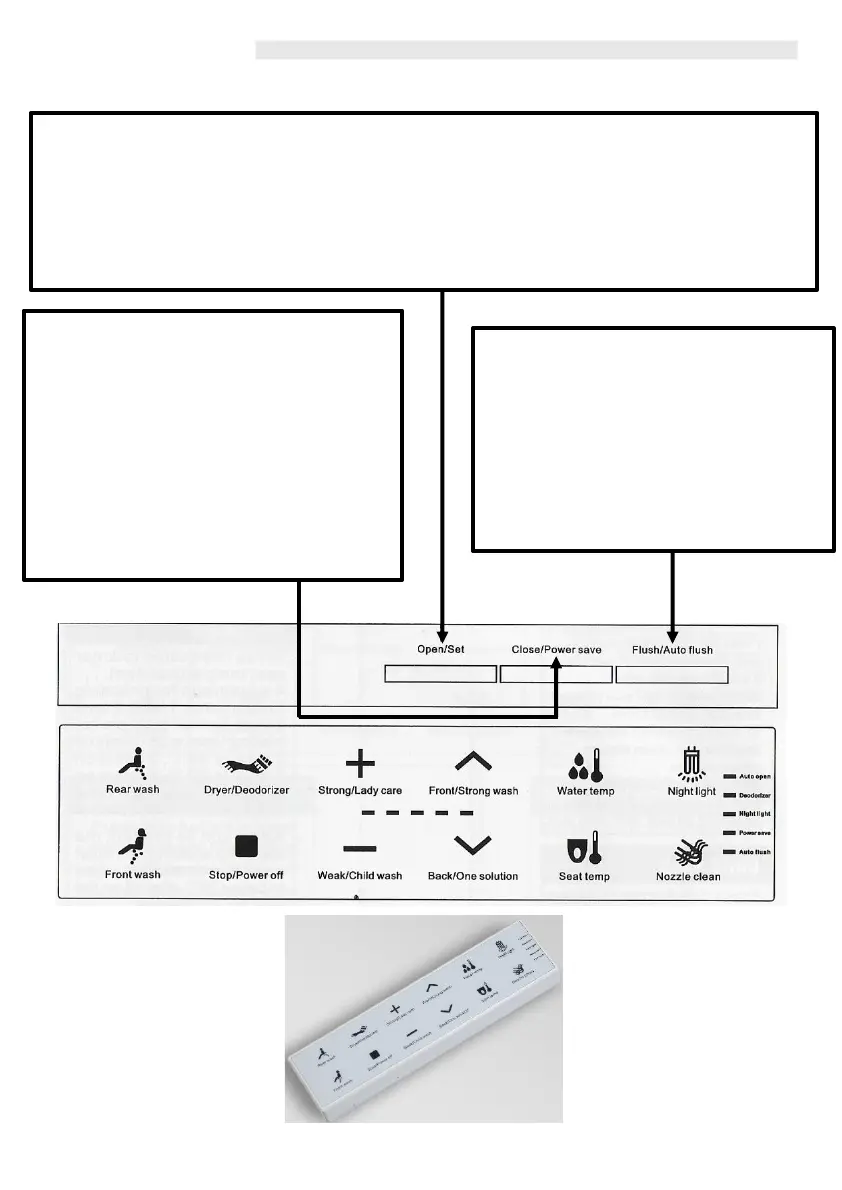
Close/Power Saving
When the seat or lid is open, press this
button to soft close the seat or lid. By
pressing the ‘Power Saving’ button, the bidet
will automatically enter the Power Save
mode. ‘Power Save’ Light on the remote
control will flash in order to notify the user of
the ‘Power Saving’ setting selected. The seat
temperature will be maintained at 25°C and
when the user selects the lid to ‘Open’ then
the Washloo will automatically turn on.
Flush/Auto Flush
By pressing this button, the Washloo will
‘Flush.’
Pressing the button for 3 seconds, will
enter the Washloo into the automatic
flush mode, when the user leaves the
toilet, the Washloo will automatically flush
5 seconds later. Pressing again will close
the lid as well.
Open/Set (Automatic Opening)
Press this button to open up the Washloo when the seat or lid is closed. Press and holding the
Open button will turn on the Automatic Seat Open Function. This will set the Washloo to ‘Open’ as
the user approaches the toilet, using a foot gesture and also once the user has finished and leaves
the Washloo, the Seat and Lid will close Automatically.
Please do not forcibly open or close the seat or lid of the Washloo as this will damage the
mechanism.



 To Next Page