Operation
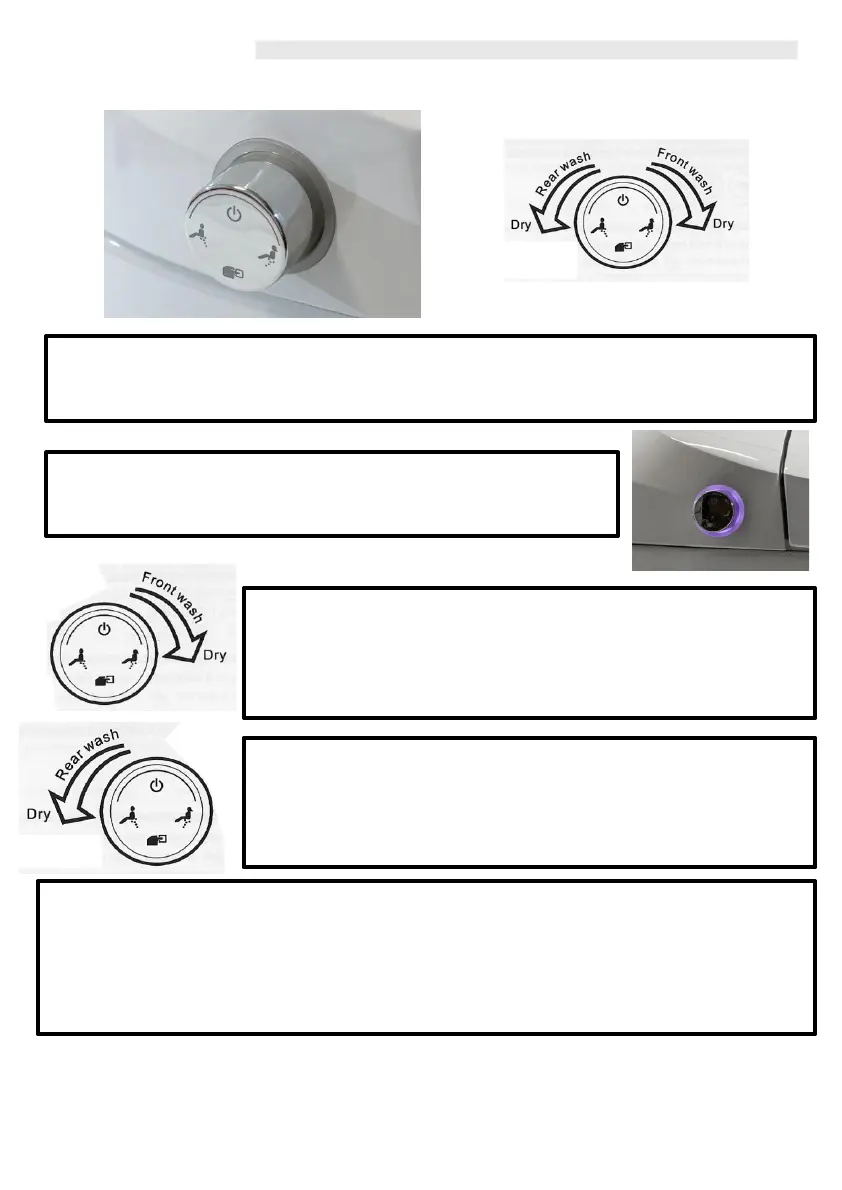
Side Control
When the Washloo is not in use, the side control ‘Knob’ will remain un lit. Only when the user
‘twists’ in order to control the Washloo will it light up (purple backlight).
By depressing the button in, will turn ‘ON’ the Washloo. The Purple
Backlight will now illuminate the side control indication to the user
that the Supreme is now powered ON.
By Rotating the ‘knob’ forwards, this will enter the Washloo into the
Automatic Front wash cycle, Washing for 1 minute and Drying for 2
minutes. By rotating the ‘knob’ forwards during the Front Wash cycle,
will skip to the drying function. The indicator light will be pink during
the washing cycle and red during the drying.
By Rotating the ‘knob’ backwards, this will enter the Washloo into the
Automatic Rear wash cycle, Washing for 1 minute and Drying for 2
minutes. By rotating the ‘knob’ backwards during the Rear Wash
cycle, will skip to the drying function. The indicator light will be blue
during the washing cycle and red during the drying.
Once the user has finished the cycle, the Washloo will enter into its ‘standby’ mode with the
Knob highlighted Purple, when the knob is depressed and released it will operate the ‘flush’
function.
Depressing and releasing the button twice, will enter the ‘water saving mode’ selecting the small
flush (2litres of water per flush only).
Depressing the button and holding for 3 seconds will turn the Washloo off.
11



 To Next Page